COMPRESSION
Switch
COMPRESSION
OFF
ON
---
....
--
c
__
o:.------n
Position
of
switch
Playback
Effect
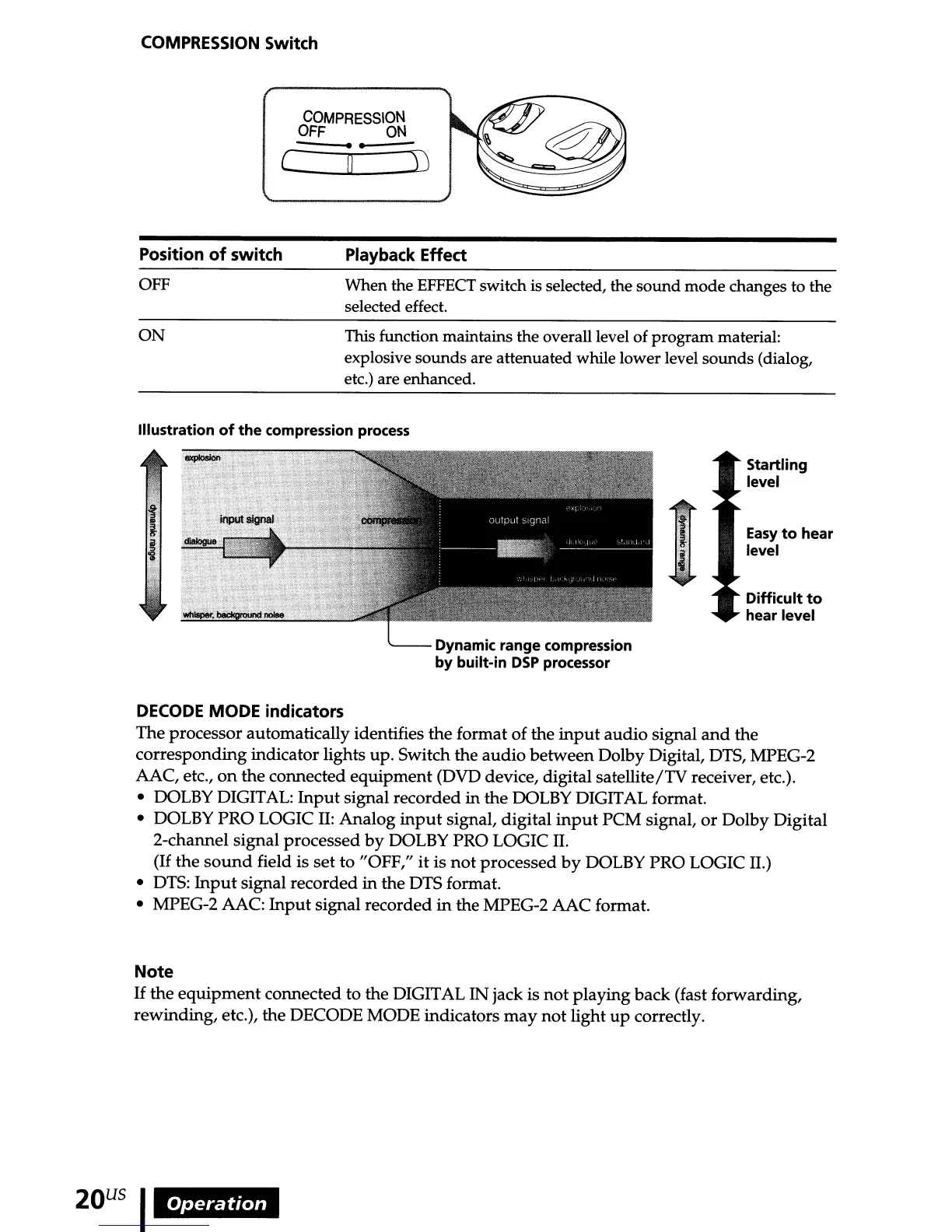
OFF
When the
EFFECT
switch
is
selected, the sound mode changes to the
selected effect.
ON
This function maintains the overall level of program material:
explosive sounds are attenuated while lower level sounds (dialog,
etc.) are enhanced.
Illustration
of
the
compression
process
Startling
level
Easy
to
hear
level
Difficult
to
hear level
Dynamic range compression
by built-in
DSP
processor
DECODE
MODE indicators
The processor automatically identifies the format of the
input
audio
signal
and
the
corresponding indicator lights up. Switch the
audio
between Dolby Digital, DTS, MPEG-2
AAC, etc.,
on
the connected
equipment
(DVD device, digital satellite/TV receiver, etc.).
•
DOLBY
DIGITAL:
Input
signal recorded in the
DOLBY
DIGITAL format.
• DOLBY PRO LOGIC
II:
Analog
input
signal, digital
input
PCM signal,
or
Dolby Digital
2-channel signal processed
by
DOLBY PRO LOGIC
II.
(If
the
sound
field is set to "OFF,"
it
is
not
processed
by
DOLBY PRO LOGIC II.)
•
DTS:
Input
signal recorded in the DTS format.
• MPEG-2 AAC:
Input
signal recorded
in
the MPEG-2 AAC format.
Note
If
the
equipment
connected to the DIGITAL
IN
jack is
not
playing back (fast forwarding,
rewinding, etc.), the DECODE MODE indicators
may
not
light
up
correctly.
20
US
I
Operation



 To Next Page