14
n
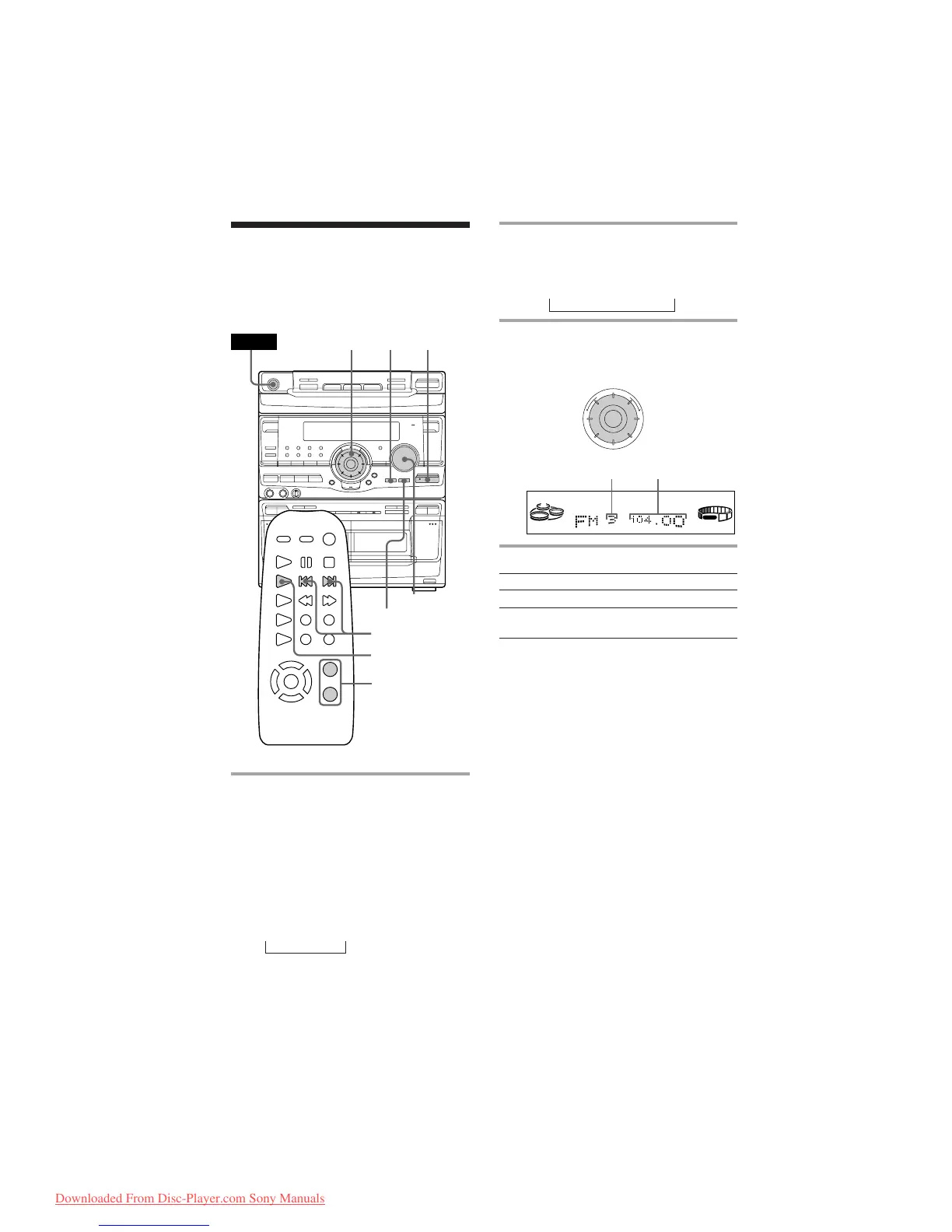
Turn counter-
clockwise
(or press =
on the remote)
for lower preset
numbers.
Turn clockwise
(or press +
on the remote)
for higher
preset numbers.
+–
TUNED
STEREO
MHz
VOLUME
PRESET
Preset number
Frequency
2 Press TUNING MODE repeatedly
so that “PRESET” appears in the
display.
MANUAL n AUTO n PRESET
3 Turn the jog dial (or press = or
+ on the remote) to tune in the
desired preset station.
To Do this
Turn off the radio Press POWER.
Adjust the volume Turn VOLUME (or press
VOL +/– on the remote).
Listening to the radio
–– Preset Tuning
Preset radio stations in the tuner's memory
first (see “Step 3: Presetting radio stations”).
·∏
‚º
π
ª·
§
§ §
π
0)
‚º
π
ª·
POWER
bB
v
V
= +
TUNER BAND
VOLUME
STEREO/MONO
VOL +/–
123
n
1 Press TUNER/BAND repeatedly
until the band you want appears in
the display.
Every time you press the button, the
band changes as follows:
North and South American, Australian
and Thai models:
FM ˜ AM
Other models:
FM n MW n SW
Downloaded From Disc-Player.com Sony Manuals


 To Next Page