Basic Operations
11
Basic Operations
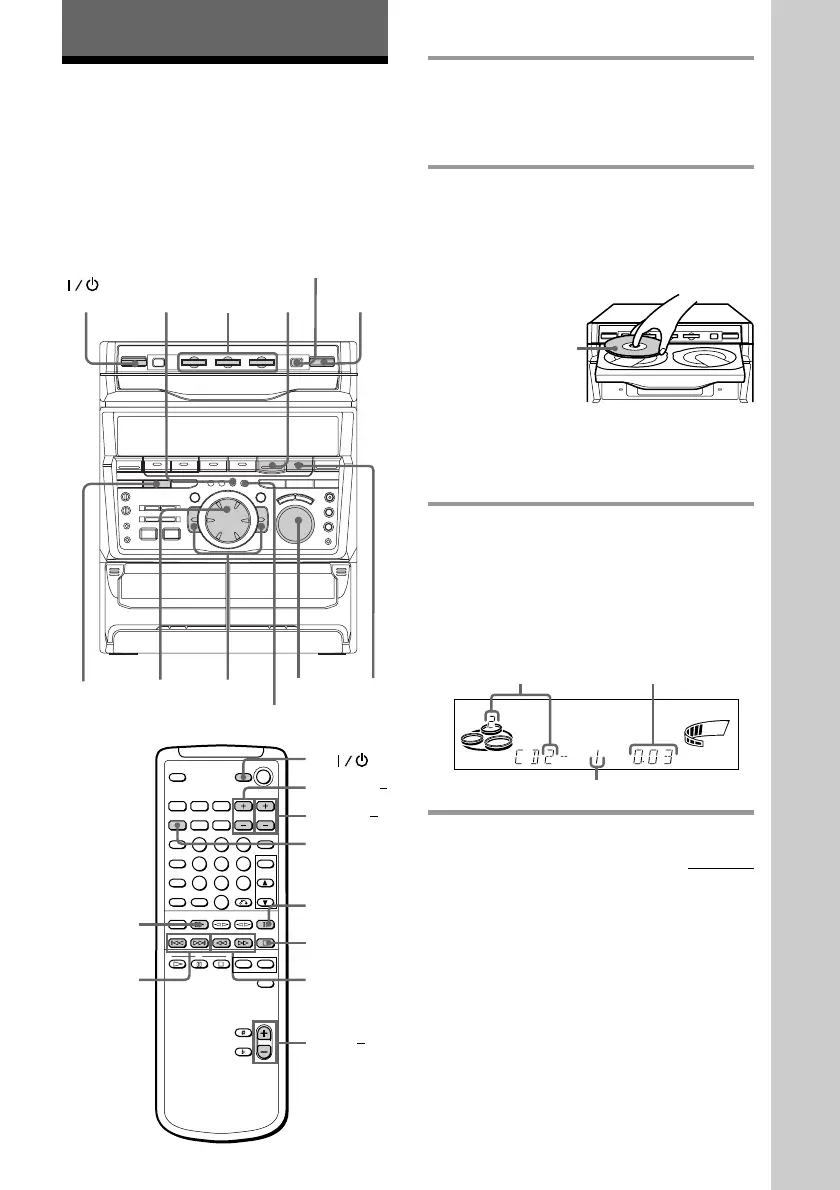
Playing a VIDEO CD
You can play both VIDEO CDs without PBC
functions (Ver. 1.1) and VIDEO CDs with
PBC functions (Ver. 2.0).
You can enjoy two kinds of playback
according to the disc type.
VOLUME
PREV
NEXT
0/)
=/+
PLAY
MODE
DISC SKIP/
EX-CHANGE
CD
(P
p
6 6
32(Power)
VOL +/
TV
P
D.SKIP
CD (
0/)=/+
(PREV/NEXT)
TV VOL +/
TV CH +/
p
1 Turn on your TV and select the
video input.
Refer to the operating instructions
supplied with your TV if you need help.
2 Press § and place up to two VIDEO
CDs on the disc tray.
If a disc is not placed properly, it will not
be recognized.
To insert a third disc, press DISC SKIP/
EX-CHANGE to rotate the disc tray.
3 Press one of the DISC 1~3 buttons.
The disc tray closes and playback starts.
If you press CD (P (or CD ( on the
remote) when the disc tray is closed,
playback starts from the CD whose
button is lit green.
With the label
side up. When
you play a
VIDEO CD
single, place it
on the inner
circle of the
tray.
Disc tray number
Playing time
Track number
SHUFFLE REPEAT1
ALL 1DISCS PROGRAM
STEP
VOLUME
SYNC
ß
continued



 To Next Page