35
p
6 6
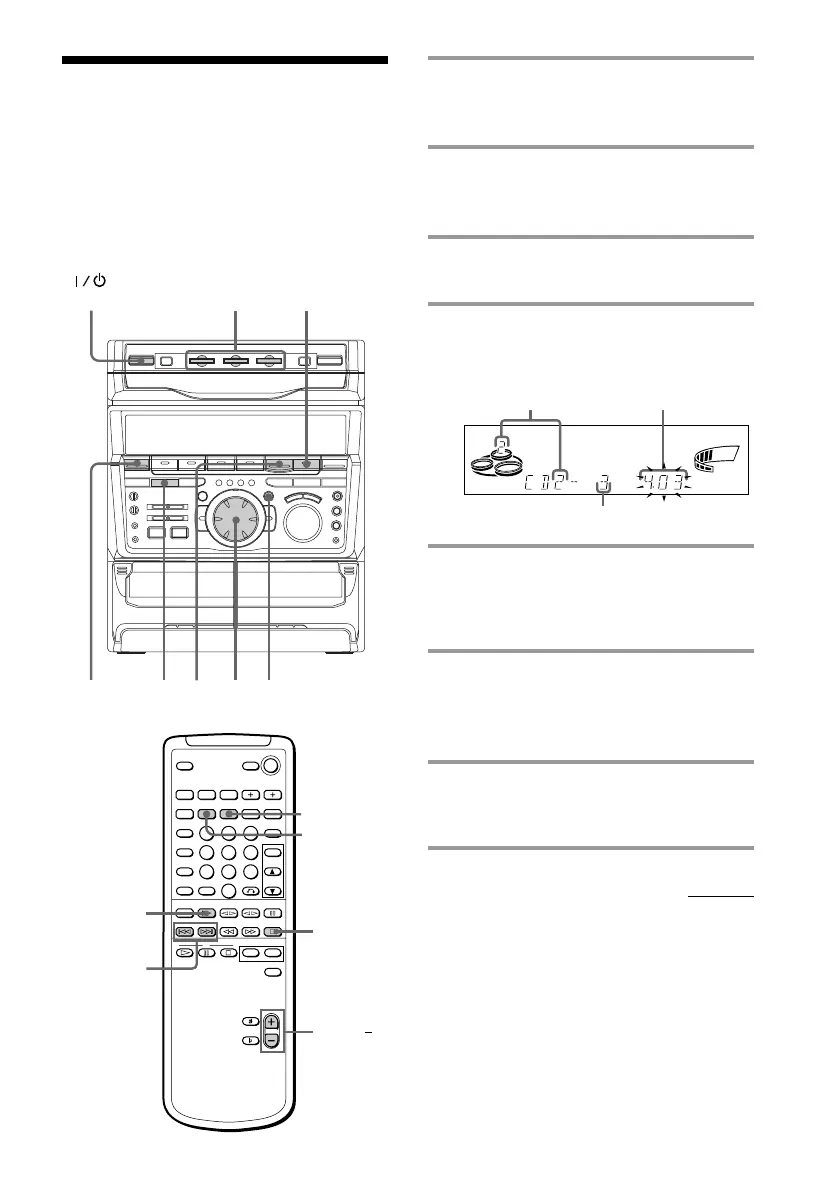
Programming the CD
tracks
–– Program Play
You can make a program of up to 32 tracks
from all the CDs in the order you want them
to be played.
Disc number
Track number
1
1 Press FUNCTION repeatedly until
“CD” appears in the display, then
place a CD.
2 Press PLAY MODE repeatedly until
“PROGRAM” appears in the
display.
3 Press one of the DISC 1~3 buttons to
select a CD.
4 Turn the jog dial until the desired
track appears in the display.
5 Press ENTER/NEXT.
The track is programmed. The program
step number appears, followed by the
total playing time.
6 To program additional tracks,
repeat steps 3 to 5.
Skip step 3 to select tracks from the
same disc.
7 Press CD (P.
All the tracks play in the order you
selected.
continued
245
37
Total playing time
(including selected track)
SHUFFLE REPEAT1
ALL 1DISCS PROGRAM
STEP
VOLUME
SYNC
ß
(Power)
VOL +/
CD (
=/+
p
CLEAR
CHECK



 To Next Page