33
Moving recorded tracks
You can change the order of the recorded
tracks.
Example
Move track C from the third to the second
track.
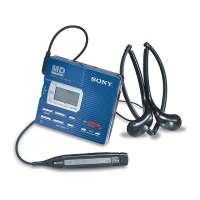
On the recorder
1 While playing the track you want to
move, press the jog lever so that
“EDIT” flashes in the display, and
then press the lever again.
“ :Name” flashes in the display
and the recorder plays the selected
track repeatedly.
2 Flip the jog lever until “ : Move”
flashes in the display, and then press
the lever.
For the example above, “MV 003 t
003” appears in the display.
3 Flip the jog lever to select the
destination track number.
For the example above, “MV 003 t
002” appears in the display.
To cancel moving, press x or T
MARK.
4 Press the jog lever again.
The track moves to the selected
destination track.
On the remote control
1 Press DISPLAY for 2 seconds or
more while playing the track you
want to move.
“ :Name” flashes in the display
and the recorder plays the selected
track repeatedly.
2 Press the control towards . or
towards N • > repeatedly until
“ : Move” appears in the display.
3 Press x.
For the example above, “MV 003 t
003” appears in the display.
4 Press the control towards . or
towards N • > repeatedly to
select the destination track number.
For the example above, “MV 003 t
002” appears in the display.
To cancel moving, press DISPLAY
for 2 seconds or more.
5 Press x again.
The selected track moves just before
the destination track.
A C DB
A B DC
Before moving
After moving
T MARK
Jog lever
x
DISPLAY
Control
x


 To Next Page
 Loading...









