11
Getting Started
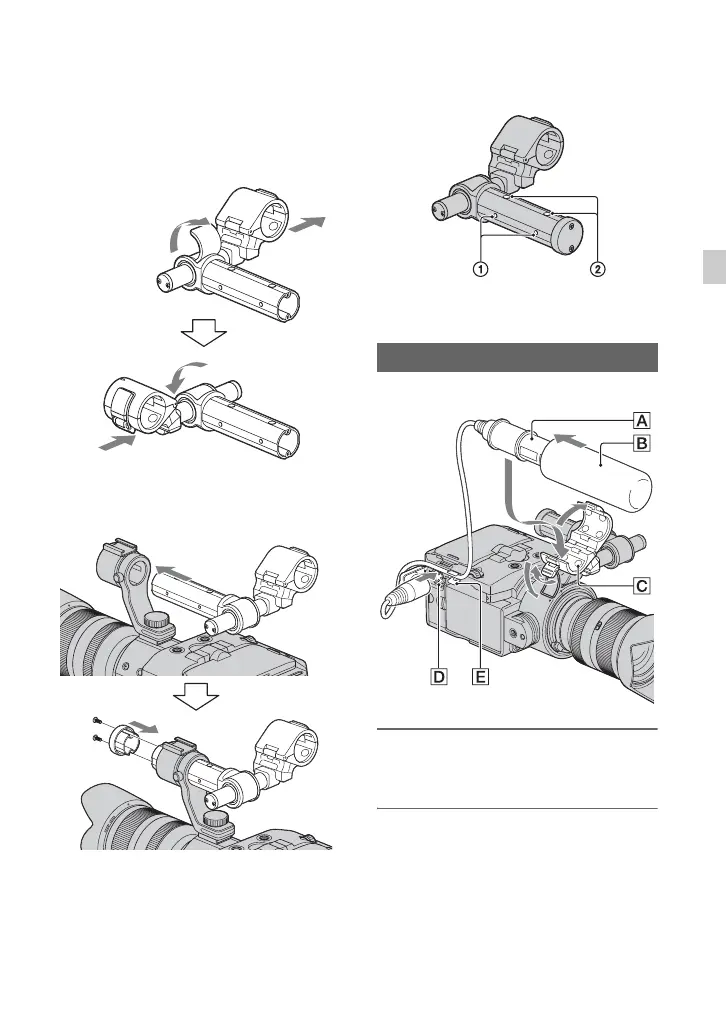
2 Reattach the microphone holder so that
it faces up.
Pull the microphone bar out. Insert the
microphone bar from the opposite side.
3 Insert the handle slide bar from the
opposite side, and replace the cap and
screws.
b Tips
• The screw holes of the handle slide bar are for
following screws.
1 For 1/4-20UNC screws
2 For 3/8-16UNC screws
Attach the microphone to the handle.
1 Attach the wind screen B to the
supplied microphone A.
2 Place the microphone A in the
microphone holder C with the
model name facing upward, close
the cover, and shut the clamp.
Attaching the microphone
Continued ,





 To Next Page