38
Useful functions
You can customize the picture quality by
adjusting picture profile items such as
[GAMMA] and [DETAIL].
Connect your camcorder to a TV or
monitor, and adjust the picture quality
while observing the picture on the TV or
monitor screen.
Picture quality settings for different
recording conditions have been stored in
[PP1] through [PP6] as default settings.
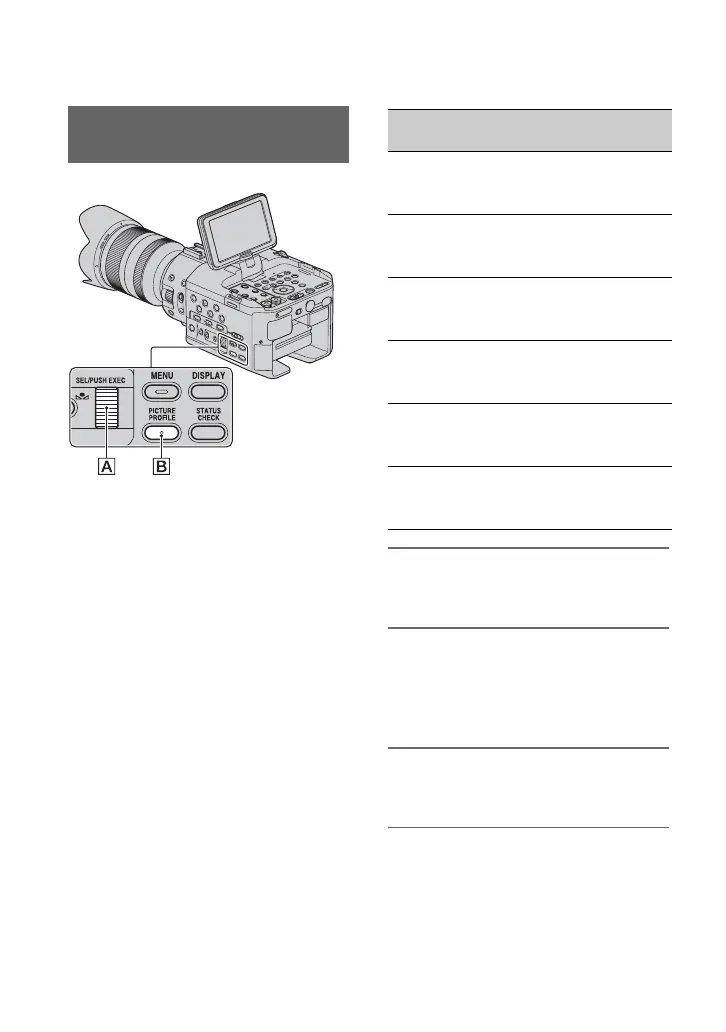
1 During standby, press the
PICTURE PROFILE button B.
2 Select a picture profile number
with the SEL/PUSH EXEC dial A.
You can record with the settings of the
selected picture profile.
3 Select [OK] with the SEL/PUSH
EXEC dial A.
Customizing the picture quality
(Picture profile)
Picture profile
number
Recording condition
PP1 Default settings the same
as when Picture Profile is
[OFF]
PP2 Default settings the same
as when Picture Profile is
[OFF]
PP3 Example settings of
natural color tone with
ITU-709 gamma
PP4 Example settings of a
color tone that is faithful
to ITU-709
PP5 Example settings of
pictures recorded on
cinema color negative film
PP6 Example settings of
pictures screened with
cinema color print film












 To Next Page