13
Getting Started
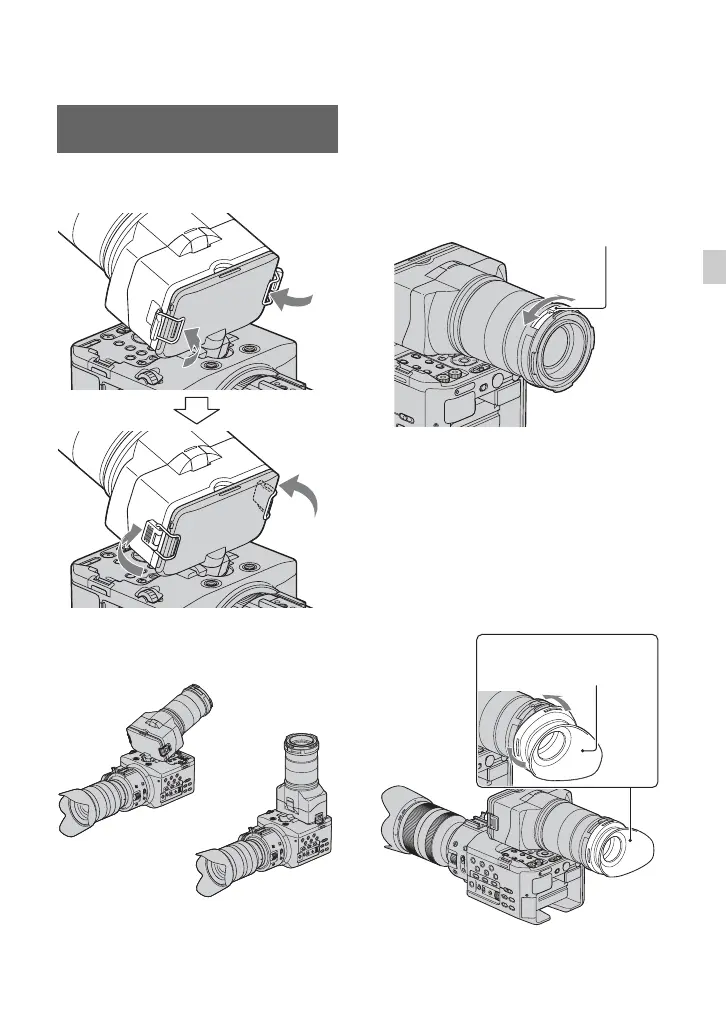
Attach the large LCD viewfinder to the
LCD screen.
You can use the viewfinder in the following
2 ways, depending on your shooting angle.
z Tips
• You can set and hold the LCD screen angle
(p. 14).
Adjusting the viewfinder lens
Turn the viewfinder lens adjustment ring so
that you can see the image on the LCD
screen clearly.
When the picture on the LCD screen is
hard to see
If you cannot see the picture on the LCD
screen clearly under bright circumstances,
use the supplied large eyecup. To attach the
large eyecup, stretch it slightly and align it
with the groove in the large LCD
viewfinder. You can attach the large eyecup
facing either the right or left side.
Attaching the large LCD
viewfinder
Viewfinder lens adjustment ring
Turn it until the picture becomes clear.
Large eyecup
(supplied)
Continued ,












 To Next Page