17
Getting Started
By using the AC Adaptor/Charger and the
connecting cord DK-415 (supplied), you
can use the camcorder on AC power,
without worrying about running out of
power.
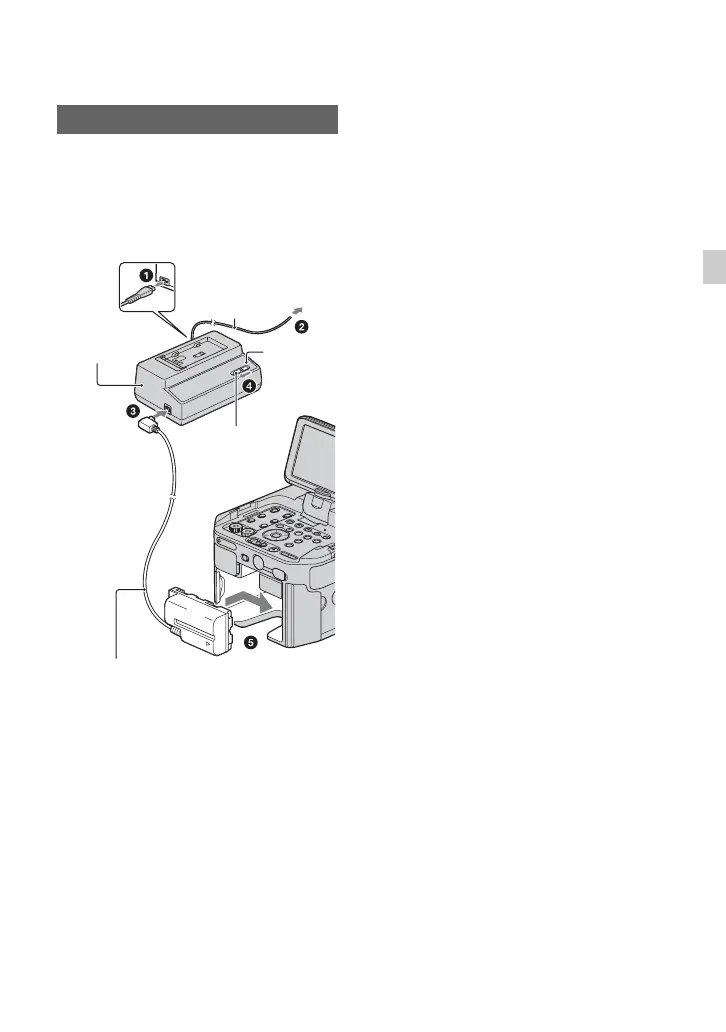
1 Connect the power cord (mains lead) to
the AC Adaptor/Charger.
2 Connect the power cord (mains lead) to
the wall outlet (wall socket).
3 Connect the connecting cord (DK-415)
to the AC Adaptor/Charger.
4 Set the mode switch of the AC Adaptor/
Charger to VCR/CAMERA.
5 Press the connecting part of the
connecting cord (DK-415) against the
back of your camcorder in the battery
slot and slide it in the direction of the
arrow.
On the AC Adaptor/Charger
• Use the nearby wall outlet when using the AC
Adaptor/Charger. Disconnect the AC Adaptor/
Charger from the wall outlet (wall socket)
immediately if any malfunction occurs while
using your camcorder.
• Do not use the AC Adaptor/Charger placed in a
narrow space, such as between a wall and
furniture.
• Do not short-circuit the DC plug of the AC
Adaptor/Charger or battery terminal with any
metallic objects. This may cause a malfunction.
• Even if your camcorder is turned off, AC power
(house current) is still supplied to it while
connected to the wall outlet (wall socket) via the
AC Adaptor/Charger.
Using an outside power source
AC Adaptor/
Charger
Power cord
To the wall outlet
(wall socket)
Mode switch
Connecting cord
DK-415
Charge
lamp












 To Next Page