49
Recording/Playback
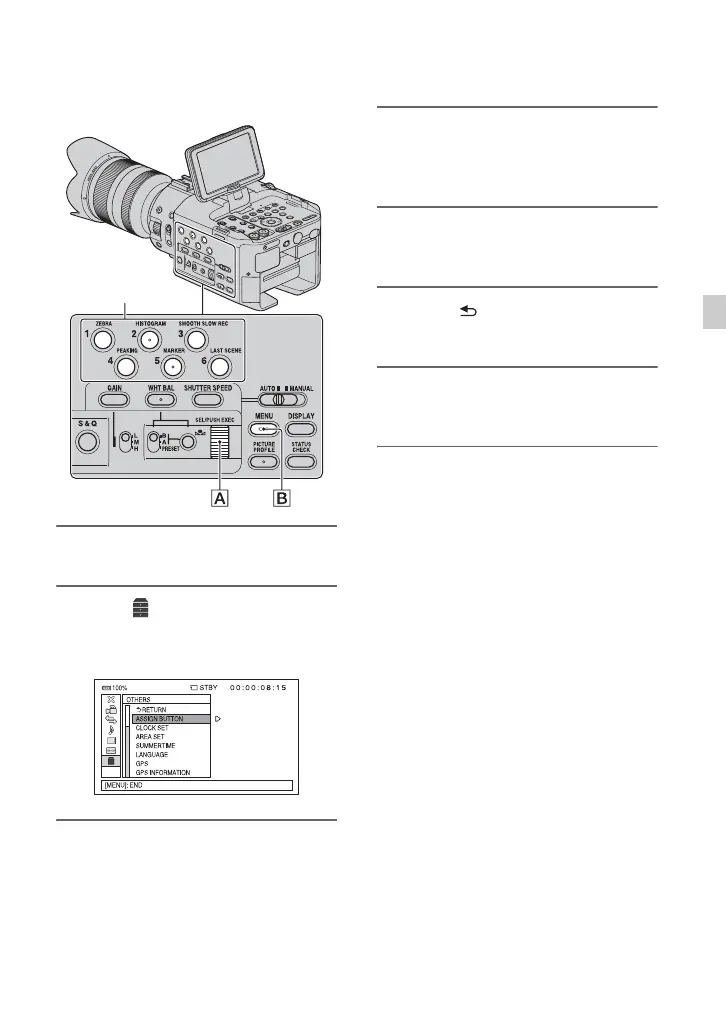
1 Press the MENU button B.
2 Select (OTHERS) t [ASSIGN
BUTTON] with the SEL/PUSH
EXEC dial A.
3 Select the ASSIGN button to
which you want to assign a
function with the SEL/PUSH
EXEC dial A.
• [--------] appears if no function is assigned
to the ASSIGN button.
4 Select the function that you want
to assign with the SEL/PUSH
EXEC dial A.
5 Select [OK] with the SEL/PUSH
EXEC dial A.
6 Select [ RETURN] with the SEL/
PUSH EXEC dial A.
7 Press the MENU button B to hide
the menu screen.
ASSIGN buttons












 To Next Page