26
4-1 Overview
Chapter 4 Handling Files
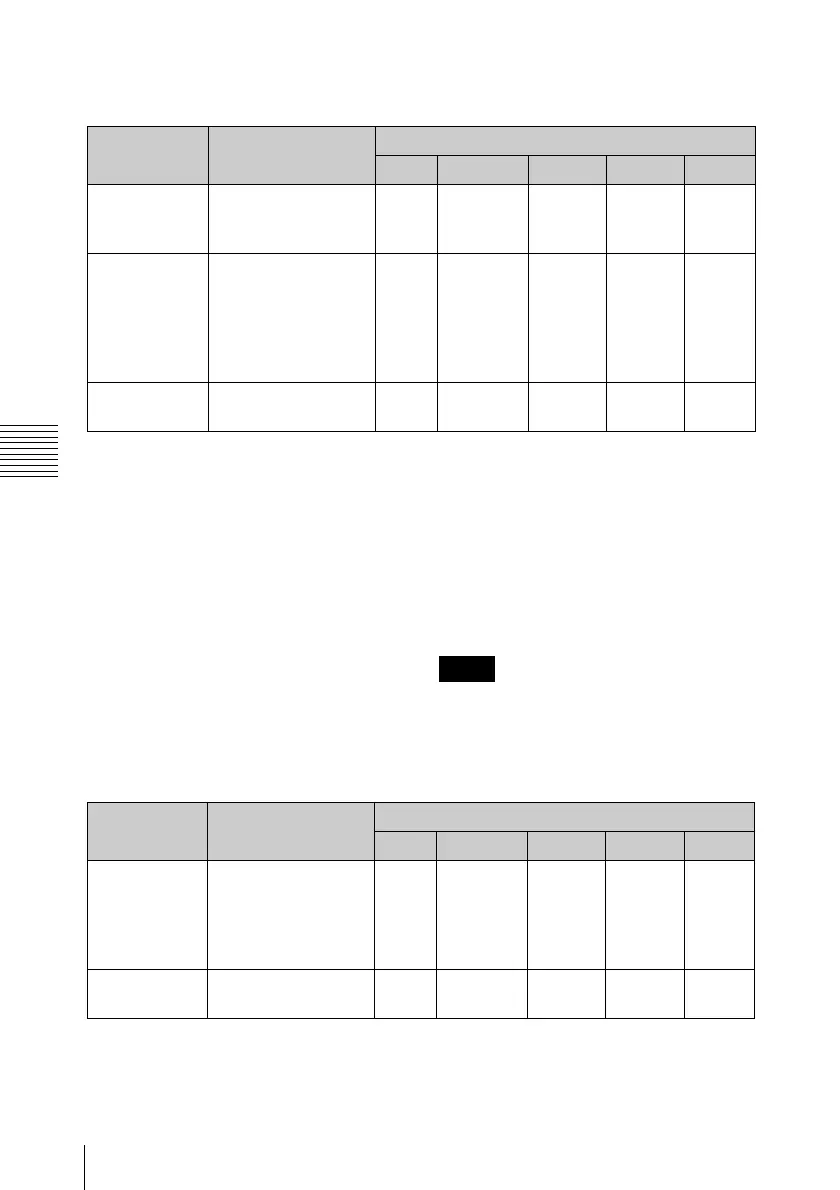
Clip directory
a) The unit can handle files with user-defined
names in the “C*” part.
b) Only files which are 2 seconds or longer in
length, in a format matching the format
(system frequency) and recording format
(MPEG HD/IMX and number of audio
channels) of the recorded sections of the disc,
and which can be overwritten by an XDCAM
device.
c) Overwriting is not possible.
d) When the “Make the drives recinhibit.” check
box is not checked in the utility software, you
can select and delete any clip.
e) Only files which can be written by an
XDCAM device.
f) When the “C*” part of a C*.MXF file name is
changed, a C*M01.XML file with the same
name in the “C*” part is also changed
automatically.
g) When a C*.MXF file is created, a
C*M01.XML file with the same name in the
“C*” part is created automatically.
h) When a C*.MXF file is deleted, a
C*M01.XML file with the same name in the
“C*” part is also deleted automatically.
Directories cannot be created in the Clip
directory.
Component directory
a) The unit can handle files with user-defined
names in the “P*” part.
b) Only files which can be written by an
XDCAM device and which are 2 seconds or
longer in length.
c) Overwriting is not possible.
File name Content Operations
Read Write Rename Create Delete
C*.MXF
a)
Clip file created by
recording (MXF file)
*: 0001 to 9999
Ye s
Ye s
b) c)
Ye s Ye s
b)
Ye s
d)
C*M01.XML
a)
Metadata file
generated
automatically when
C*.MXF file is
created.
*: 0001 to 9999
Ye s Ye s
e)
No
f)
No
g)
No
h)
Other files Files other than the
above
—No — No —
Note
File name Content Operations
Read Write Rename Create Delete
P*.MXF
a)
Directories and files
played back after
voice-over editing
with a PDW-HR1
*: 0001 to 0099
Ye s
a)
Ye s
b) c) d)
e)
Ye s
e)
Ye s
b) d)
Ye s
f)
Other files Files other than the
above
No No No No No


 To Next Page