27
4-1 Overview
Chapter 4 Handling Files
d) Multiple files cannot be opened
simultaneously.
e) Only when the utility software user setting
window has “Naming From” set to “free”.
f) Any clip can be selectively deleted.
It is not possible to create a directory within
the Component directory.
Edit directory
a) The unit can handle files with user-defined
names in the “E*” part.
b) Only files which can be written by an
XDCAM device. Partial writing is not
possible.
c) Only files which can be written by an
XDCAM device.
d) When the “Make the drives RecInhibit.” check
box is not checked in the utility software.
e) When the “E*” part of an E*01.SMI file name
is changed, an E*M01.XML file with the same
name in the “E*” part is also changed
automatically.
f) When an E*E01.SMI file is created, an
E*M01.XML file with the same name in the
“E*” part is also generated automatically.
g) When an E*E01.SMI file is deleted, an
E*M01.XML file with the same name in the
“E*” part is also deleted automatically.
Directories cannot be created in the Edit
directory.
Sub directory
Note
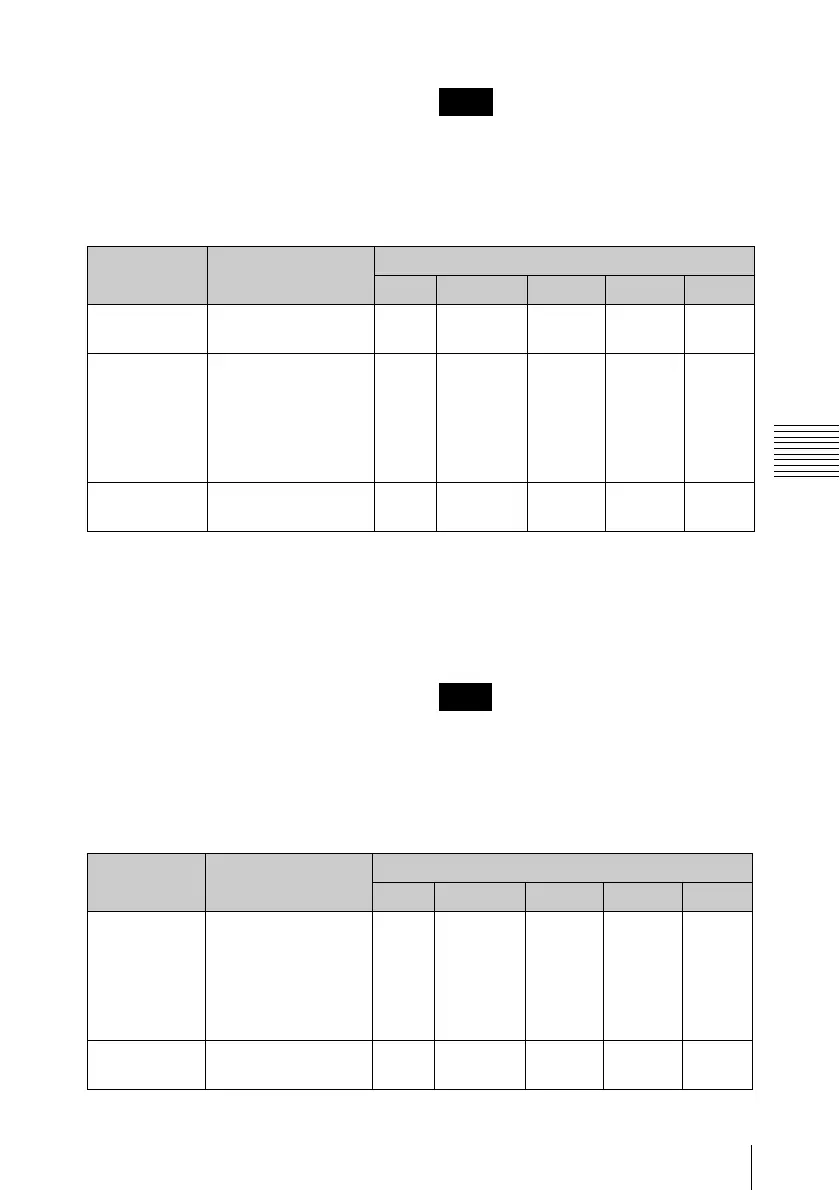
File name Content Operations
Read Write Rename Create Delete
E*E01.SMI
a)
Clip list file
*: 0001 to 0099
Ye s
Ye s
b)
Ye s
Ye s
c)
Ye s
d)
E*M01.XML
a)
Metadata file
generated
automatically when
E*E01.MXF file is
created.
*: 0001 to 0099
Ye s
Ye s
b)
No
e)
No
f)
No
g)
Other files Files other than the
above
—No — No —
Note
File name Content Operations
Read Write Rename Create Delete
C*S01.MXF
a)
Proxy AV data (MXF
file) generated
automatically when
a C*.MXF file is
created.
*: 0001 to 9999
Ye s N o
No
b)
No
c)
No
d)
Other files Files other than the
above
—No — No —


 To Next Page