Reader™ User Guide
Print
Search
Getting started
Basic Operations
Adding/Getting Content
Browsing Content Lists
Reading
Organizing
Other Applications
Settings
Other Information
Contents list
Top page > Basic Operations > [Home] Screen > Applications and the [Home] Screen
Applications and the [Home] Screen
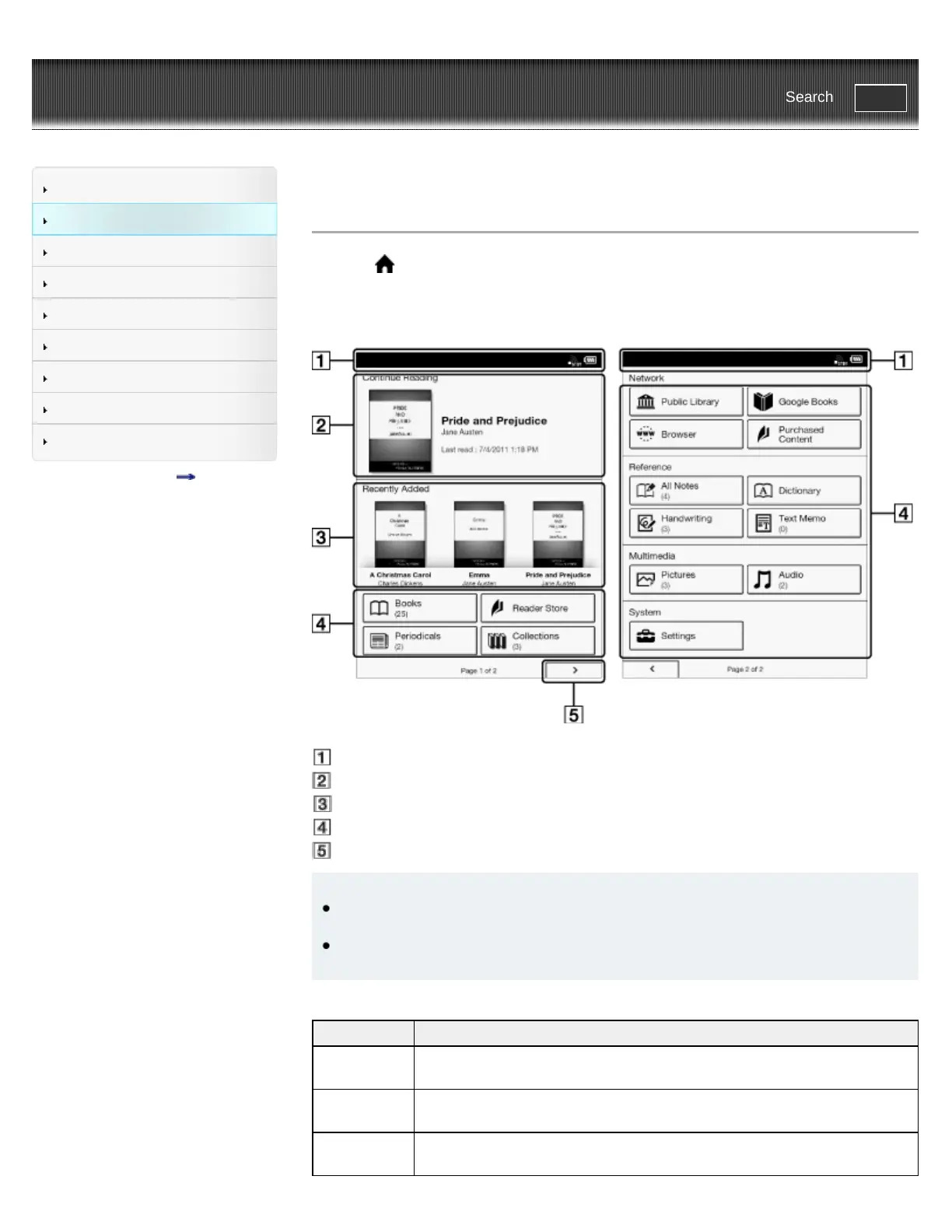
Press the (Home) button to display the [Home] screen. The [Home] screen has the following
applications.
Applications appear on the first and second page of the [Home] screen.
The displayed icons may vary depending on the country/region setting.
Status bar
Last read book/periodical
Newly added books
Applications
Navigate to the second page of the [Home] screen
Tip
The most recent book/periodical that you opened is shown under [Continue Reading] on the
first page of the [Home] screen. Tap it to continue reading where you previously left off.
The three most recent books that have been added to the Reader are displayed under
[Recently Added] on the first page of the [Home] screen. Tap one to start reading it.
Application Description
[Books]
Lists all the books/transferred content in the Reader and, if inserted, the
microSD card. See Details.
[Reader
Store]*
Enters Reader Store. You can find featured titles, bestsellers, new arrivals and
more. See Details.
[Periodicals]*
Lists all the periodicals in the Reader and, if inserted, the microSD card. See
Details.














 To Next Page