try not to handwrite or draw too quickly.
this functionality is not designed for very detailed drawings or for writing small characters.
To delete a drawn line
Tap (Erase) and drag across the drawn line.
Press the (Back) button when you are done to continue reading.
Tip
To delete all annotations in the current book/periodical, press the
(Menu) button tap
[Notes]. See Details.
To delete annotations across all books and periodicals, use the [All Notes] application. See
Details.
Hiding annotations
You can set the viewer to show or hide the annotations that you have made to the book. This is
convenient for when a highlight overlaps with a link.
1. Press the
(Menu) button.
The option items appear.
2. Tap [More].
3. Tap [Settings].
4. Tap [Show Notes].
Check the checkbox to show annotations.
Uncheck it to hide annotations.
5. Press the
(Back) button when done.
Finding annotations within a book or periodical
You can search and view all annotations (bookmarks/highlights/handwritten notes) in the
currently open book or periodical.
To search, sort and view all annotations across all books and periodicals, use the [All Notes]
application. See Details.
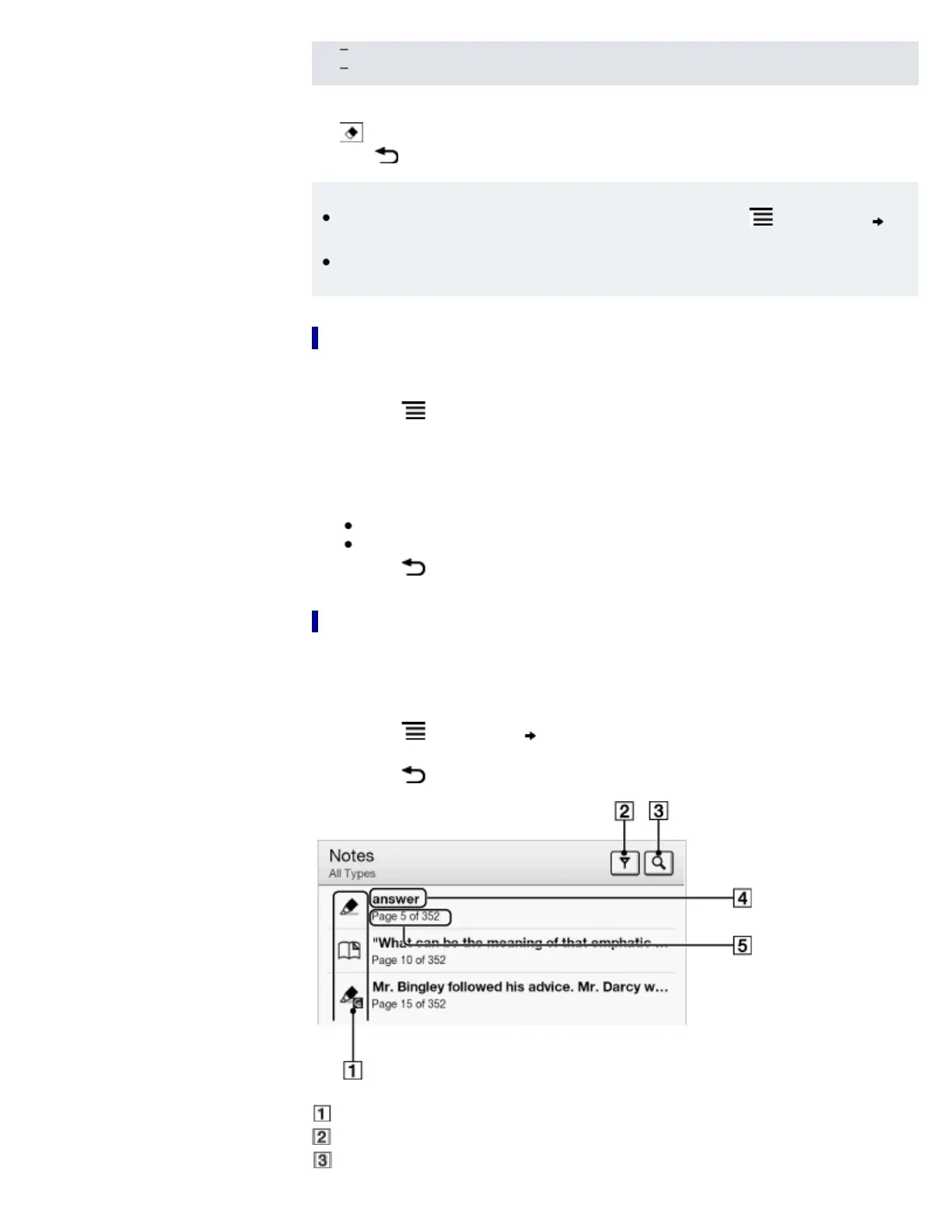
1. Press the
(Menu) button tap [Notes].
The annotations in the book/periodical are listed.
Press the
(Back) button to return to the book.
Note icons
Filter note type
Search icon














 To Next Page