EasyManua.ls Logo

Sony PS-LX2 - Connections; Audio and Power Connections; Record Playing; Preparation and Starting Playback

Sony PS-LX2
8 pages
Print Icon
To Next Page IconTo Next Page
To Previous Page IconTo Previous Page
Loading...
CONNECTIONS
RECORD
PLAYING
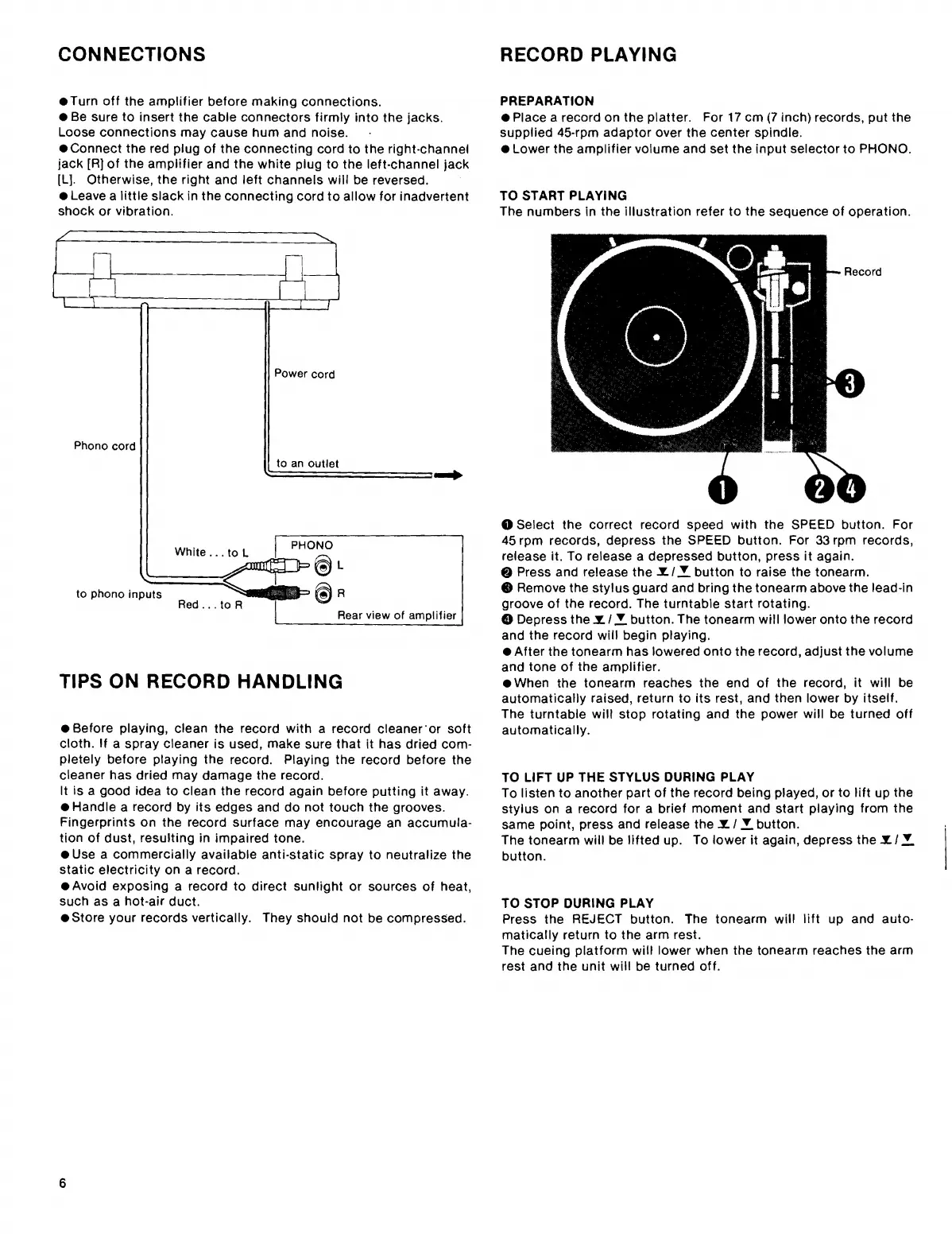
Turn
off
the
amplifier
before
making
connections.
Be
sure
to
insert
the
cable
connectors
firmly
into
the
jacks.
Loose
connections
may
cause
hum
and
noise.
Connect
the
red
plug
of
the
connecting
cord
to
the
right-channel
jack
[Rj
of
the
amplifier
and
the
white
plug
to
the
left-channel
jack
[L].
Otherwise,
the
right
and
left
channels
will
be
reversed.
Leave
a
little
slack
in
the
connecting
cord
to
allow
for
inadvertent
shock
or
vibration.
TIPS
ON
RECORD
HANDLING
Before
playing,
clean
the
record
with
a
record
cleaner
or
soft
cloth.
If
a
spray
cleaner
is
used,
make
sure
that
it
has
dried
com¬
pletely
before
playing
the
record.
Playing
the
record
before
the
cleaner
has
dried
may
damage
the
record.
It
is
a
good
idea
to
clean
the
record
again
before
putting
it
away.
Handle
a
record
by
its
edges
and
do
not
touch
the
grooves.
Fingerprints
on
the
record
surface
may
encourage
an
accumula¬
tion
of
dust,
resulting
in
impaired
tone.
Use
a
commercially
available
anti-static
spray
to
neutralize
the
static
electricity
on
a
record.
Avoid
exposing
a
record
to
direct
sunlight
or
sources
of
heat,
such
as
a
hot-air
duct.
Store
your
records
vertically.
They
should
not
be
compressed.
PREPARATION
Place
a
record
on
the
platter.
For
17
cm
(7
inch)
records,
put
the
supplied
45-rpm
adaptor
over
the
center
spindle.
Lower
the
amplifier
volume
and
set
the
input
selector
to
PHONO.
TO
START
PLAYING
The
numbers
in
the
illustration
refer
to
the
sequence
of
operation.
Q
Select
the
correct
record
speed
with
the
SPEED
button.
For
45rpm
records,
depress
the
SPEED
button.
For
33
rpm
records,
release
it.
To
release
a
depressed
button,
press
it
again.
€)
Press
and
release
the
X/
.
button
to
raise
the
tonearm.
6
Remove
the
stylus
guard
and
bring
the
tonearm
above
the
lead-in
groove
of
the
record.
The
turntable
start
rotating.
Q
Depress
the
X
/
.
button.
The
tonearm
will
lower
onto
the
record
and
the
record
will
begin
playing.
After
the
tonearm
has
lowered
onto
the
record,
adjust
the
volume
and
tone
of
the
amplifier.
When
the
tonearm
reaches
the
end
of
the
record,
it
will
be
automatically
raised,
return
to
its
rest,
and
then
lower
by
itself.
The
turntable
will
stop
rotating
and
the
power
will
be
turned
off
automatically.
TO
LIFT
UP
THE
STYLUS
DURING
PLAY
To
listen
to
another
part
of
the
record
being
played,
or
to
lift
up
the
stylus
on
a
record
for
a
brief
moment
and
start
playing
from
the
same
point,
press
and
release
the
X
/
.
button.
The
tonearm
will
be
lifted
up.
To
lower
it
again,
depress
the
X
/
.
button.
TO
STOP
DURING
PLAY
Press
the
REJECT
button.
The
tonearm
will
lift
up
and
auto¬
matically
return
to
the
arm
rest.
The
cueing
platform
will
lower
when
the
tonearm
reaches
the
arm
rest
and
the
unit
will
be
turned
off.
6

Related product manuals