EasyManua.ls Logo

Sony PS-LX2 - Replacing the Stylus; Stylus Replacement Procedure

Sony PS-LX2
8 pages
Print Icon
To Next Page IconTo Next Page
To Previous Page IconTo Previous Page
Loading...
REPLACING
THE
STYLUS
MAINTENANCE
The
stylus
will
lose
its
effectiveness
and
begin
to
damage
records
after
about
400
hours
of
use.
An
ND-5G
replacement
stylus
for
the
VL-5
is
available
at
your
Sony
dealer.
Handle
the
stylus
carefully
as
it
is
very
delicate.
Install
the
replacement
stylus
as
follows.
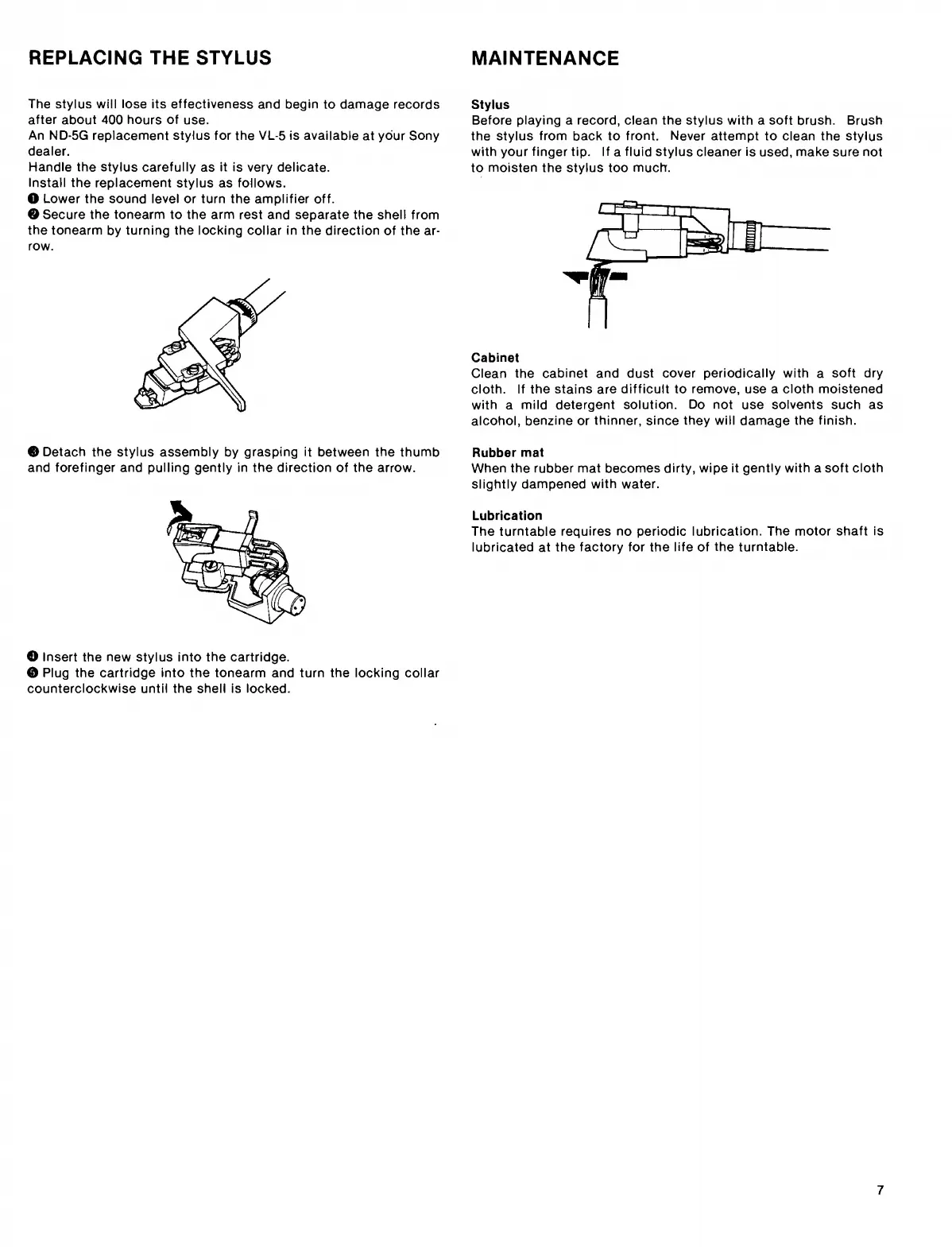
O
Lower
the
sound
level
or
turn
the
amplifier
off.
©
Secure
the
tonearm
to
the
arm
rest
and
separate
the
shell
from
the
tonearm
by
turning
the
locking
collar
in
the
direction
of
the
ar¬
row.
Stylus
Before
playing
a
record,
clean
the
stylus
with
a
soft
brush.
Brush
the
stylus
from
back
to
front.
Never
attempt
to
clean
the
stylus
with
your
finger
tip.
If
a
fluid
stylus
cleaner
is
used,
make
sure
not
to
moisten
the
stylus
too
much.
Cabinet
Clean
the
cabinet
and
dust
cover
periodically
with
a
soft
dry
cloth.
If
the
stains
are
difficult
to
remove,
use
a
cloth
moistened
with
a
mild
detergent
solution.
Do
not
use
solvents
such
as
alcohol,
benzine
or
thinner,
since
they
will
damage
the
finish.
©Detach
the
stylus
assembly
by
grasping
it
between
the
thumb
and
forefinger
and
pulling
gently
in
the
direction
of
the
arrow.
Rubber
mat
When
the
rubber
mat
becomes
dirty,
wipe
it
gently
with
a
soft
cloth
slightly
dampened
with
water.
Lubrication
The
turntable
requires
no
periodic
lubrication.
The
motor
shaft
is
lubricated
at
the
factory
for
the
life
of
the
turntable.
©
Insert
the
new
stylus
into
the
cartridge.
©
Plug
the
cartridge
into
the
tonearm
and
turn
the
locking
collar
counterclockwise
until
the
shell
is
locked.
7

Related product manuals