EasyManua.ls Logo

Sony PS-LX40 - Turntable Assembly

Sony PS-LX40
6 pages
Print Icon
To Next Page IconTo Next Page
To Previous Page IconTo Previous Page
Loading...
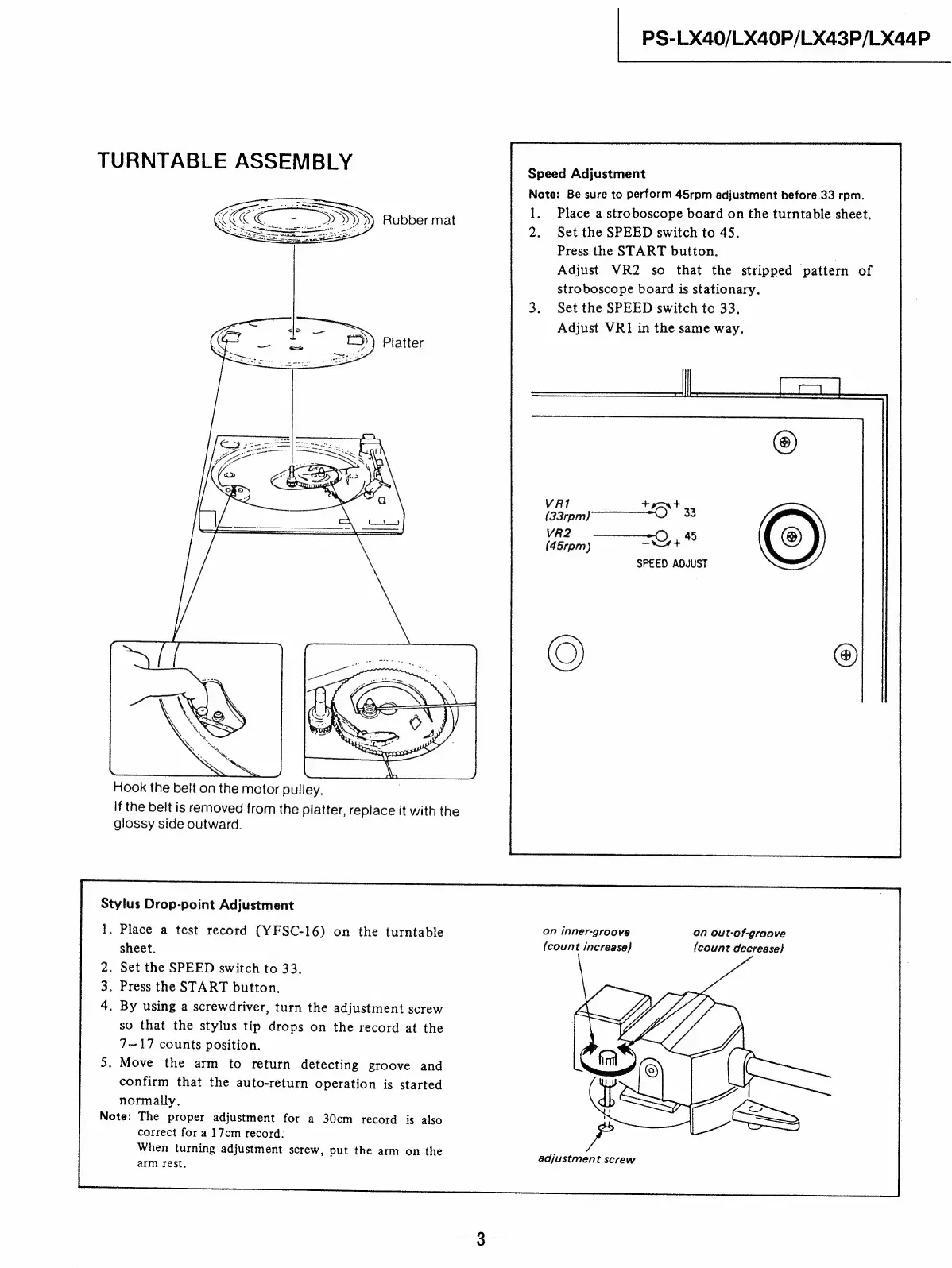
TURNTABLE
ASSEMBLY
PS-LX40/LX40P/LX43P/LX44P
Speed
Adjustment
Rubber
mat
Hook
the
belt
on
the
motor
pulley.
if
the
belt
is
removed
from
the
platter,
replace
it
with
the
glossy
side
outward.
Stylus
Drop-point
Adjustment
1.
Place
a
test
record
(YFSC-16)
on
the
turntable
sheet.
.
Set
the
SPEED
switch
to
33.
.
Press
the
START
button.
.
By
using
a
screwdriver,
turn
the
adjustment
screw
so
that
the
stylus
tip
drops
on
the
record
at
the
7~—17
counts
position.
.
Move
the
arm
to
return
detecting
groove
and
confirm
that
the
auto-return
operation
is
started
normally.
Note:
The
proper
adjustment
for
a
30cm
record
is
also
correct
for
a
17cm
record:
When
turning
adjustment
screw,
put
the
arm
on
the
arm
rest.
Note:
Be
sure
to
perform
45rpm
adjustment
before
33
rpm.
1.
2.
Place
a
stroboscope
board
on
the
turntable
sheet.
Set
the
SPEED
switch
to
45.
Press
the
START
button.
Adjust
VR2
so
that
the
stripped
pattern
of
stroboscope
board
is
stationary.
Set
the
SPEED
switch
to
33.
Adjust
VR1
in
the
same
way.
VRi
+m
t+
3
(33rpm])
O33
VR2
45
(45rpm)
“hat
SPEED
ADJUST
©
on
inner-groove
(count
increase)
on
out-of-groove
(count
decrease)