SECTION 1
GENERAL
PVM-2530
RM-739
1-1. LOCATION AND FUNCTION OF PARTS AND CONTROLS
Front panel
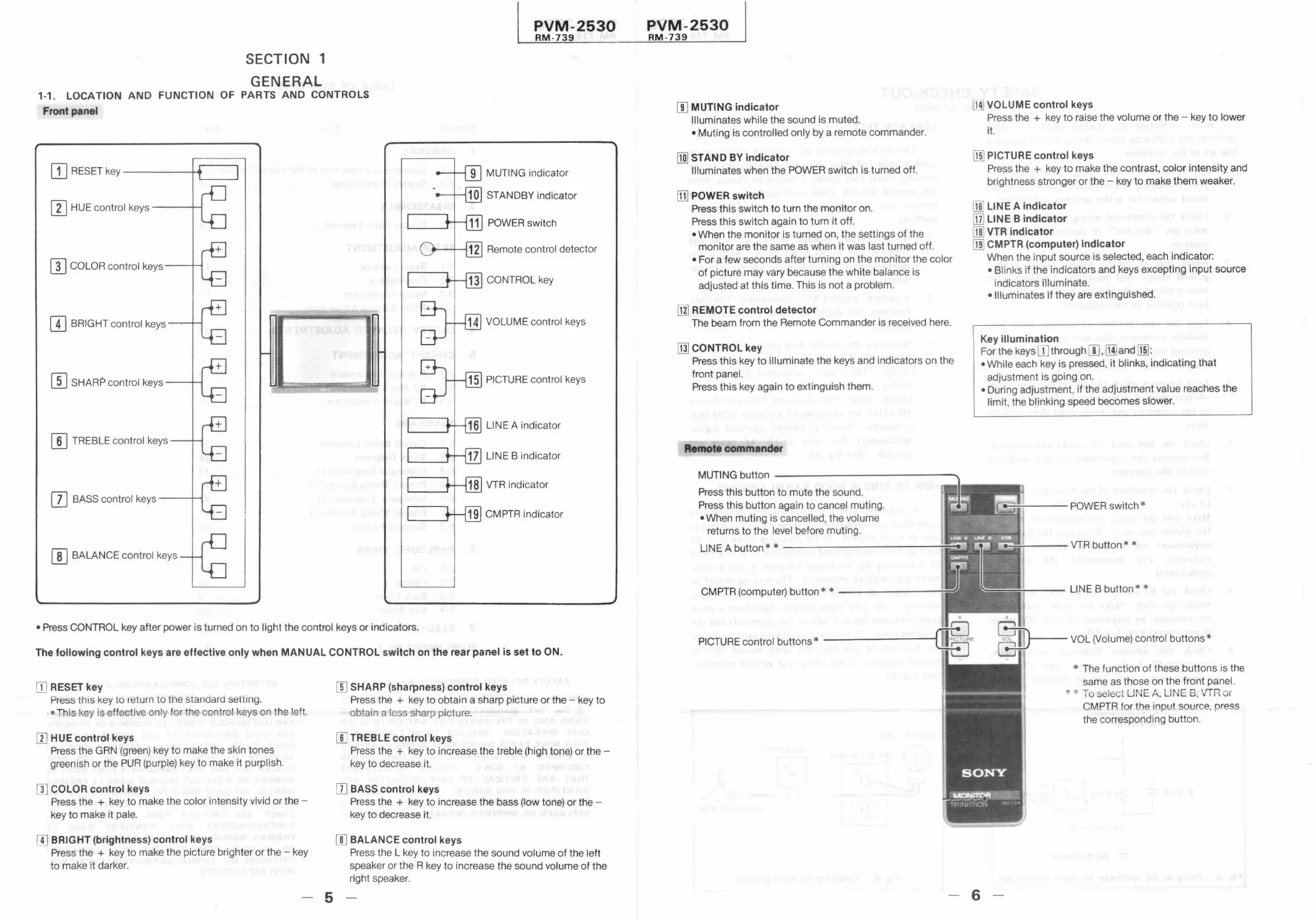
ITJ RESET key ------4 ...
....._ _ ___,
[I] HUE control keys--- ......
[I] COLOR control keys---
[I] BRIGHT control keys ---+---1
[[] SHARP control keys ---+-c
[[] TREBLE control keys
[]] BASS control keys ---
[[] BALANCE control keys
MUTING indicator
STANDBY indicator
POWER switch
Remote control detector
CONTROL key
LINE A indicator
LINE B indicator
VTR indicator
CMPTR indicator
• Press CONTROL key after power is turned on to light the control keys or indicators.
The following control keys are effective only when MANUAL CONTROL switch on the rear panel is set to ON.
OJ RESET key
ress this Key to return to me stanaara setting.
• This key is effective only for the control keys on the left.
[I] HUE control keys
Press the GRN (green) key to make the skin tones
greenish or the PUR (purple) key to make it purplish.
[I] COLOR control keys
Press the + key to make the color intensity vivid or the -
key to make it pale.
[I] BRIGHT (brightness) control keys
Press the + key to make the picture brighter or the - key
to make it darker.
- 5
[[] SHARP (sharpness) control keys
Press the + key to obtain a sharp picture or the - key to
obtain a less sharp picture.
[I] TREBLE control keys
Press the + key to increase the treble (high tone) or the -
key to decrease it.
[I] BASS control keys
Press the + key to ,increase the bass (low tone) or the -
key to decrease it.
[[] BALANCE control keys
Press the L key to increase the sound volume of the lleft
speaker or the R key to increase the sound volume of the
right speaker.
PVM-2530
RM-739
!I] MUTING indicator
Illuminates while the sound is muted.
• Muting is controlled only by a remote commander.
[1ID STAND BY indicator
Illuminates when the POWER switch is turned off.
[I] POWER switch
Press this switch to turn the monitor on.
Press this switch again to turn it off
• When the monitor is turned on, the settings of tihe
monitor are the same as when it was last turned off.
•Fora few seconds after turning on the monitor the color
of picture may vary because the white balance is
adjusted at this time. This is not a problem.
[11] REMOTE control detector
The beam from the Remote Commander is received here.
[ill CONTROL key
Press this key to illuminate the keys and indicators on the
front panel.
Press this key again to extinguish them.
Remote commander
MUTING button ------ ------ -- -..
Press this button to mute the sound.
Press this button again to cancel muting .
• When muting is cancelled, the volume
returns to the level before muting.
LINE A button* * ____________ ...,,.._;
CMPTR (computer) button* * -- ---------..
PICTURE control buttons* ---------t
lM] VOLUME control keys
Press the + key to raise the volume or the - key to lower
it.
[fil PICTURE control keys
Press the + key to make the contrast, color intensity and
brightness stronger or the - key to make them weaker.
ml LINE A indicator
[j] LINE B indicator
[ID VTR indicator
rn] CMPTR (computer) indicator
When the input source is selected, each indicator:
• Blinks if the indicators and keys excepting input source
indicators illuminate.
• Illuminates if they are extinguished.
Key illumination
For the keys[]] through[[],~ and~:
• While each key is pressed, it blinks, indicating that
adjustment is going on.
• During adjustment, if the adjustment value reaches the
limit, the blinking speed becomes slower.
VTR button * *
LINE B button**
* The function of these buttons is the
same as those on the front panel.
CMPTR for the input source, press
the corresponding button .
- 6







 To Next Page