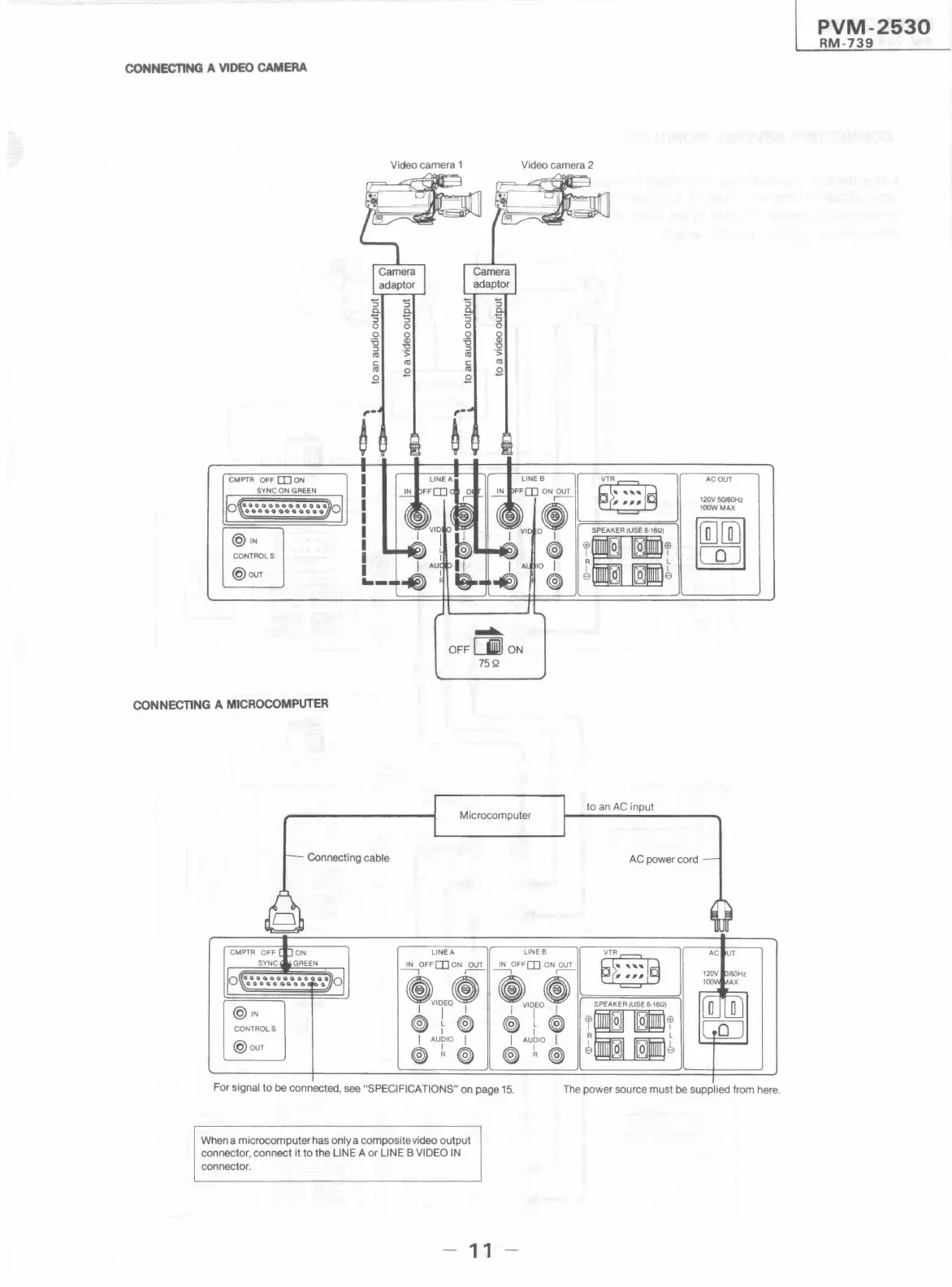
CONNECTING A VIDEO CAMERA
Video camera 1 Video camera 2
Camera
adaptor
'S
'S
'S
0..
0..
0..
'S 'S
'S
'S
0
0
0
0
Q.
2
0
2
'6
ii
::,
"O
::,
"O
<1:1 ">
<1:1
">
C
<1:1
C
<1:1
<1:1
.8
<1:1
.8
.8
.8
CMPTR OFF [I) ON
LINE B
~
AC OUT
IN
FF[I] ON OUT
,---
-
120V 50/60Hz
e
lOOWMAX
SPEAKER (USE 8-16Q)
~
@1N
o I
·u·
CONTROLS
~
I ' ' I
A 10 I
R L
0
@our
I
~
@J I
~
e , O e
......
OFF []I ON
75Q
CONNECTING A MICROCOMPUTER
Microcomputer
to an AC input
Connecting cable
AC power cord
LINEA
LINE B
~
~OFF[I)ON~
IN OFF [I] ON OUT
--, ,---
-
eVIDEOe
~IDEOe
SPEAKER (USE 8-16Q)
@1N
I I I
I I I
·n·
CONTROLS
®~@
@~~
I ' ' I
I AUDIO I
I AUDIO I
A L
@our
I
~
@J I
@) ~@
@~~
8 , 0 8
For signal to be connected, see "SPECIFICATIONS" on page 15.
The power source must be supplied from here.
When a microcomputer has only a composite video output
connector, connect it to the LINE A or LINE B VIDEO IN
connector.
- 11
PVM-2530
RM-739




 To Next Page