Annotation
41
Table of Contents Index
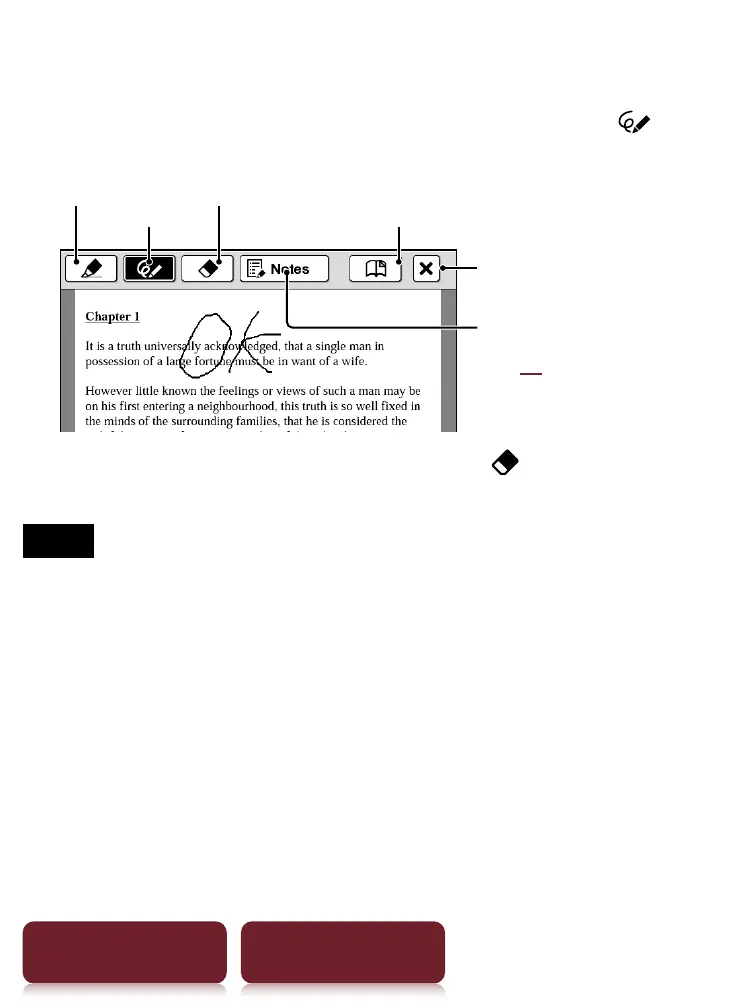
Handwriting a note
Press OPTIONS
tap [Notes]
[Create/Edit]
use
a stylus or finger to mark your note.
Pen
Lists notes in the content
(
44)
Marker Eraser
Bookmark
Auto save and quit
Deleting a drawn line/highlight: Tap and stroke
across the drawn line or highlight.
Notes
While writing, make sure that you are not touching another
area on the screen – this could affect the notes that you
write with the stylus or your finger.
To ensure your notes are correctly saved, do not handwrite
notes too close to the edge of the screen.
If you experience difficulties when handwriting or drawing
on your Reader:
– a
void applying e
xcessive pressure to the screen.
– try not to handwrite or draw too quickly.
– the notes functionality is not designed for very detailed
drawings or for writing small characters.













 To Next Page