Watching the TV
1
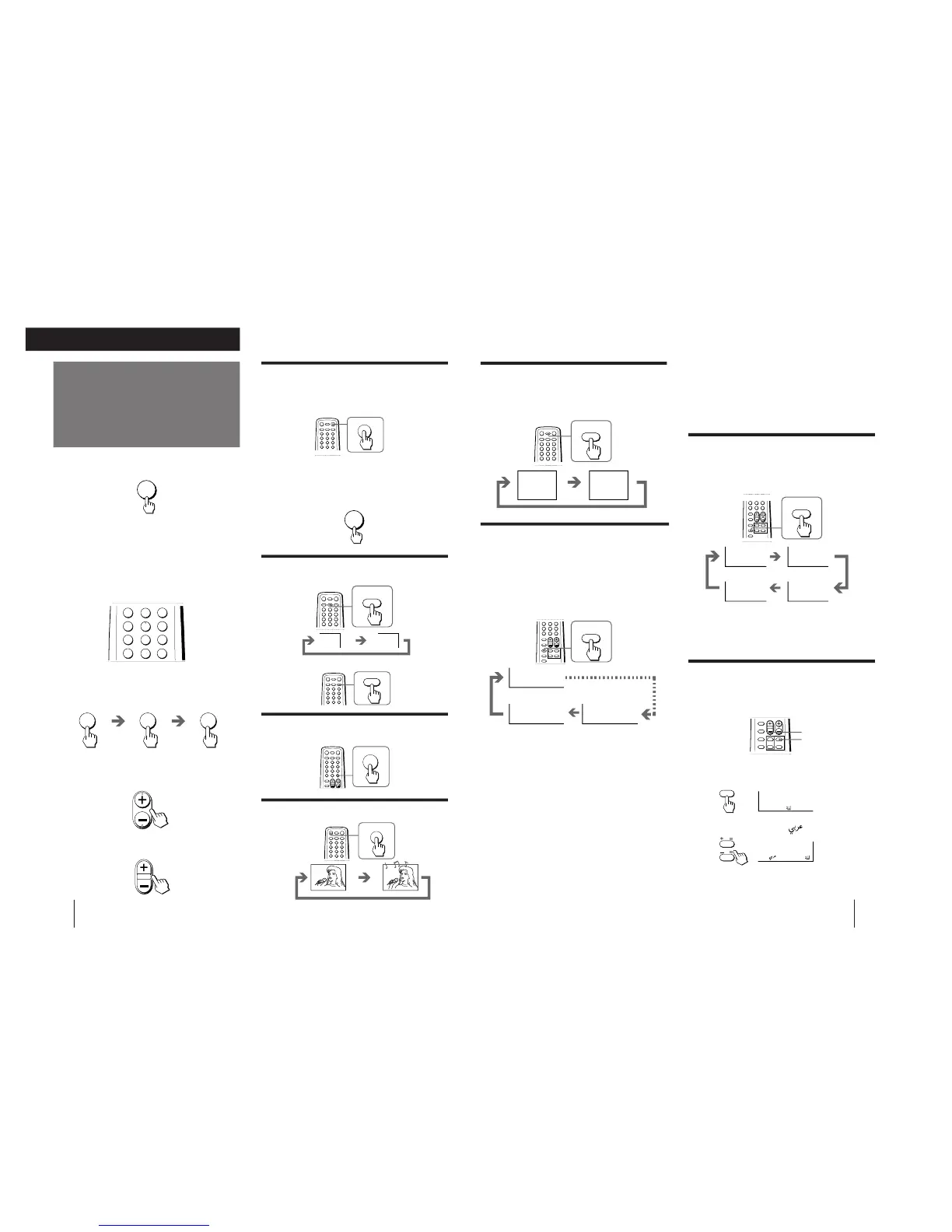
Press POWER to turn on the TV.
When the TV is turned on in standby mode, press
POWER on the remote commander.
2
Select the TV program you want to watch.
To select a program position directly
Press the number button.
To select a two-digit program position, press “-/--”
before pressing the number buttons.
For example: to select program position 25, press
“-/--,” and then “2” and “5.”
To scan through program positions
Press PROGR +/– until the program position you
want appears.
3
Press VOL +/– to adjust the volume.
Turning off the TV
To turn off the TV temporarily
Press POWER on the remote commander. The
STANDBY indicator on the TV lights up.
To turn off the TV completely
Press POWER on the TV.
If the power on the TV is turned off in standby mode,
the STANDBY indicator on the TV may remain alight for
a while.
Watching the video input
Press VIDEO/HOLD.
To watch TV
Press TV.
Switching back quickly to the previous
channel
Press JUMP.
Muting the sound
Press MUTING.
Setting the Sleep Timer
You can set the TV to automatically turn off as you
have programmed.
Press SLEEP/TEXT CLR.
To cancel the Sleep Timer, press SLEEP/TEXT CLR
repeatedly until “SLEEP TIMER: OFF” appears, or turn
off the TV.
Changing the on-screen display
language
You can use buttons on the remote commander or the
TV to change the on-screen display language.
1
Press SELECT until the screen appears as
follows:
2
Press + or – to select “ ”.
Note
• You can also use SELECT and VOLUME +/– on the TV to
select the on-screen display language.
Setting the Wake Up Timer
You can set the TV to automatically turn on as you have
programmed.
1
Press WAKE UP/INDEX repeatedly to set the
timer.
The on-screen display appears and the WAKE UP
indicator on the TV lights up.
2
If you want a particular TV program or
video input to be displayed using the Wake
Up Timer, select the TV program or video
input.
3
Press POWER on the remote commander or
set the Sleep Timer to turn off the TV in
standby mode.
To cancel the Wake Up Timer, press WAKE UP/INDEX
repeatedly until “WAKE UP TIMER: OFF” appears, or
turn off the main power of the TV.
Notes
• The Wake Up Timer starts immediately after the on-screen
display disappears.
• The last TV program position or video input just before the TV
turns into standby mode will appear when the TV is turned on
using the Wake Up Timer.
• If no buttons or controls are pressed for more than two hours
after the TV is turned on using the Wake Up Timer, the TV
automatically turns into standby mode. If you want to
continue watching the TV, press any button or control on the
remote commander or the TV.





 To Next Page