EasyManua.ls Logo

Sony RM-E700 - Creating;Displaying Titles

Sony RM-E700
86 pages
Print Icon
To Next Page IconTo Next Page
To Previous Page IconTo Previous Page
Loading...
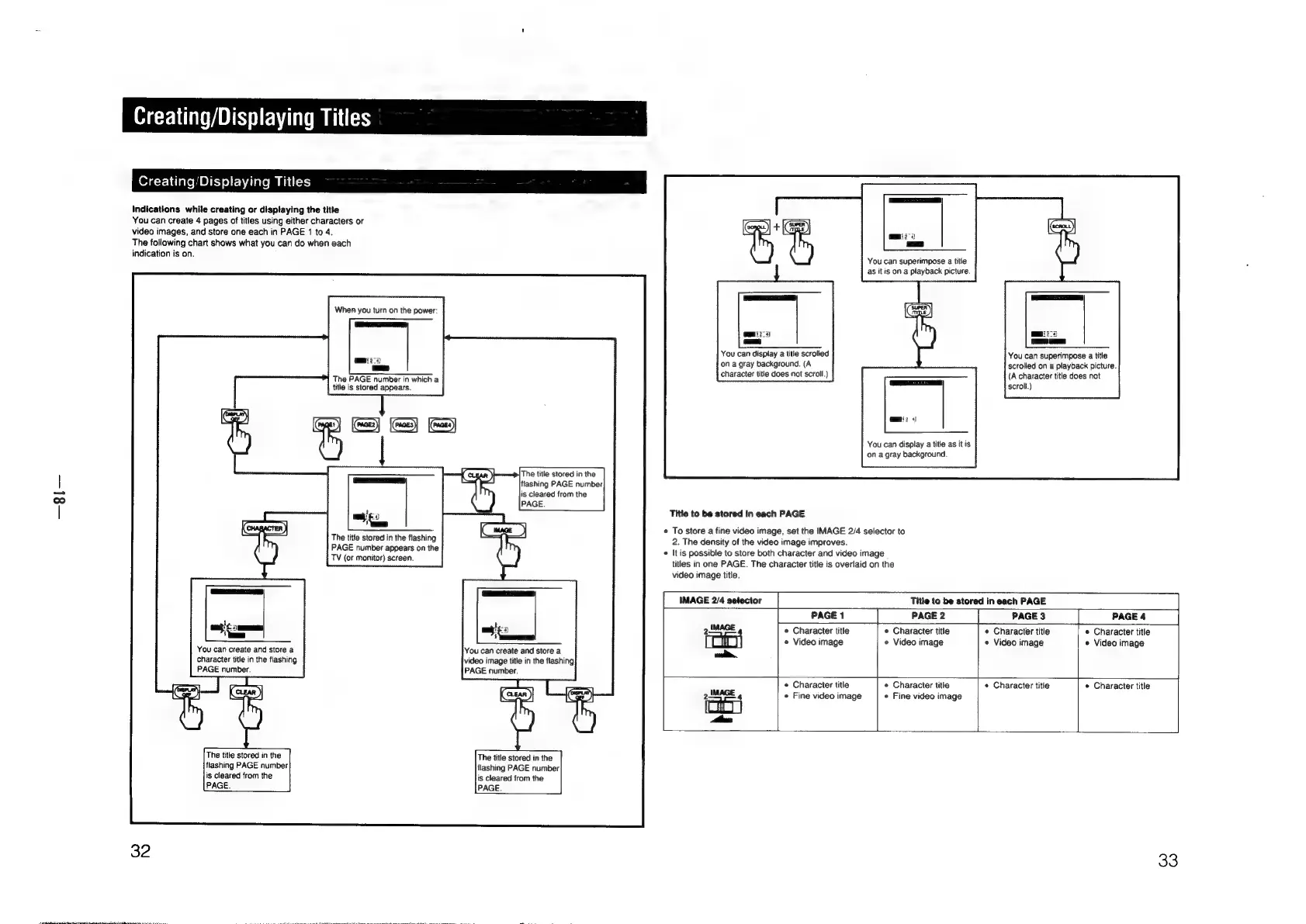
Creating/Displaying
Titles
indications
while
creating
or
displaying
the
title
You
can
create
4
pages
of
titles
using
either
characters
or
video
images,
and
store
one
each
in
PAGE
1
to
4.
The
following
chart
shows
what
you
can
do
when
each
indication
is
on.
You
can
create
and
store
a
character
title
in
the
flashing
PAGE
number.
The
title
stored
in
the
flashing
PAGE
number
is
cleared
from
the
PAGE.
Fe
ee
eA
AOR
Sy
ae
aes
SE
When
you
turn
on
the
power
The
PAGE
number
in
which
a
title
is
stored
appears.
The
title
stored
in
the
flashing
PAGE
number
is
cleared
from
the
PAGE
The
title
stored
in
the
flashing
PAGE
number
appears
on
the
TV
(or
monitor)
screen.
4]
t
'You
can
create
and
store
a
video
image
title
in
the
flashing
PAGE
number.
The
title
stored
in
the
flashing
PAGE
number
is
cleared
from
the
PAGE.
You
can
superimpose
a
title
as
it
is
on
a
playback
picture.
You
can
display
a
title
scrolled
on
a
gray
background.
(A
character
title
does
not
scroll.)
scrob.)
ii?
¢)
You
can
display
a
title
as
itis
on
a
gray
background.
Title
to
be
stored
in
each
PAGE
¢
To
store
a
fine
video
image,
set
the
IMAGE
2/4
selector
to
2.
The
density
of
the
video
image
improves.
«
It
is
possible
to
store
both
character
and
video
image
titles
in
one
PAGE.
The
character
title
is
overlaid
on
the
video
image
title.
You
can
superimpose
a
title
scrolled
on
a
playback
picture.
(A
character
title
does
not
IMAGE
2/4
selector
Title
to
be
stored
in
each
PAGE
PAGE
1
PAGE
2
PAGE
3
PAGE
4
+————
+
2IMAGE
*
Character
title
¢
Character
title
¢
Character
title
*
Character
title
Coto)
¢
Video
image
e
Video
image
*
Video
image
e
Video
image
=.
4
¢
Character
title
«
Character
title
«
Character
title
¢
Character
title
2/MAGE
,
*
Fine
video
image
*
Fine
video
image
Aen,
33

Other manuals for Sony RM-E700

Related product manuals