EasyManua.ls Logo

Sony RM-E700 - Adjustments

Sony RM-E700
86 pages
Print Icon
To Next Page IconTo Next Page
To Previous Page IconTo Previous Page
Loading...
SECTION
7
ELECTRICAL
ADJUSTMENTS
During
the
Adjustment,
See
the
Parts
location
diagram
relevant
to
the
adjustment
on
page
107.
The
following
measuring
instruments
are
needed
in
electrical
adjustment.
[Using
instruments]
1)
Monitor
TV
2)
Oscilloscope
dual-trace,
Band
width
more
than
1OMHz
with
delay
mode
(Use
a
probe
of
10:
1,
unless
otherwise
specified.)
3)
Frequency
counter
4)
PAL
pattern
generator
with
video
output
terminal
and
Y/C
separate
output
terminal
5)
Digital
voltmeter
6)
PAL
vectorscope
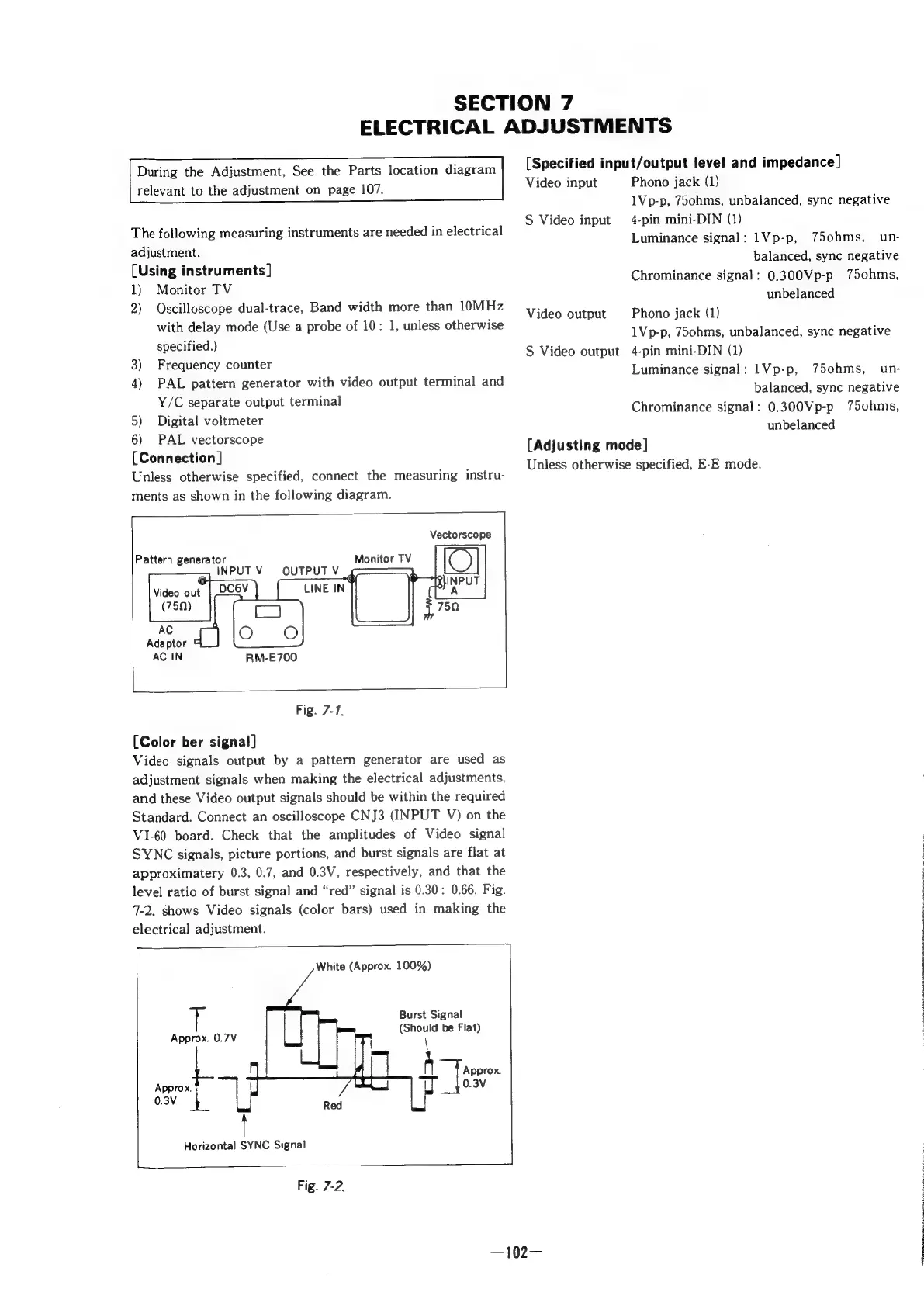
[Connection]
Unless
otherwise
specified,
connect
the
measuring
instru-
ments
as
shown
in
the
following
diagram.
Vectorscope
Pattern
generator
INPUT
V
©
Video
out
RM-E700
Fig.
7-7.
(Color
ber
signal]
Video
signals
output
by
a
pattern
generator
are
used
as
adjustment
signals
when
making
the
electrical
adjustments,
and
these
Video
output
signals
should
be
within
the
required
Standard.
Connect
an
oscilloscope
CNJ3
(INPUT
V)
on
the
VI1-60
board.
Check
that
the
amplitudes
of
Video
signal
SYNC
signals,
picture
portions,
and
burst
signals
are
flat
at
approximatery
0.3,
0.7,
and
0.3V,
respectively,
and
that
the
level
ratio
of
burst
signal
and
“red”
signal
is
0.30:
0.66.
Fig.
7-2.
shows
Video
signals
(color
bars)
used
in
making
the
electrical
adjustment.
Fa
Burst
Signal
Should
be
Flat
Approx.
0.7V
(Should
at)
er
‘|
Horizontal
SYNC
Signal
White
(Approx.
100%)
Red
Fig.
7-2.
[Specified
input/output
level
and
impedance]
Video
input
Phono
jack
(1)
1Vp-p,
75ohms,
unbalanced,
sync
negative
4-pin
mini-DIN
(1)
Luminance
signal:
1Vp-p,
75ohms,
un-
balanced,
sync
negative
Chrominance
signal:
0.300Vp-p
75ohms,
unbelanced
S
Video
input
Phono
jack
(1)
1Vp-p,
75ohms,
unbalanced,
sync
negative
4-pin
mini-DIN
(1)
Luminance
signal:
1Vp-p,
75ohms,_
un-
balanced,
sync
negative
Chrominance
signal:
0.300Vp-p
75ohms,
unbelanced
Video
output
S
Video
output
[Adjusting
mode]
Unless
otherwise
specified,
E-E
mode.
—102—

Other manuals for Sony RM-E700

Related product manuals