EasyManua.ls Logo

Sony RM-E700 - Clearting the Stored Title; Displaying the Stored Title

Sony RM-E700
86 pages
Print Icon
To Next Page IconTo Next Page
To Previous Page IconTo Previous Page
Loading...
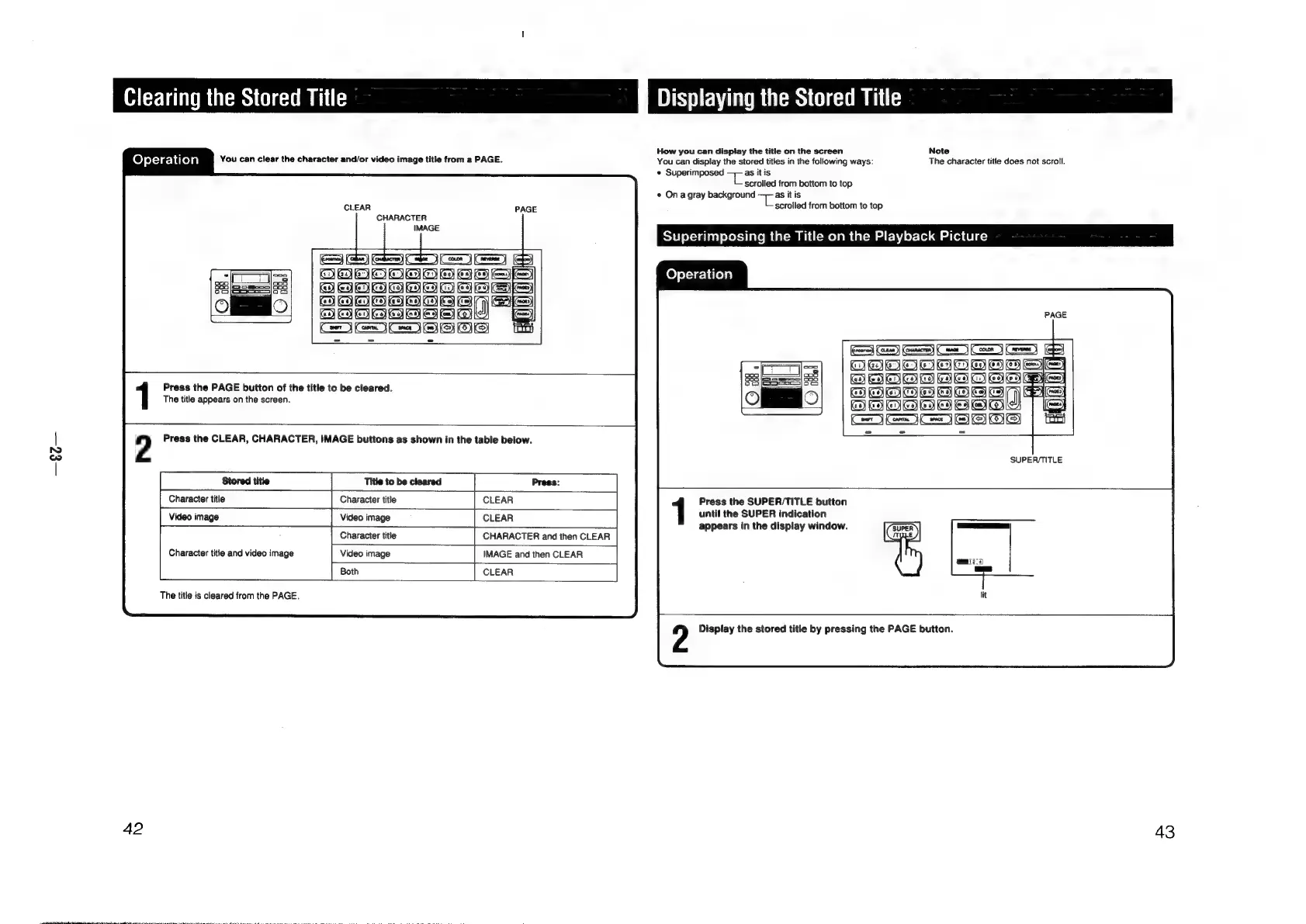
Clearing
the
Stored
Title
Displaying
the
Stored
Title
7
How
you
can
dispiay
the
title
on
the
screen
Note
Operation
You
can
clear
the
character
and/or
video
image
title
from
a
PAGE.
You
can
display
the
stored
titles
in
the
following
ways:
The
character
title
does
not
scroll.
«
Superimposed
=
as
it
is
scrolled
from
bottom
to
top
©
Ona
gray
background
an
a
itis
scrolled
from
bottom
to
top
Superimposing
the
Title
on
the
Playback
Picture
CLEAR
CHARACTER
Operation
Bey
Biatatotetotae
=
5
omer)
en)
Pa
TS
AHaiooo
Ea
Fa)
Games)
Coe
(Con
Cees)
fee)
aiatntisteeisteisieis
SS
y
"
if
yy
ie
Ki}
Key Key
BEBOSeEos
si)
3
Dill
Se
zo]
I
SoS
ta
Press
the
PAGE
button
of
the
title
to
be
cleared.
The
title
appears
on
the
screen.
2
Press
the
CLEAR,
CHARACTER,
IMAGE
buttons
as
shown
in
the
table
below.
SUPER/TITLE
Character
title
Character
title
CLEAR
|
CLEAR
Character
title
|
CHARACTER
and
then
CLEAR
|
IMAGE
and
then
CLEAR
[
CLEAR
Press
the
SUPER/TITLE
button
until
the
SUPER
indication
appears
in
the
display
window.
Video
image
Video
image
The
title
is
cleared
from
the
PAGE.
Display
the
stored
title
by
pressing
the
PAGE
button.
42
43

Other manuals for Sony RM-E700

Related product manuals