EasyManua.ls Logo

Sony RM-E700 - Page 22

Sony RM-E700
86 pages
Print Icon
To Next Page IconTo Next Page
To Previous Page IconTo Previous Page
Loading...
PO
eR
CR
ee
ee
OE
Foe
ee
by
See
er
ee
ee
Creating
a
Video
Image
Title
else
Select
the
color.
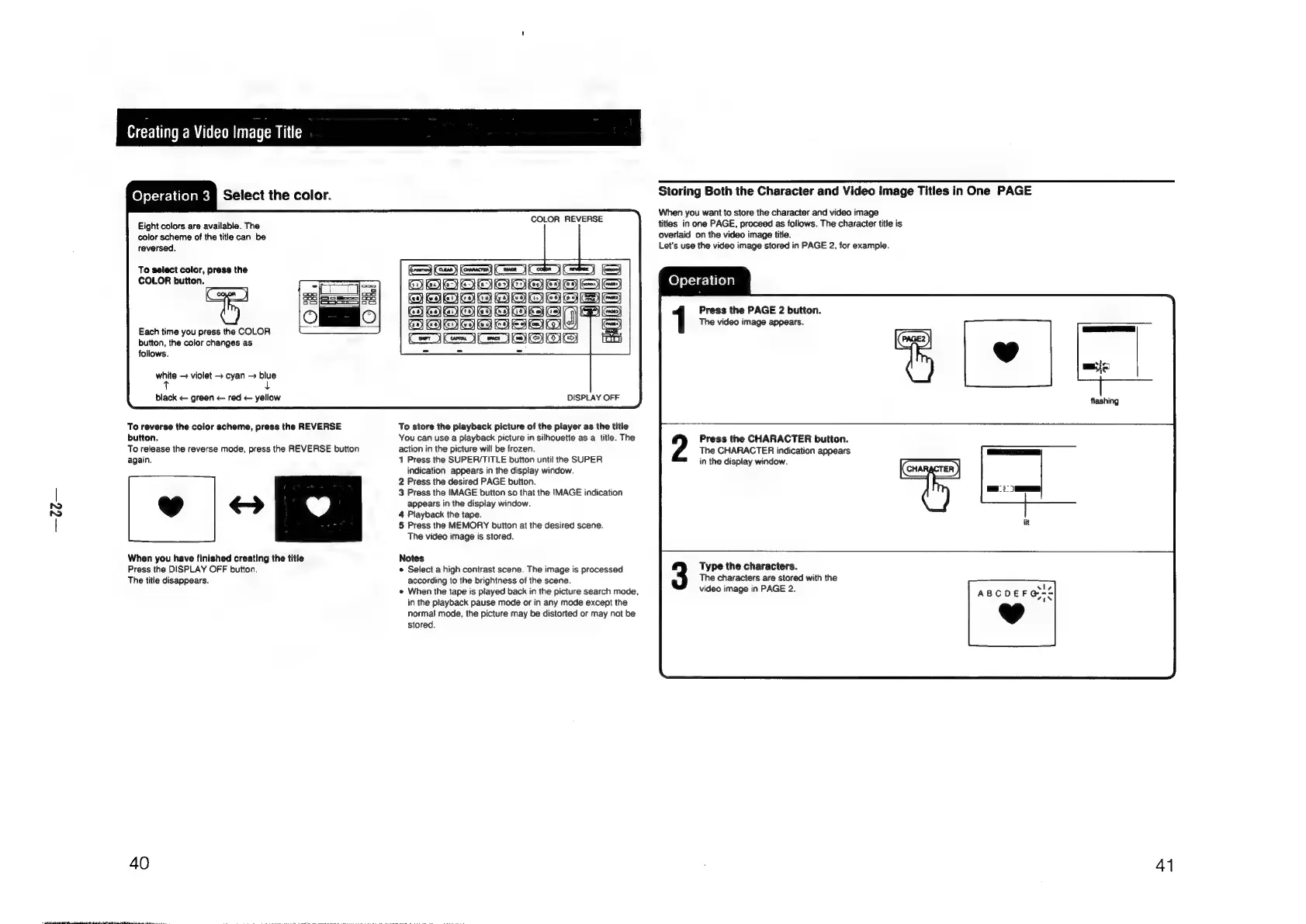
Eight
colors
are
available.
The
color
scheme
of
the
title
can
be
reversed.
To
select
color,
press
the
COLOR
button.
Each
time
you
press
the
COLOR
button,
the
color
changes
as
follows.
white
violet
>
cyan
blue
t
4
black
<—
green
red
<—
yellow
To
reverse
the
color
scheme,
press
the
REVERSE
button.
To
release
the
reverse
mode,
press
the
REVERSE
button
again.
Eo
When
you
have
finished
creating
the
title
Press
the
DISPLAY
OFF
button.
The
title
disappears.
40
COLOR
REVERSE
©
Pee
DISPLAY
OFF
To
store
the
playback
picture
of
the
player
as
the
title
You
can use
a
playback
picture
in
silhouette
as
a
title.
The
action
in
the
picture
will
be
frozen.
1
Press
the
SUPER/TITLE
button
until
the
SUPER
indication
appears
in
the
display
window.
2
Press
the
desired
PAGE
button.
3
Press
the
IMAGE
button
so
that
the
IMAGE
indication
appears
in
the
display
window.
4
Playback
the
tape.
5
Press
the
MEMORY
button
at
the
desired
scene.
The
video
image
is
stored.
Notes
e
Select
a
high
contrast
scene.
The
image
is
processed
according
to
the
brightness
of
the
scene.
«
When
the
tape
is
played
back
in
the
picture
search
mode,
in
the
playback
pause
mode
or
in
any
mode
except
the
normal
mode,
the
picture
may
be
distorted
or
may
not
be
stored.
Storing
Both
the
Character
and
Video
Image
Titles
in
One
PAGE
When
you
want
to
store
the
character
and
video
image
titles
in
one
PAGE,
proceed
as
follows.
The
character
title
is
overlaid
on
the
video
image
title.
Let's
use
the
video
image
stored
in
PAGE
2,
for
example.
Operation
Press
the
PAGE
2
button.
The
video
image
appears.
Press
the
CHARACTER
button.
The
CHARACTER
indication
appears
in
the
display
window.
Type
the
characters.
The
characters
are
stored
with
the
video
image
in
PAGE
2.
41

Other manuals for Sony RM-E700

Related product manuals