EasyManua.ls Logo

Sony RM-E700 - Scene-By-Scene Editing -To Edit

Sony RM-E700
86 pages
Print Icon
To Next Page IconTo Next Page
To Previous Page IconTo Previous Page
Loading...
Step
3
Scene-by-Scene
Editing,
Creating/Displaying
Titles
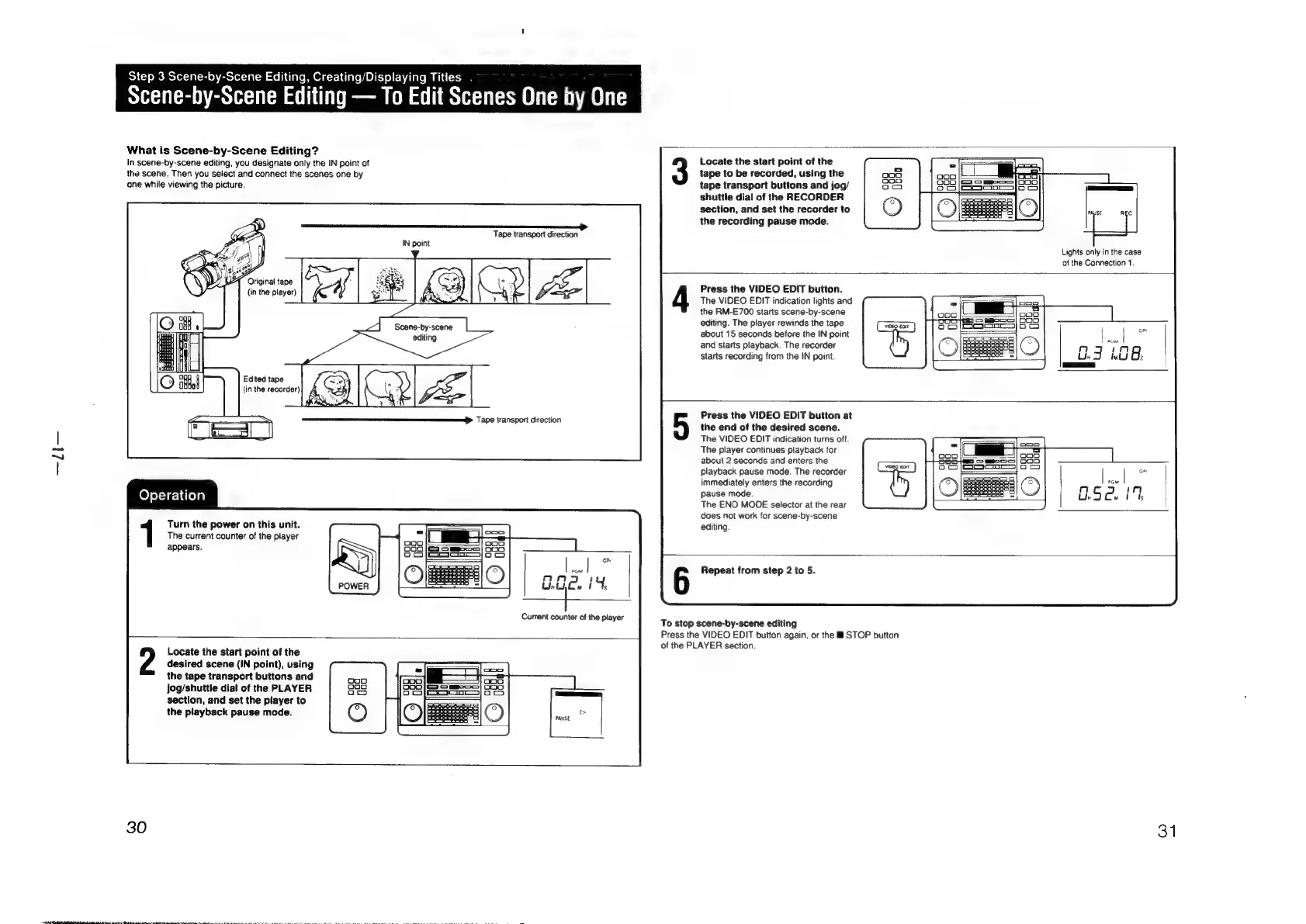
Scene-by-Scene
Editing
To
Edit
Scenes
One
by
One
What
is
Scene-by-Scene
Editing?
In
scene-by-scene
editing,
you
designate
only
the
IN
point
of
Locate
the
start
point
of
the
the
scene.
Then
you
select
and
connect
the
scenes
one
by
tape
to
be
recorded,
using
the
one
while
viewing
the
picture.
tape
transport
buttons
and
jog/
shuttle
dial
of
the
RECORDER
section,
and
set
the
recorder
to
the
recording
pause mode.
Tape
transport
direction
Lights
only
in
the
case
of
the
Connection
1.
Press
the
VIDEO
EDIT
button.
The
VIDEO
EDIT
indication
lights
and
the
RM-E700
starts
scene-by-scene
editing.
The
player
rewinds
the
tape
about
15
seconds
before
the
IN
point
;
|
.
|
a
and
starts
playback.
The
recorder
a
:
nm
J
qn
starts
recording
from
the
IN
point.
ar
WU
Os
eam
Edited
tape
(in
the
recorder)
Press
the
VIDEO
EDIT
button
at
the
end
of
the
desired
scene.
The
VIDEO
EDIT
indication
turns
off.
The
player
continues
playback
for
about
2
seconds
and
enters
the
playback
pause
mode.
The
recorder
immediately
enters
the
recording
Pause mode.
The
END
MODE
selector
at
the
rear
does
not
work
for
scene-by-scene
editing.
Tape
transport
direction
Operation
Turn
the
power
on
this
unit.
The
current
counter
of
the
player
appears.
oP
wl
Repeat
from
step
2
to
5.
nn
'
thtyOw
t
Ts
{+
Current
counter
of
the
player
To
stop
scene-by-scene
editing
Press
the
VIDEO
EDIT
button
again,
or
the
&@
STOP
button
of
the
PLAYER
section.
Locate
the
start
point
of
the
desired
scene
(iN
point),
using
the
tape
transport
buttons
and
jog/shuttle
dial
of
the
PLAYER
section,
and
set
the
player
to
the
playback
pause mode.
30
31

Other manuals for Sony RM-E700

Related product manuals