EasyManua.ls Logo

Sony RM-E700 - Timing Adjustment Flowchart

Sony RM-E700
86 pages
Print Icon
To Next Page IconTo Next Page
To Previous Page IconTo Previous Page
Loading...
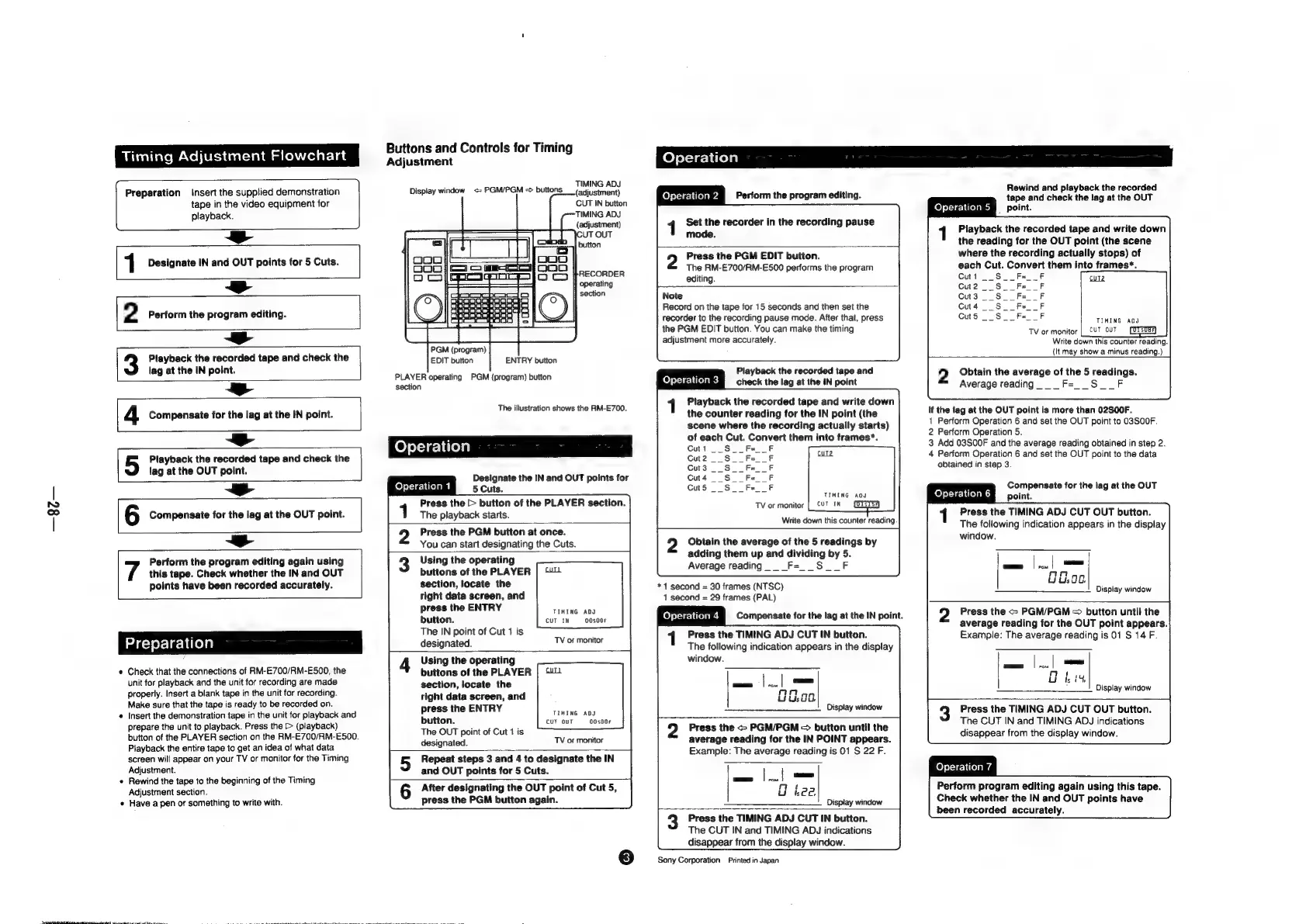
Timing
Adjustment
Flowchart
Preparation
Insert
the
supplied
demonstration
tape
in
the
video
equipment
for
playback.
r
1
Designate
IN
and
OUT
points
for
5
Cuts.
¢
2
Perform
the
program
editing.
Buttons
and
Controls
for
Timing
Adjustment
Display
window
<=
PGM/PGM
=
buttons
Honpiadiner
CUT
IN
button
TIMING
ADJ
(adjustment)
4
[3
Playback
the
recorded
tape
and
check
the
lag
at
the
IN
point.
¢
4
Compensate
for
the
lag
at
the
IN
point.
4
i
a
A
5
Playback
the
recorded
tape
and
check
the
lag
at
the
OUT
point.
¢
6
Compensate
for
the
lag
at
the
OUT
point.
this
tape.
Check
whether
the
IN
and
OUT
points
have
been
recorded
accurately.
7
Perform
the
program
editing
again
using
Check
that
the
connections
of
RM-E700/RM-E500,
the
unit
for
playback
and
the
unit
for
recording
are
made
properly.
Insert
a
blank
tape
in
the
unit
for
recording.
Make
sure
that
the
tape
is
ready
to
be
recorded
on.
Insert
the
demonstration
tape
in
the
unit
for
playback
and
prepare
the
unit
to
playback.
Press
the
[>
(playback)
button
of
the
PLAYER
section
on
the
RM-E700/RM-E500.
Playback
the
entire
tape
to
get
an
idea
of
what
data
screen
will
appear
on
your
TV
or
monitor
for
the
Timing
Adjustment.
Rewind
the
tape
to
the
beginning
of
the
Timing
Adjustment
section.
Have
a
pen
or
something
to
write
with.
PGM
(program)
EDIT
button
ENTRY
button
PLAYER
operating
PGM
(program)
button
section
The
illustration
shows
the
RM-E700.
Designate
the
IN
and
OUT
points
for
5
Cuts.
Press
the
>
button
of
the
PLAYER
section.
1
The
playback
starts.
2
Press
the
PGM
button
at
once.
You
can
start
designating
the
Cuts.
3
Using
the
operating
buttons
of
the
PLAYER
|
“U
section,
locate
the
right
data
screen,
and
press
the
ENTRY
CIMT
Ke
“ADS
button.
CUT
IN
00s00F
The
IN
point
of
Cut
1
is
designated.
4
Using
the
operating
buttons
of
the
PLAYER
|
“U
section,
locate
the
right
data
screen,
and
press
the
ENTRY
fiwiwexauy
button.
CUT
OUT
—-00s00F
The
OUT
point
of
Cut
4
is
designated.
Repeat
steps
3
and
4
to
designate
the
IN
and
OUT
points
for
5
Cuts.
6
After
designating
the
OUT
point
of
Cut
5,
press
the
PGM
button
again.
Operation
1
TV
of
monitor
TV
of
monitor
o
8
felel1¢-1
lead
Perform
the
program
editing.
Set
the
recorder
in
the
recording
pause
mode.
2
Press
the
PGM
EDIT
button.
The
RM-E700/RM-E500
performs
the
program
editing.
Note
Record
on
the
tape
for
15
seconds
and
then
set
the
recorder
to
the
recording
pause
mode.
After
that,
press
the
PGM
EDIT
button.
You
can
make
the
timing
adjustment
more
accurately.
Playback
the
recorded
tape
and
TTR
check
the
lag
at
the
IN
point
Playback
the
recorded
tape
and
write
down
the
counter
reading
for
the
IN
point
(the
scene
where
the
recording
actually
starts)
of
each
Cut.
Convert
them
into
frames*.
Cutt
__
Write
down
this
counter
reading
Obtain
the
average
of
the
5
readings
by
adding
them
up
and
dividing
by
5.
Average
reading.
__F=__S__F
*1
second
=
30
frames
(NTSC)
1
second
=
29
frames
(PAL)
Operation
4
Compensate
for
the
lag
at
the
IN
point.
Press
the
TIMING
ADJ
CUT
IN
button.
The
following
indication
appears
in
the
display
window.
Display
window
Press
the
~
PGM/PGM
=
button
until
the
average
reading
for
the
IN
POINT
appears.
Example:
The
average
reading
is
01
S
22
F.
—————____________
Display
window
Press
the
TIMING
ADJ
CUT
IN
button.
The
CUT
IN
and
TIMING
ADJ
indications
disappear
from
the
display
window.
Sony
Corporation
Printed
in
Japan
Rewind
and
playback
the
recorded
tape
and
check
the
lag
at
the
OUT
felted
§
point.
Playback
the
recorded
tape
and
write
down
the
reading
for
the
OUT
point
(the
scene
where
the
recording
actually
stops)
of
each
Cut.
Convert
them
into
frames*.
Cut1
__S_
_F
Cut2
_
_Fe__F
Cut3
_
_Fe__F
~S_
aS
Cut4
__S__F=__F
-S.
Cut5
_
_Fe__F
——
TIMING
ADJ
TV
or
monitor
|_CUT
OUT
Write
down
this
counter
reading.
(It
may
show
a
minus
reading.)
2
Obtain
the
average
of
the
5
readings.
Average
reading.
_
F=__S__F
if
the
lag
at
the
OUT
point
is
more
than
02SO0F.
1
Perform
Operation
6
and
set
the
OUT
point
to
O3SO0F.
2
Perform
Operation
5.
3
Add
03S00F
and
the
average
reading
obtained
in
step
2.
4
Perform
Operation
6
and
set
the
OUT
point
to
the
data
obtained
in
step
3.
;
Compensate
for
the
lag
at
the
OUT
UE
point.
Press
the
TIMING
ADJ
CUT
OUT
button.
The
following
indication
appears
in
the
display
Display
window
Press
the
<>
PGM/PGM
=
button
until
the
average
reading
for
the
OUT
point
appears.
Example:
The
average
reading
is
01
S
14
F.
a
al
=
lca
t
Oki
Display
window
Press
the
TIMING
ADJ
CUT
OUT
button.
The
CUT
IN
and
TIMING
ADJ
indications
disappear
from
the
display
window.
Operation
7
Perform
program
editing
again
using
this
tape.
Check
whether
the
IN
and
OUT
points
have
been
recorded
accurately.

Other manuals for Sony RM-E700

Related product manuals