EasyManua.ls Logo

Sony RM-E700 - Page 27

Sony RM-E700
86 pages
Print Icon
To Next Page IconTo Next Page
To Previous Page IconTo Previous Page
Loading...
Adjustment
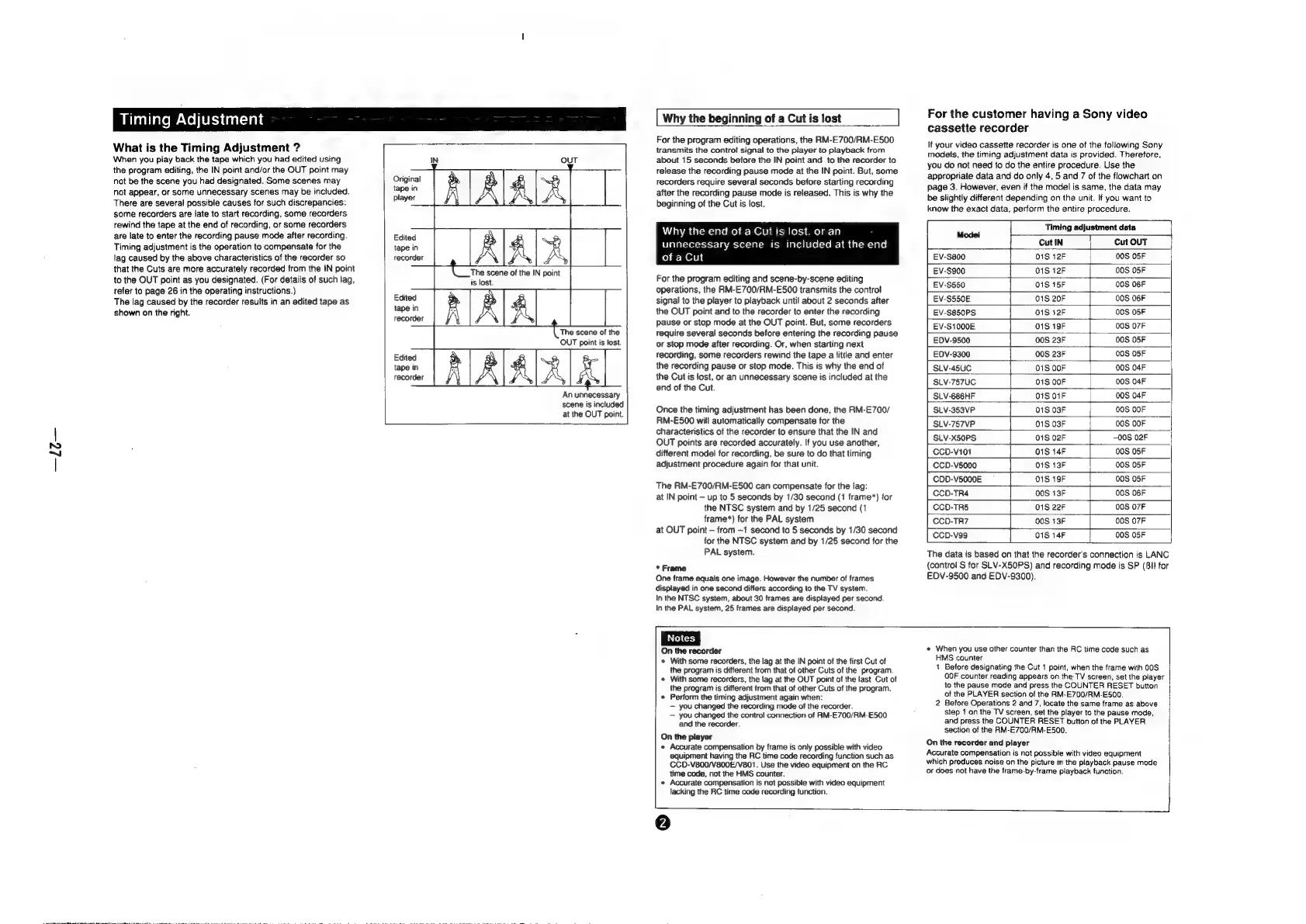
What
is
the
Timing
Adjustment
?
When
you
play
back
the
tape
which
you
had
edited
using
the
program
editing,
the
IN
point
and/or
the
OUT
point
may
not
be
the
scene
you
had
designated.
Some
scenes
may
not
appear,
or
some
unnecessary
scenes
may
be
included.
There
are
several
possible
causes
for
such
discrepancies:
some
recorders
are
late
to
start
recording,
some
recorders
rewind
the
tape
at
the
end
of
recording,
or
some
recorders
are
late
to
enter
the
recording
pause
mode
after
recording.
Timing
adjustment
is
the
operation
to
compensate
for
the
lag
caused
by
the
above
characteristics
of
the
recorder
so
that
the
Cuts
are
more
accurately
recorded
from
the
IN
point
to
the
OUT
point
as
you
designated.
(For
details
of
such
lag,
tefer
to
page
26
in
the
operating
instructions.)
The
lag
caused
by
the
recorder
results
in
an
edited
tape
as
shown
on
the
right.
Original
tape
in
player
Edited
tape
in
recorder
Edited
tape
in
recorder
is
lost.
OUT
The
scene
of
the
IN
point
Edited
tape
in
recorder
The
scene
of
the
OUT
point
is
lost.
AAR
A
An
unnecessary
scene
is
included
at
the
OUT
point.
|
Why
the
beginning
of
a
Cut
is
lost
For
the
program
editing
operations,
the
RM-E700/RM-ES500
transmits
the
control
signal
to
the
player
to
playback
from
about
15
seconds
before
the
IN
point
and
to
the
recorder
to
release
the
recording
pause
mode
at
the
IN
point.
But,
some
recorders
require
several
seconds
before
starting
recording
after
the
recording
pause
mode
is
released.
This
is
why
the
beginning
of
the
Cut
is
lost.
Why
the
end
of
a
Cut
is
lost.
or
an
unnecessary
scene
is
included
at
the
end
of
a
Cut
For
the
program
editing
and
scene-by-scene
editing
operations,
the
RM-E700/RM-E500
transmits
the
control
signal
to
the
player
to
playback
unti!
about
2
seconds
after
the
OUT
point
and
to
the
recorder
to
enter
the
recording
pause
or
stop
mode
at
the
OUT
point.
But,
some
recorders
require
several
seconds
before
entering
the
recording
pause
or
stop
mode
after
recording.
Or,
when
starting
next
recording,
some
recorders
rewind
the
tape
a
little
and
enter
the
recording
pause
or
stop
mode.
This
is
why
the
end
of
the
Cut
is
lost,
or
an
unnecessary
scene
is
included
at
the
end
of
the
Cut.
Once
the
timing
adjustment
has
been
done,
the
RM-E700/
RM-E500
will
automatically
compensate
for
the
characteristics
of
the
recorder
to
ensure
that
the
IN
and
OUT
points
are
recorded
accurately.
If
you
use
another,
different
model
for
recording,
be
sure
to
do
that
timing
adjustment
procedure
again
for
that
unit.
The
RM-E700/RM-E500
can
compensate
for
the
lag:
at
IN
point
up
to
5
seconds
by
1/30
second
(1
frame*)
for
the
NTSC
system
and
by
1/25
second
(1
frame*)
for
the
PAL
system
at
OUT
point
from
-1
second
to
5
seconds
by
1/30
second
for
the
NTSC
system
and
by
1/25
second
for
the
PAL
system.
*
Frame
One
frame
equals
one
image.
However
the
number
of
frames
displayed
in
one
second
differs
according
to
the
TV
system.
In
the
NTSC
system,
about
30
frames
are
displayed
per
second.
In
the
PAL
system,
25
frames
are
displayed
per
second.
For
the
customer
having
a
Sony
video
cassette
recorder
lf
your
video
cassette
recorder
is
one
of
the
following
Sony
models,
the
timing
adjustment
data
is
provided.
Therefore,
you
do
not
need
to
do
the
entire
procedure.
Use
the
appropriate
data
and
do
only
4,
5
and
7
of
the
flowchart
on
page
3.
However,
even
if
the
model
is
same,
the
data
may
be
slightly
different
depending
on
the
unit.
If
you
want
to
know
the
exact
data,
perform
the
entire
procedure.
Timing
adjustment
data
Modei
|
Cut
IN
Cut
OUT
EV-S800
01S
12F
00S
O5F
EV-S900
01S
12F
00S
O5F
EvV-S550
01S
15F
00S
06F
EV-S550E
01S
20F
00S
06F
EV-S850PS
01S
12F
00S
05F
£V-S1000E
01S
19F
00S
07F
EDV-9500
00S
23F
00S
05F
EDV-9300
00S
23F
00S
O5F
SLV-45UC
01S
OOF
00S
04F
SLV-757UC.
01S OOF
00S
04F
SLV-686HF
01S O1F
00S
04F
SLV-353VP
01S
03F
00S
OOF
SLV-757VP
01S
03F
00S
00F
SLV-X50PS
01S
02F
00S
02F
CCD-V101
01S
14F
00S
05F
CCD-V5000
01S
13F
00S
O5SF
COD-V5000E
01S
19F
00S
05F
CCD-TR4
00S
13F
00S
06F
CCD-TRS
01S
22F
00S
07F
CCD-TR7
00S
13F
00S
07F
CCD-V99
01S
14F
00S
05F
The
data
is
based
on
that
the
recorder's
connection
is
LANC
(contro!
S
for
SLV-XSOPS)
and
recording
mode
is
SP
(Bll
for
EDV-9500
and
EDV-9300).
On
the
recorder
*
With
some
recorders,
the
lag
at
the
IN
point
of
the
first
Cut
of
the
program
is
different
from
that
of
other
Cuts
of
the
program.
«
With
some
recorders,
the
lag
at
the
OUT
point
of
the
last
Cut
of
the
program
is
different
from
that
of
other
Cuts
of
the
program.
«
Perform
the
timing
adjustment
again
when:
you
changed
the
recording
mode
of
the
recorder.
you
changed
the
control
connection
of
RM-E700/RM-E500
and
the
recorder.
On
the
player
«
Accurate
compensation
by
frame
is
only
possible
with
video
equipment
having
the
RC
time
code
recording
function
such
as
CCD-V800/V800E/V801.
Use
the
video
equipment
on
the RC.
time
code,
not
the
HMS
counter.
«
Accurate
compensation
is
not
possible
with
video
equipment
lacking
the
RC
time
code
recording
function.
e
When
you
use
other
counter
than
the
RC
time
code
such
as
HMS
counter
1
Before
designating
the
Cut
1
point,
when
the
frame
with
00S
OOF
counter
reading
appears
on
the:
TV
screen,
set
the
player
to
the
pause
mode
and
press
the
COUNTER
RESET
button
of
the
PLAYER
section
of
the
RM-E700/RM-E500.
2
Before
Operations
2
and
7,
locate
the
same
frame
as
above
step
1
on
the
TV
screen,
set
the
player
to
the
pause
mode,
and
press
the
COUNTER
RESET
button
of
the
PLAYER
section
of
the
RM-E700/RM-E500.
On
the
recorder
and
player
Accurate
compensation
is
not
possible
with
video
equipment
which
produces
noise
on
the
picture
in
the
playback
pause
mode
or
does
not
have
the
frame-by-frame
playback
function.

Other manuals for Sony RM-E700

Related product manuals