EasyManua.ls Logo

Sony RM-E700 - Page 24

Sony RM-E700
86 pages
Print Icon
To Next Page IconTo Next Page
To Previous Page IconTo Previous Page
Loading...
Displaying
the
Stored
Title
Displaying
the
Title
on
a
Gray
Background
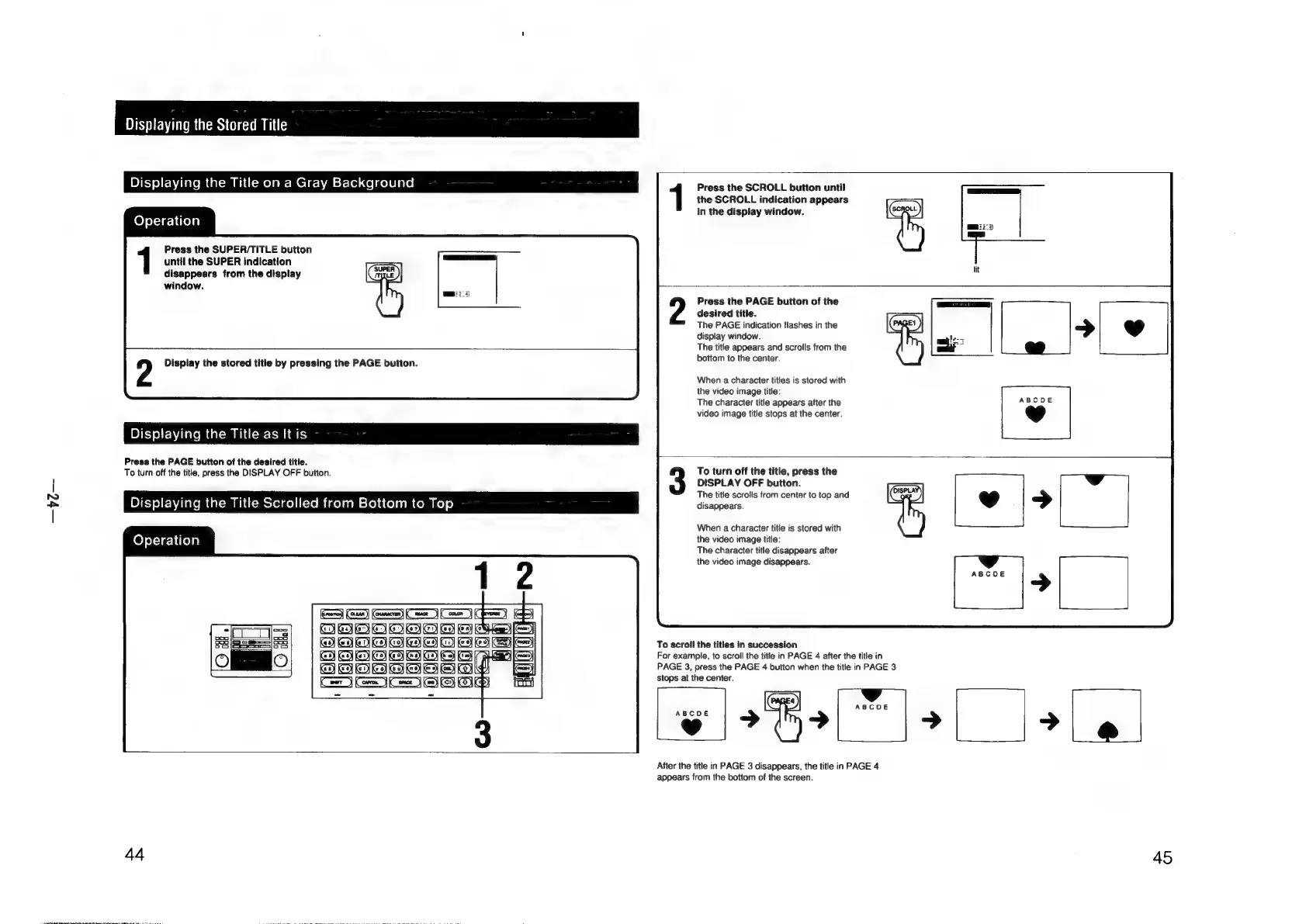
Press
the
SCROLL
button
until
the
SCROLL
indication
appears
in
the
display
window.
Operation
Press
the
SUPER/TITLE
button
until
the
SUPER
indication
disappears
from
the
display
window.
Press
the
PAGE
button
of
the
desired
title.
The
PAGE
indication
flashes
in
the
display
window.
The
title
appears
and
scrolls
from
the
bottom
to
the
center.
Display
the
stored
title
by
pressing
the
PAGE
button.
When
a
character
titles
is
stored
with
the
video
image
title:
The
character
title
appears
after
the
video
image
title
stops
at
the
center.
Displaying
the
Title
as
It
is
Press
the
PAGE
button
of
the
desired
title.
To
turn
off
the
title,
press
the
DISPLAY
OFF
button.
To
turn
off
the
title,
press
the
DISPLAY
OFF
button.
.
é
:
The
title
scrolls
from
center
to
top
and
Displaying
the
Title
Scrolled
from
Bottom
to
Top
disappears.
When
a
character
title
is
stored
with
the
video
image
title:
The
character
title
disappears
after
the
video
image
disappears.
Operation
To
scroil
the
titles
in
succession
‘)
a}
For
example,
to
scroll
the
title
in
PAGE
4
after
the
title
in
q
PAGE
3,
press
the
PAGE
4
button
when
the
title
in
PAGE
3
3
ae
ee
vB).
After
the
title
in
PAGE
3
disappears,
the
title
in
PAGE
4
appears
from
the
bottom
of
the
screen.
44
45

Other manuals for Sony RM-E700

Related product manuals