EasyManua.ls Logo

Sony RM-E700 - Page 85

Sony RM-E700
86 pages
Print Icon
To Next Page IconTo Next Page
To Previous Page IconTo Previous Page
Loading...
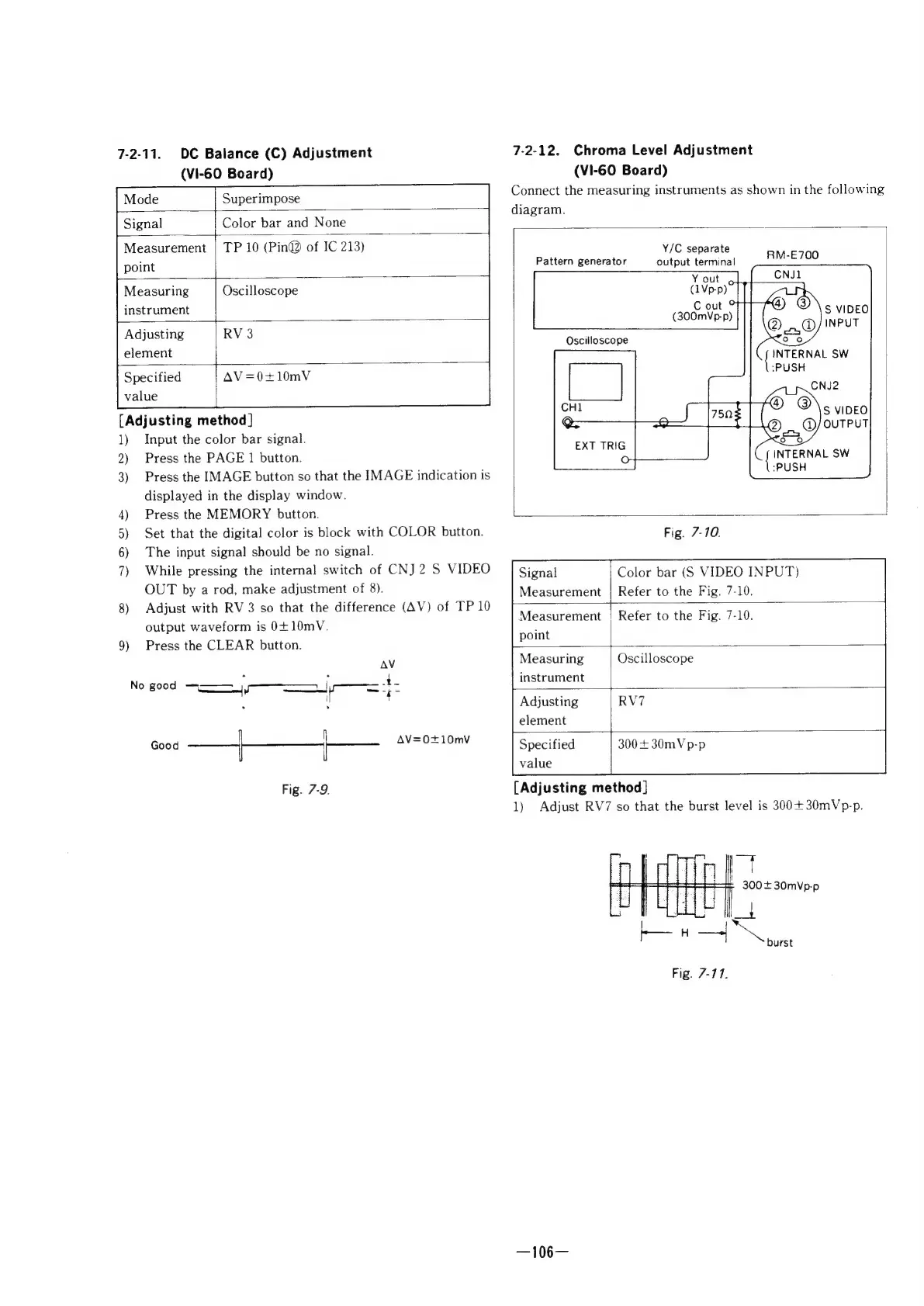
7-2-11.
DC
Balance
(C)
Adjustment
7-2-12.
Chroma
Level
Adjustment
(VI-60
Board)
(VI-60
Board)
Connect
the
measuring
instruments
as
shown
in
the
following
Mode
Superimpose
diagram.
Signal
Color
bar
and
None
Measurement
|
TP
10
(Pin@®
of
IC
213)
Y/C
separate
point
Pattern
generator
output
terminal
RM-E700
Measuring
Oscilloscope
C
out
instrument
°
(300mVp-p)
Adjusting
RV
3
element
Specified
AV
=0+10mV
value
[Adjusting
method]
1)
Input
the
color
bar
signal.
2)
Press
the
PAGE
1
button.
3)
Press
the
IMAGE
button
so
that
the
IMAGE
indication
is
displayed
in
the
display
window.
4)
Press
the
MEMORY
button.
5)
Set
that
the
digital
color
is
block
with
COLOR
button.
Fig.
7-10.
6)
The
input
signal
should
be
no
signal.
7)
While
pressing
the
internal
switch
of
CNJ
2
S
VIDEO
Signal
Color
bar
VIDEO
INPUT)
OUT
by
a
rod,
make
adjustment
of
8).
Measurement
|
Refer
to
the
Fig.
7-10.
8)
Adjust
with
RV3
so
that
the
difference
(AV)
of
TP
10
output
waveform
is
0+10mV.
Measurement
|
Refer
to
the
Fig.
7-10.
9)
Press
the
CLEAR
button.
pot
:
AV
Measuring
Oscilloscope
No
good
4,
a
instrument
:
:
y
Adjusting
RV7
element
Good
—_,———}—
Seay
Specified
300+
30mVp-p
value
Fig.
7-9.
[Adjusting
method]
1)
Adjust
RV7
so
that
the
burst
level
is
300+30mVp-p.
|
300+
30mVp-p
|
tH
a
Fig.
7-17.
)
7
i
t
burst
—106—

Other manuals for Sony RM-E700

Related product manuals