.QI/GPW
Outline㧦
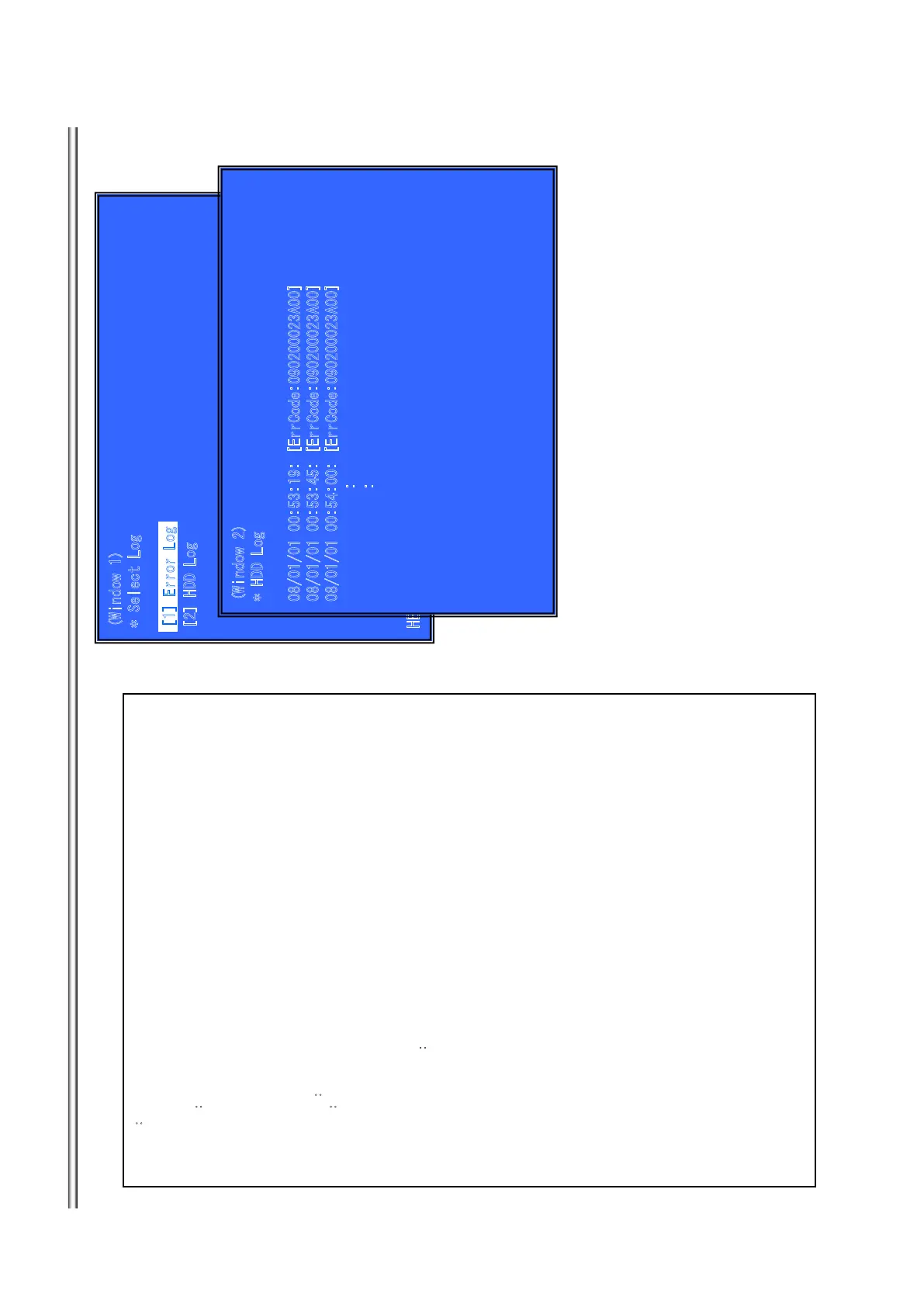
Display each contents of the log,
(Window 1) select log.
Operation㧦
[1] Activate and Display Error log
[2] Activate and Display Command Log
[UP] Move Up cursor
[DOWN] Move Down cursor
[ENT] Activate the selected cursor.
[RET] Return to Service Top Menu.
(Window 2)㧦
Display HDD Log
Operation㧦
[LEFT] Next Page
[RIGHT] Previous Page
[RET] Return to select log (window 1)
[RED] Write the contents of an error log on a USB memory.
Front Panel Display㧦
select log HDD Log㧦 S-HLOG
Display Page display page ex) 1/50
>Log contents
See P31.
**Write the contents of a log on a USB memory**
[RED] is pushed where a USB memory is inserted in a set in log display screen.
Error Log:
“HDD_Text” file is outputted in a USB memory.
9KPFQY
5
GNGEV.QI
=?*&&.QI
*'
.2
=
&
190
?
='
06?=
07
/
?
9
K
PFQY
*&&.QI
='TT%QFG#?
='TT%QFG#?
='TT%QFG#?
=
?'T
TQT
.
Q
I
7-13
BDP-BX38/S280/S380/S383



 To Next Page