0GVYQTM 㧔0GVYQTM6GUV +HEQPHKI㧕
9
K
PFQY
0GVYQTM
6GUV2KPI
Outline㧦
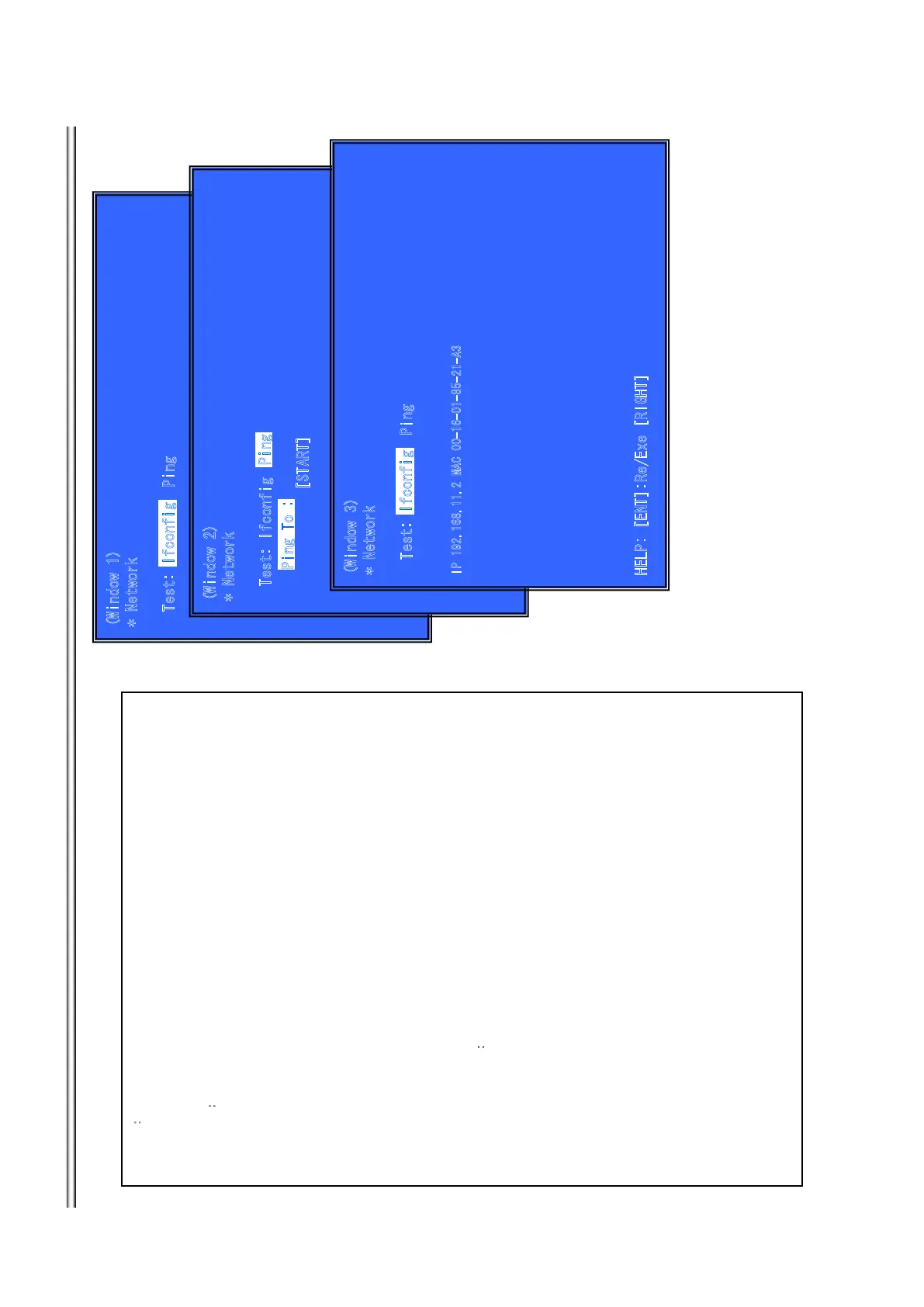
Network Menu for the wired Ethernet.
(Window1)Ifconfig Test
Operation㧦
[ENT] Activate Ifconfig㧔Display network setting㧕
[RIGHT] Select Ping Test.
[RET] Return to Service Top Menu.
(Window 2)Ping Test
Operation:
[LEFT] Select Ifconfig Test.
[RET] Return to Service Top Menu.
(The details of a Ping test are nest page)
(Window 3)Ifconfig Test Active
Display Ifconfig command results.
Operation:
[ENT] Ifconfig retry
[RIGHT] Select Ping Test.
[RET] Return to Service Top Menu.
Front Panel Display㧦
S-NET
9
KPF
QY
0G
V
YQTM
6GUV+HEQPHKI
2KPI 6Q
=56#46?
2KPI6Q
2KPI
+HEQP
H
K
I
9KPFQY
0GVYQTM
6GUV2KPI
+2/#%#
*
'
.
2
='06?
4
G
'Z
G=4+)*6?
+HEQPH
KI
7-15
BDP-BX38/S280/S380/S383



 To Next Page