0GVYQTM 㧔0GVYQTM6GUV 2KPI㧕
Outline㧦
Ping Test for the wired Ethernet.
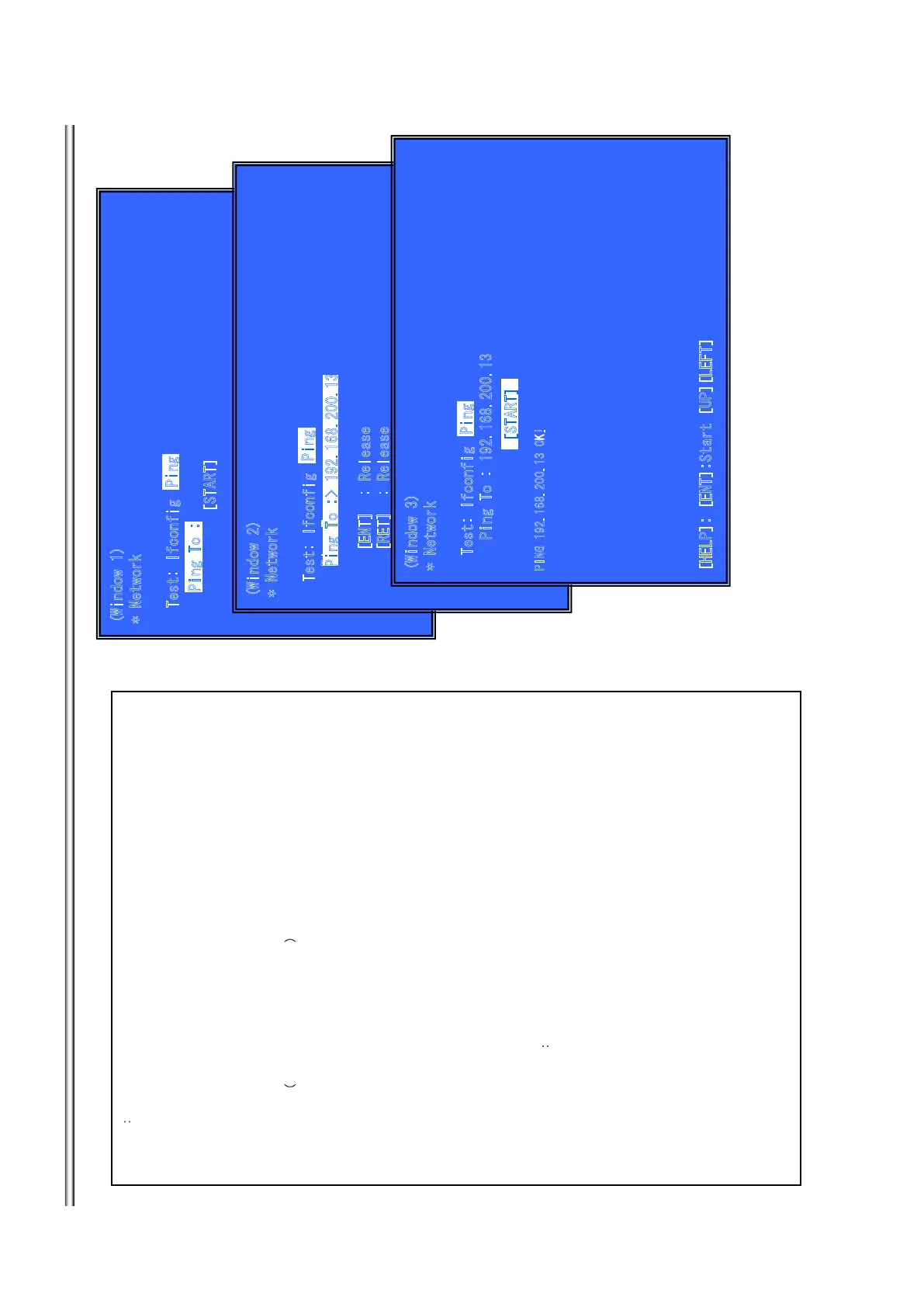
(Window 1)Ping Test
Operation:
[LEFT] Select Ifconfig Test.
[DOWN] Ping execution preparation.
[RET] Return to Service Top Menu.
(Window 2) The IP address of the Ping point is set up.
㧔
IP address input mode㧕
When “Ping to :>” is reversed, [ENT] is pushed and IP is inputted.
Operation:
[ENT] Finish to input.
[RET] Finish to input.
[LEFT] Finish to input and Select Ifconfig Test.
[(NUM)] Input Character sting ‘0-9’
[TIME] Input Character sting ’.’
[CLEAR] Backspace
(Windows3): Ping Test Active
When [START] is reversed, [ENT] is pushed and execute ping .
Operation:
[ENT] Activate Ping Test
[UP] The IP address of the Ping point is set up.
[RET] Return to Service Top Menu.
Front Panel Display㧦
S-NET
9KPFQY
0GVYQTM
6GUV+HEQPHKI
2KPI 6Q
=56#46?
2KPI6Q
2KPI
9KPFQY
0GVYQTM
6GUV+HEQPHKI
2KPI 6Q
='06?4GNGCUG
=4'6?4GNGCUG
=.'(6?+HEQPHKI 6GUV
=07/?
=6+/'?
=%.'#4?$CEMURCEG
2KPI
6
Q
2
KP
I
9KPFQ
Y
0GVY
Q
TM
6GUV+HEQPHKI
2KPI 6Q
2
+
0
)
1
-
=*'.2?='06?5VCTV
=
72?=.'(6?
2K
PI
=56#46?
7-16
BDP-BX38/S280/S380/S383



 To Next Page