2-14
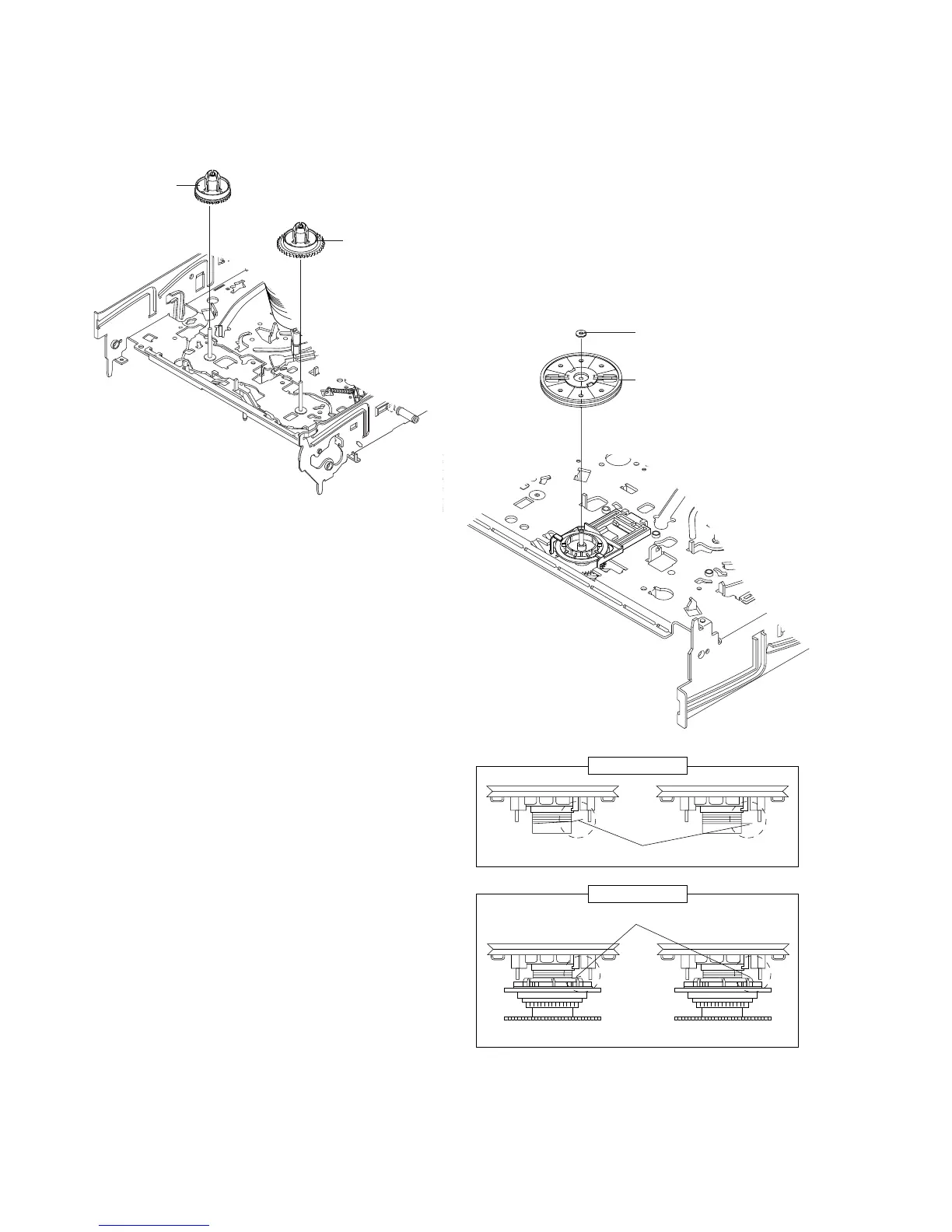
2-4-15 Disk S, T Reel Removal
1) Lift the Disk S, T Reel 1, 2.
Fig. 2-27 Disk S, T Reel Removal
2-4-16 Ass’y Holder Clutch Removal
1) Remove the Washer Slit 1.
2) Lift the Ass’y Holder Clutch 2.
Note: When you reinstall Ass’y Holder Clutch.
1) Check the condition of spring as shown in detail A.
2) Don't push Ass’y Holder Clutch down with excessive force Just
insert Holder Clutch Ass’y into post center with dead force and
Rotate it smoothly.
Be sure to confirm that spring is in the slit of Ass’y Gear Center
as shown in detail B.
Fig. 2-28 Ass’y Holder Clutch Removal
1 WASHER SLIT
2 ASS
'
Y HOLDER CLUTCH
DETAIL A
<BAD> SPRING <GOOD>
<BAD>
SPRING
<GOOD>
DETAIL B
1 REEL S
2 REEL T



 To Next Page