12
GB
Rear
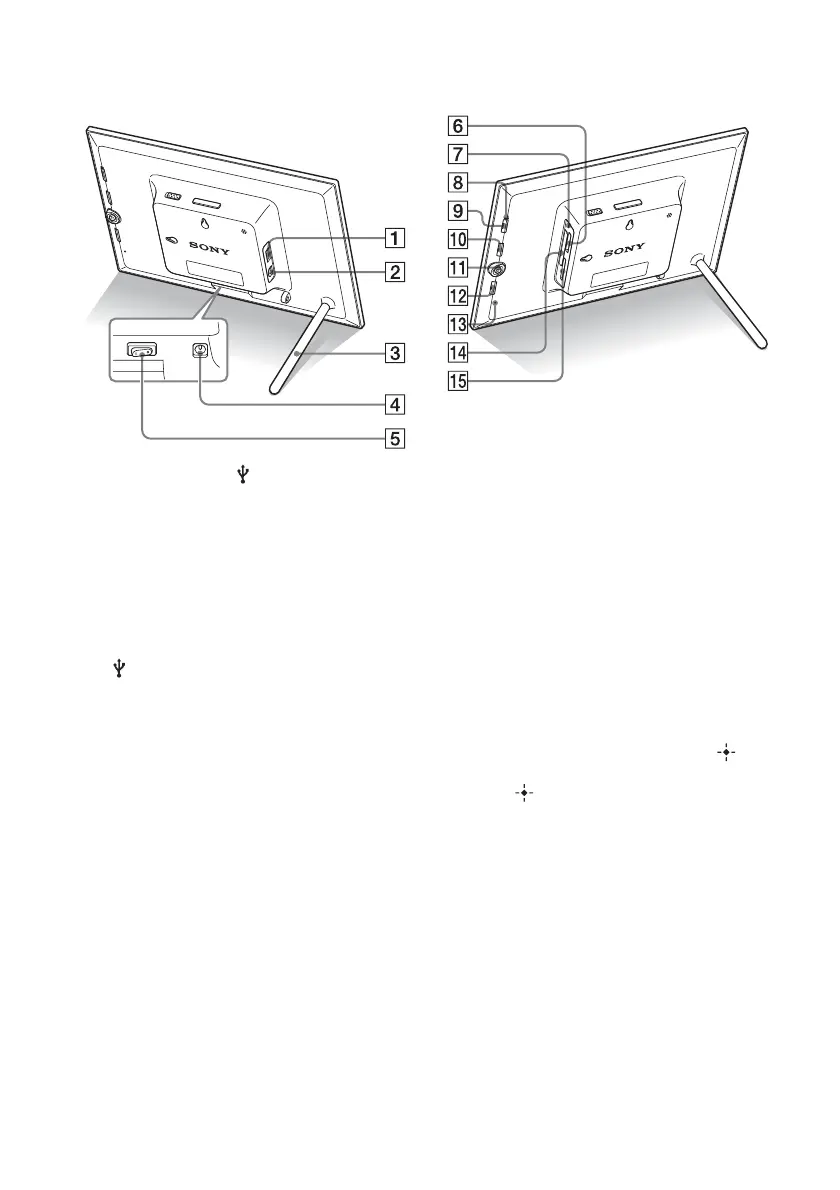
A Connector for USB A/Bluetooth
adaptor (.page 49)
You can transfer images wirelessly from a
BLUETOOTH™ compatible mobile phone or
digital camera by connecting a Bluetooth
adaptor (optional: DPPA-BT1).
You can also connect a digital camera, USB
memory, or photo storage compatible with
USB mass storage.
B USB B connector (.page 51)
Connect a USB cable when you want to use
the photo frame with a computer.
C Stand (.page 16)
D DC IN 12 V jack (.page 18)
Insert the plug of the supplied AC adaptor to
this jack, and connect to the wall outlet.
E Power Switch (.page 19)
F “Memory Stick PRO” (Standard/
Duo) slot (.page 21)
G Access lamp
H Standby indicator
I 1 (on/standby) button
J MENU button
Displays the menu.
From the menu, you can operate the same
functions as those of the buttons on the
remote control, such as [Slideshow Settings],
[Rotate], [Add to album] and [Date/time
settings].
K Direction (B/b/v/V) buttons,
Press B/b/v/V to select the menu items. Then
press to enter the selection.
L BACK button
Returns to the previous screen.
M Reset switch (.page 58)
The date/time setting, alarm settings, and the
auto power on/off settings return to their
factory default setting. Use a long, thin object,
such as a pin, to push the switch.
N CompactFlash card/Microdrive
slot (.page 21)
O SD memory card/MMC/xD-Picture
Card slot (.page 21)










 To Next Page