43
GB
Advanced operations
zone changes to gray, after you select
the blue time zone and then press .
The power supply of the photo frame is
turned off while it is in the gray time
zone.
Tip
The power is turned off automatically at the
time you set for [Auto power OFF] when
you are using the photo frame.
The power is turned on automatically at the
time you set for [Auto power ON] during the
standby mode.
2
Press B/b/v/V to select [OK].
Using the alarm function
You can use the photo frame as an alarm clock.
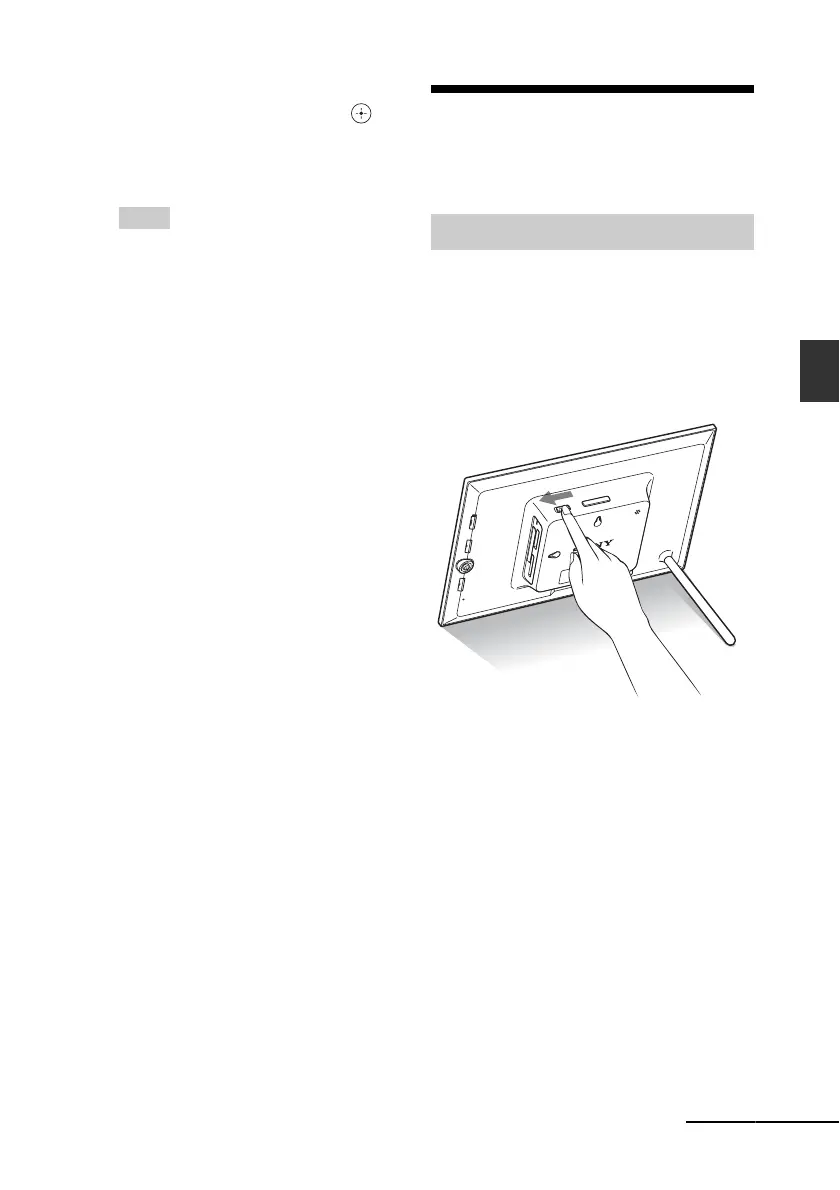
Set to the alarm switch on the rear panel
to ON.
Under condition of main power switch set to
“On”, the alarm sound and alarm mode screen
will appear at the scheduled alarm time.
To turn off the alarm
Set the alarm switch on the rear panel to OFF.
The alarm is stopped although an alarm screen
continues to be displayed.
The normal screen is displayed after you press
any button on the photo frame other than 1
(on/standby).
Setting the alarm
Continued













 To Next Page