15
GB
Basic operations
Basic operations
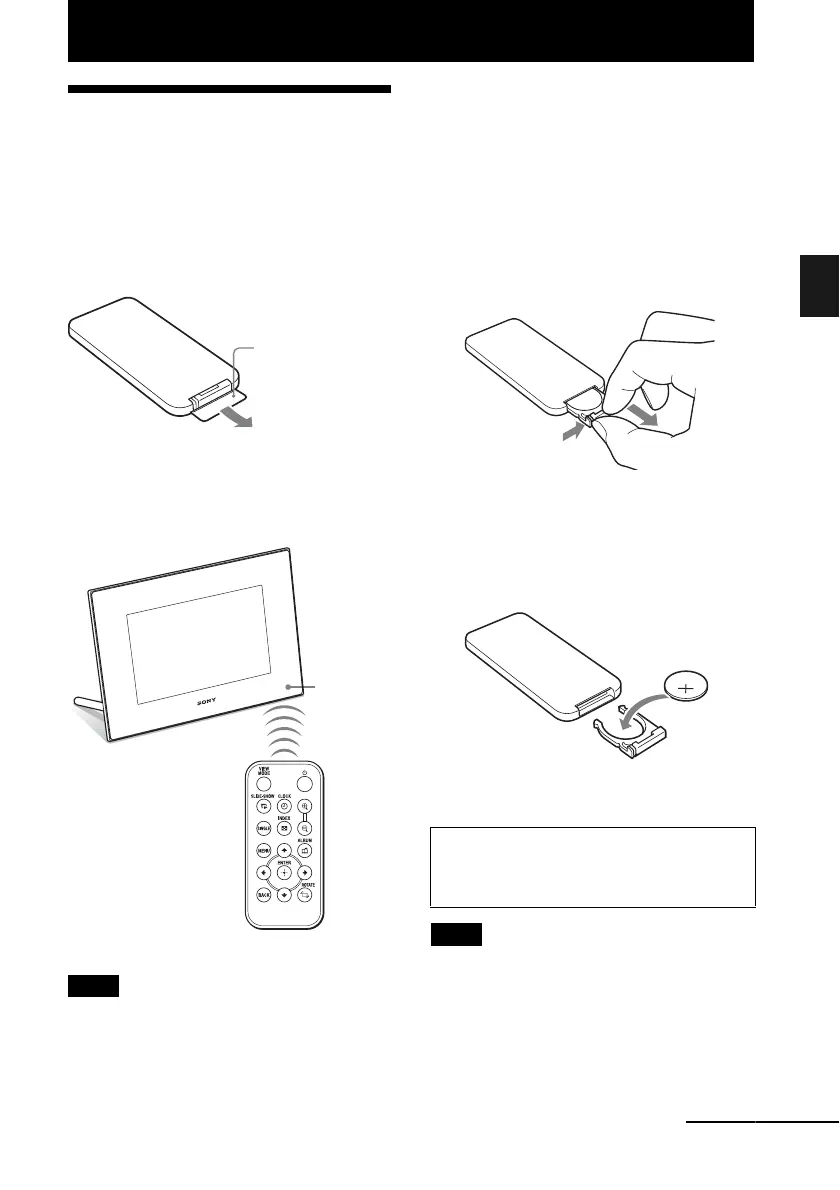
Preparing the remote
control
The supplied lithium battery (CR2025) has
already been inserted into the remote control.
Pull out the protective sheet before use as
shown in the figure.
Using the remote control
Point the top end of the remote control towards
the remote sensor on the photo frame.
Note
The photo frame may fall if you use the buttons on the
photo frame when it is hanging on the wall. Operate
the photo frame using the remote control.
Replacing the battery of the
remote control
If the remote control stops working, replace the
battery (CR2025 lithium battery) with a new
one.
1 Pull out the battery holder.
While pressing in the tab of the battery
holder, pull out the battery holder.
2 Remove the old battery from the
battery holder and then insert a new
battery.
Insert the battery so that “+” is facing
upwards.
3 Reinsert the battery holder into the
remote control.
Notes
• When the lithium battery becomes weak, the
operating distance of the Remote control may
shorten, or the Remote control may not function
properly. In this case, replace the battery with a
Sony CR2025 lithium battery. Use of another
battery may present a risk of fire or explosion.
Protective sheet
Remote
sensor
WARNING
Battery may explode if mistreated. Do not
recharge, disassemble or dispose of in fire.
Continued










 To Next Page