EasyManua.ls Logo

Sony SA-WMSP75 - User Manual

Sony SA-WMSP75
12 pages
Print Icon
To Next Page IconTo Next Page
Loading...
SA-WMSP75/WMSP85
US Model
Canadian Model
SA-WMSP75/WMSP85
AEP Model
UK Model
E Model
Australian Model
SA-WMSP85
SERVICE MANUAL
ACTIVE SUBWOOFER
Ver 1.4 2004.01
SPECIFICATION
Sony Corporation
Home Audio Company
Published by Sony Engineering Corporation
9-877-044-05
2004A16-1
© 2004.01
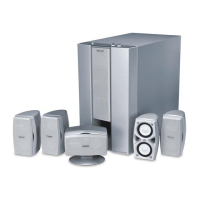
SA-WMSP75/WMSP85 are the sub woofer
section HT-DDW750,HT-1800DP,HT-6600DP
and HT-1750DP.
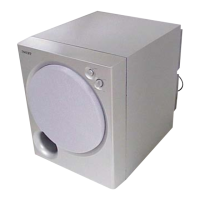
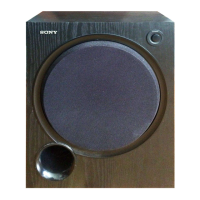
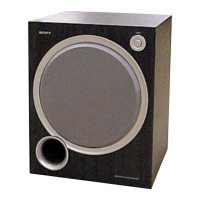
photo: SA-WMSP75
•Abbreviation
AU : Australian model
CA : Canadian model
CEK : UK model
CEL : AEP model
MX : Mexican model
SP : Singapore model
U: US model
POWER OUTPUT AND TOTAL
HARMONIC DISTORTION:
With 6 ohm loads, from 28 – 200 Hz; rated 75
watts (SA-WMSP75) / 100 watts (SA-WMSP85),
minimum RMS power, with no more than 0.8%
total harmonic distortion from 250 milliwatts to
rated output (Models of area code U only).
Speaker system Active subwoofer,
magnetically shielded
Speaker unit Woofer: 20 cm cone type
Enclosure type Acoustically loaded bass
reflex
Continuous RMS power output
(6 ohms, 20 – 250 Hz)
SA-WMSP75 75 W
SA-WMSP85 100 W
Reproduction frequency range
28Hz – 200 Hz
High frequency cut-off frequency
150 Hz
Input LINE IN (input pin jacks)
Power requirements
Area code Power requirements
U, CA, MX 120 V AC, 60 Hz
CEL, CEK, SP, AU 230 V AC, 50/60 Hz
E2 120/220/230 V AC, 50/60 Hz
Power consumption
SA-WMSP75 75 W
SA-WMSP85 100 W
Dimensions (w/h/d) Approx. 270 × 325 × 398
mm (10 3/4 × 12 7/8 × 15 3/4
inches) including front
panel
Mass
SA-WMSP85 10.0 kg (22 lb 1 oz)
SA-WMSP75 9.0 kg (19 lb 14 oz)


Questions and Answers

  • S
    shericlarkAug 19, 2025
    How to fix severe hum or noise in Sony Home Theater System?
    • A
      Adam ReedAug 19, 2025
      If you're experiencing a hum or noise with your Sony Home Theater System, make sure the speakers and components are securely connected. Ensure connecting cords are away from interference sources like transformers, motors, TVs, or fluorescent lights (at least 3 meters away). Try moving the TV away from the audio components. Also, clean the plugs and jacks with a cloth slightly moistened with alcohol.
  • A
    angela39Aug 21, 2025
    How to troubleshoot no sound from a specific component on Sony Home Theater System?
    • B
      Beth HayesAug 21, 2025
      If there's no sound from a specific component on your Sony Home Theater System, verify that the component is correctly connected to the audio input jacks. Ensure the cords are fully inserted into the jacks on both the receiver and the component. Finally, confirm that you have selected the correct component on the receiver.
  • B
    Benjamin JonesAug 25, 2025
    What to do if one front speaker has no sound on Sony Home Theater System?
    • D
      Douglas PaulAug 25, 2025
      If there is no sound from one of the front speakers of your Sony Home Theater System, connect a pair of headphones to the PHONES jack to verify if sound is output from the headphones. If only one channel is output from the headphones, check that all the cords are fully inserted into the jacks on both the receiver and the component. If both channels are output from the headphones, check the connection of the front speaker which is not outputting any sound.
  • H
    hernandezmatthewAug 26, 2025
    Why is there no sound from center or surround speaker on Sony Home Theater System?
    • B
      Barbara GrahamAug 26, 2025
      If there's no sound or very low sound from the center or surround speaker on your Sony Home Theater System, ensure the sound field function is activated by pressing MOVIE or MUSIC. You can also select a sound field containing “C.ST.EX”. Adjust the speaker level and make sure the center or surround speaker size parameter is set to either “SMALL” or “LARGE”.
  • P
    Pamela MendozaAug 28, 2025
    Why Dolby Digital or DTS multi channel sound is not reproduced on Sony Home Theater System?
    • T
      torreskeithAug 28, 2025
      If Dolby Digital or DTS multi-channel sound isn't being reproduced on your Sony Home Theater System, first check that the DVD or other media being played is recorded in Dolby Digital or DTS format. When connecting a DVD player to the digital input jacks, verify the audio settings (audio output settings) of the connected component.
  • M
    Maurice NelsonAug 30, 2025
    How to fix unbalanced sound on Sony Home Theater System?
    • T
      Trevor RiveraAug 30, 2025
      If the left and right sounds are unbalanced or reversed on your Sony Home Theater System, check that the speakers and components are connected correctly and securely. You can also adjust the balance parameters in the LEVEL menu.
  • R
    Raymond DunnSep 1, 2025
    Why is there no sound from the Sony Home Theater System subwoofer?
    • M
      melaniecarterSep 1, 2025
      If there's no sound from the active subwoofer on your Sony Home Theater System, check that the subwoofer is connected correctly and securely.
  • C
    cliffordcastilloSep 3, 2025
    How to enable surround sound effect on Sony Home Theater System?
    • S
      shirleygarciaSep 3, 2025
      If you're not getting a surround effect with your Sony Home Theater System, make sure the sound field function is turned on by pressing MOVIE or MUSIC.
  • L
    Larry GonzalezSep 5, 2025
    Why is my Sony Home Theater System remote not working?
    • H
      Holly PenningtonSep 6, 2025
      If the Sony Home Theater System remote isn't working, ensure you're pointing it at the remote sensor on the receiver and that there are no obstacles in the way. Check that the command mode of the remote corresponds to that of the receiver. If you intend to use the V/v/B/b buttons for receiver operation, first press MAIN MENU on the remote. For buttons with orange printing, press ALT before pressing them. Also, try replacing the batteries with new ones and ensure the correct input selector is chosen on the remote. If the remote is set to operate the TV only, select a different source before operating the receiver.
  • T
    Tanya CombsSep 8, 2025
    What to do if there is no picture or unclear picture on Sony Home Theater System?
    • B
      Brad BlackSep 8, 2025
      If you're getting no picture or an unclear picture on your TV screen or monitor with your Sony Home Theater System, first select the appropriate input selector on the receiver. Also, ensure your TV is set to the correct input mode. Moving your TV away from the audio components can sometimes help as well.

Sony SA-WMSP75 Specifications

General IconGeneral
TypeActive
Driver Size8 inches
Amplifier Power100 Watts
Frequency Response28 Hz - 200 Hz
InputsLine-level (RCA)

Related product manuals