EasyManua.ls Logo

Sony SAVA-7 - Using External Surround Speakers

Sony SAVA-7
29 pages
Print Icon
To Next Page IconTo Next Page
To Previous Page IconTo Previous Page
Loading...
12°
Enjoying
Surround
Sound
Connecting
an
external
center
speaker
lets
you
choose
trom
4
different
Dolby
Pro
Logic
Surround
center
modes:
NORMAL,
WIDE,
3
CH
(3
Channel
logic),
or
PHANTOM.
Use
the
NORMAL
or
WIDE
mode.
For
details
on
Dotby
Pro
Logic
Surround
sound,
see
page
15.
~~
CENTER
MODE
Powta
CENTER
MOOe
SURROUND
~
-
1
Press
PRO
LOGIC
on
the
remote
or
press
SURROUND
on
the
main
unit
until
“PRO
LOGIC”
appears.
2
>
Press
CENTER
MODE
on
the
left
speaker
a
few
times
until
the
center
mode
you
want
appears
in
the
display.
3
Adjust
the
speaker
volumes
and
delay
time,
if
necessary,
by
referring
to
page
10.
SSE
SSS
ee
eee
Using
External
Surround
Speakers
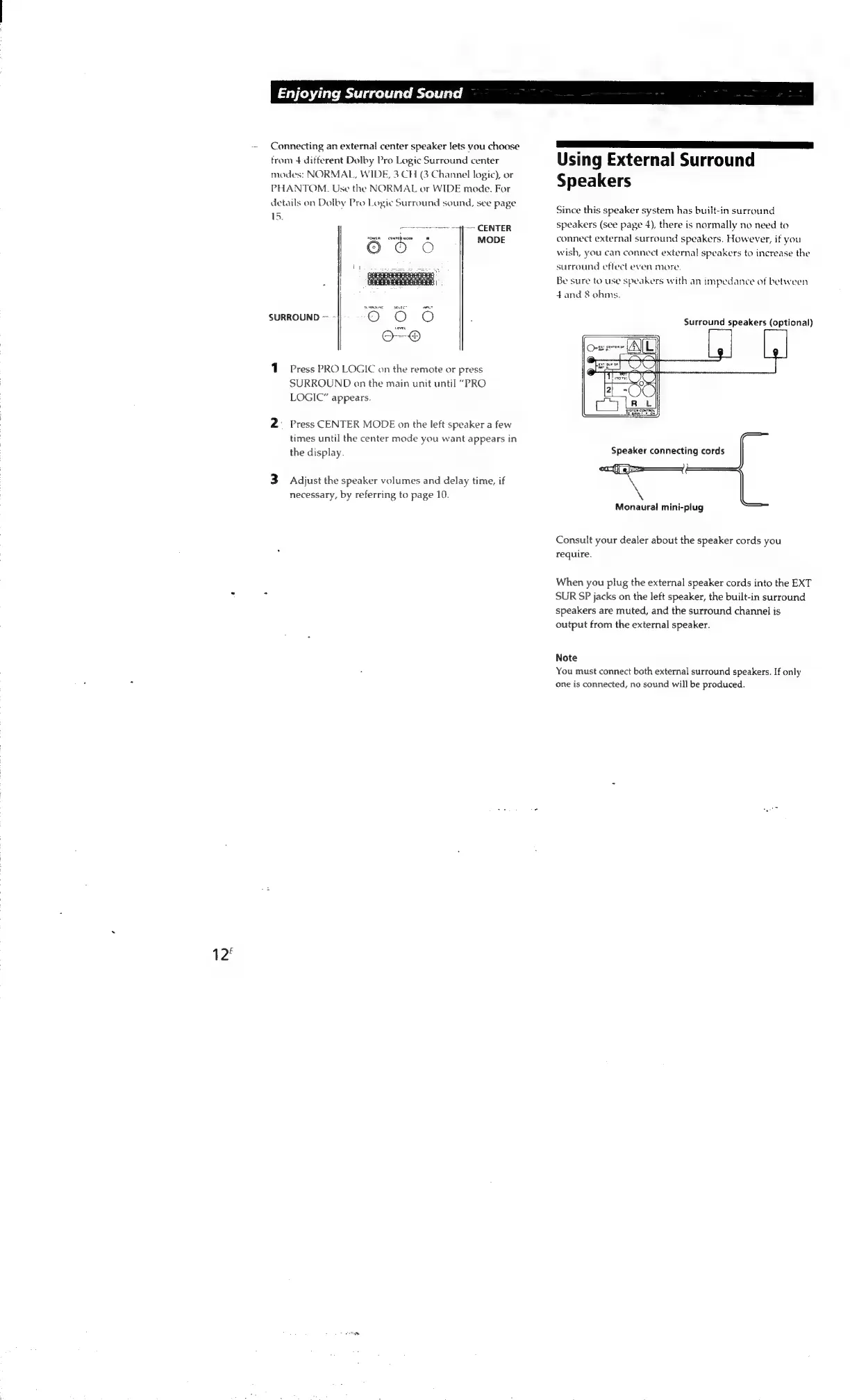
Since
this
speaker
system
has
built-in
surround
speakers
(see
page
4),
there
is
normally
no
need
to
connect
external
surround
speakers.
However,
if
you
wish,
you
can
connect
external
speakers
to
increase
the
surround
effect
even
more.
Be
sure
to
use
speakers
with
an
impedance
of
between
4and
8
ohms.
Surround
speakers
(optional)
Speaker
connecting
cords
A.
Monaural
mini-plug
Consult
your
dealer
about
the
speaker
cords
you
require.
When
you
plug
the
external
speaker
cords
into
the
EXT
SUR
SP
jacks
on
the
left
speaker,
the
built-in
surround
speakers
are
muted,
and
the
surround
channel
is
output
from
the
external
speaker.
Note
You
must
connect
both
external
surround
speakers.
If
only
one
is
connected,
no
sound
will
be
produced.

Other manuals for Sony SAVA-7

Related product manuals