EasyManua.ls Logo

Sony SAVA-7 - Speaker System Hookups; Connecting Speakers; Connecting to TV

Sony SAVA-7
29 pages
Print Icon
To Next Page IconTo Next Page
To Previous Page IconTo Previous Page
Loading...
Getting
Started
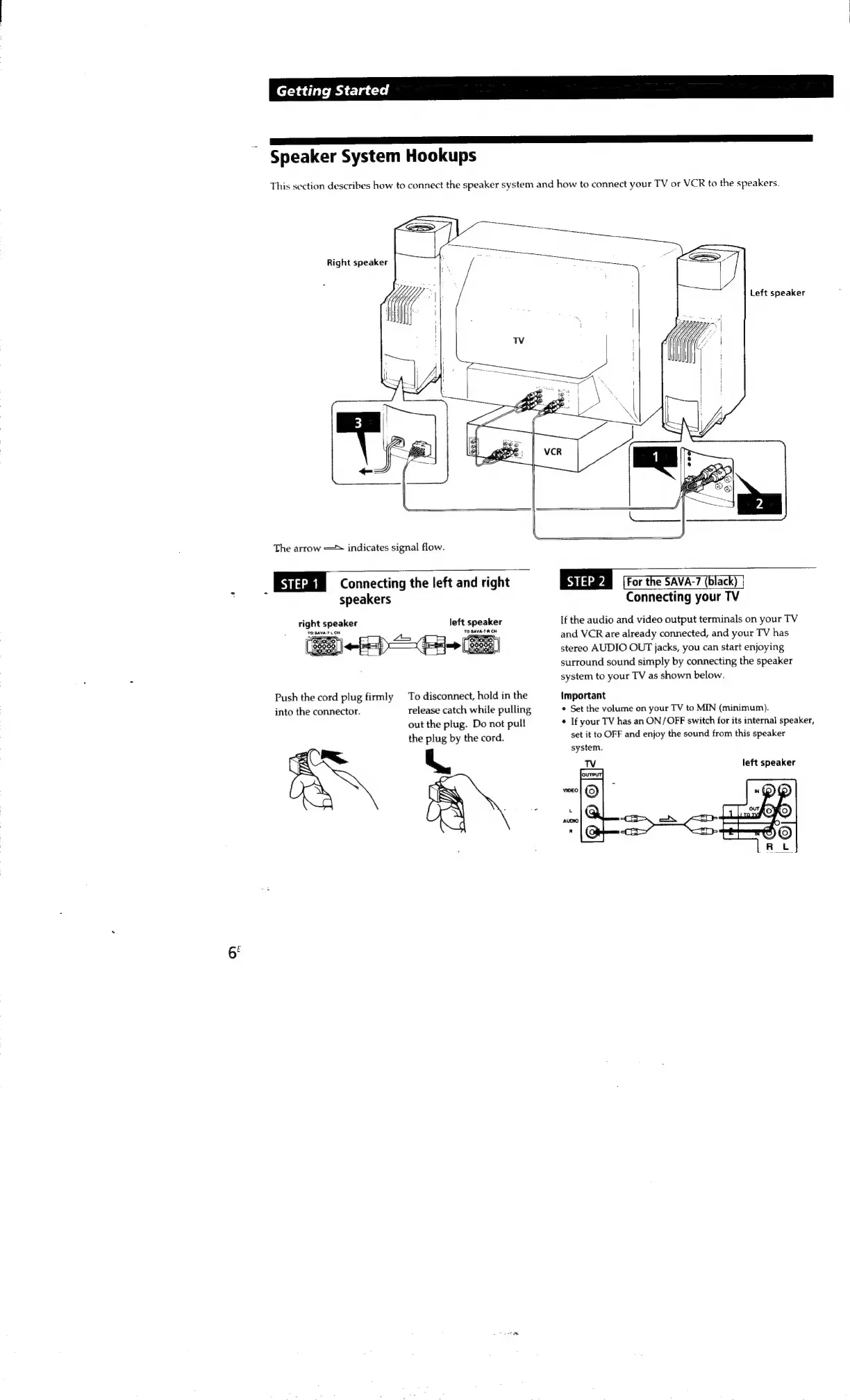
Speaker
System
Hookups
This
section
describes
how
to
connect
the
speaker
system
and
how
to
connect
your
TV
or
VCR
to
the
speakers.
Right
speaker
Left
speaker
The
arrow
—*
indicates
signal
flow.
iaaum
Connecting
the
left
and
right
speakers
left
speaker
right
speaker
To
disconnect,
hold
in
the
release
catch
while
pulling
out
the
plug.
Do
not
pull
the
plug
by
the
cord.
Push
the
cord
plug
firmly
into
the
connector.
mS
Slava
[For
the
SAVA-7
(black)
|
Connecting
your
TV
If
the
audio
and
video
output
terminals
on
your
TV
and
VCR
are
already
connected,
and
your
TV
has
stereo
AUDIO
OUT
jacks,
you
can
start
enjoying
surround
sound
simply
by
connecting
the
speaker
system
to
your
TV
as
shown
below.
Important
*
Set
the
volume
on
your
TV
to
MIN
(minimum).
¢
If
your
TV
has
an
ON/OFF
switch
for
its
internal
speaker,
set
it
to
OFF
and
enjoy
the
sound
from
this
speaker
system.
left
speaker

Other manuals for Sony SAVA-7

Related product manuals