EasyManua.ls Logo

Sony SAVA-7 - Sound Adjustment; Adjusting Surround Sound Levels

Sony SAVA-7
29 pages
Print Icon
To Next Page IconTo Next Page
To Previous Page IconTo Previous Page
Loading...
Enjoying
Surround
Sound
7S
ee
Note
Adjusting
the
Surround
Sound
Pressing
buttons
other
than
MASTER
VOL,
RESET,
CENTER
+/-,
SUR
+/-,
or
BALANCE
L/R
cancels
the
test
tone.
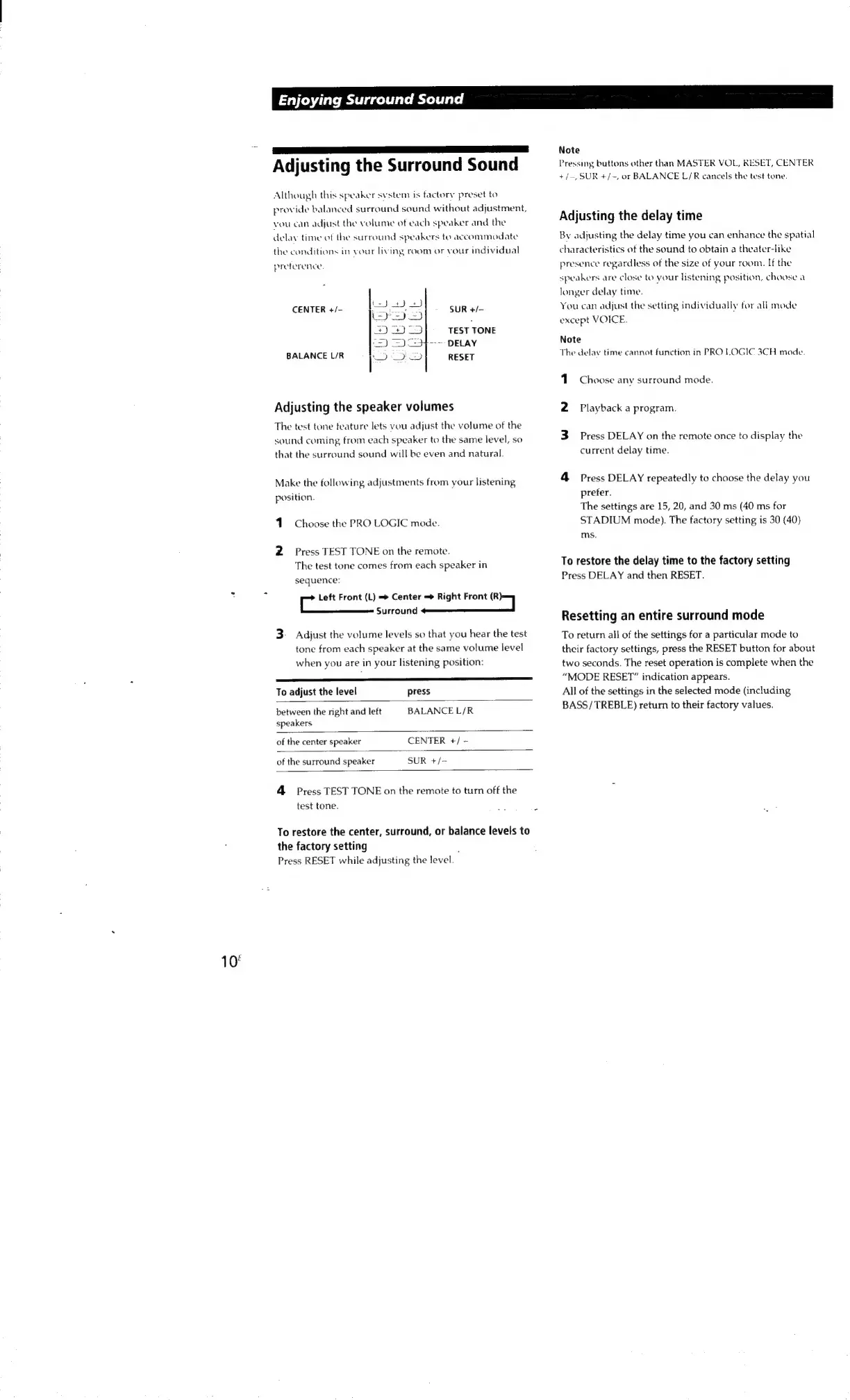
Although
this
speaker
system
is
factory
preset
to
provide
balanced
surround
sound
without
adjustment,
Adjusting
the
delay
time
vou
can
adjust
the
volume
of
each
speaker
and
the
delay
time
of
the
surround
speakers
to
accommodate
By
adjusting
the
delay
time
you
can
enhance
the
spatial
the
conditions
in
veur
living
room
or
vour
individual
characteristics
of
the
sound
to
obtain
a
theater-like
preference.
presence
regardless
of
the
size
of
your
room.
If
the
speakers
are
close
to
your
listening
position,
choase
a
longer
delay
time.
CENTER
+/-
a
=
SUR
+/-
You
can
adjust
the
setting
individually
for
all
mode
peor!
except
VOICE.
Ea
pas
ee
TEST
TONE
c=)
2)
54-->
DELAY
Note
BALANCE
L/R
I?
a
re
RESET
The
delay
time
cannot
function
in
PRO
LOGIC
3CH
mode.
1.
Choose
any
surround
mode.
Adjusting
the
speaker
volumes
2
Playback
a
program.
The
test
tone
feature
lets
vou
adjust
the
volume
of
the
sound
coming,
from
each
speaker
to
the
same
level,
so
3
Press
DELAY
on
the
remote
once
to
display
the
that
the
surround
sound
will
be
even
and
natural.
current
delay
time.
Make
the
following
adjustments
from
your
listening
4
Press
DELAY
repeatedly
to
choose
the
delay
you
position.
prefer.
The
settings
are
15,
20,
and
30
ms
(40
ms
for
Choose
the
PRO
LOGIC
mode.
STADIUM
mode).
The
factory
setting
is
30
(40)
ms.
2
Press
TEST
TONE
on
the
remote.
:
:
The
test
tone
comes
from
each
speaker
in
To
restore
the
delay
time
to
the
factory
setting
sequence:
Press
DELAY
and
then
RESET.
*
c
Left
Front
(L)
Center
Right
Front
(R)}
Surround
peliniaiaetsia|
.
Z
tee
Resetting
an
entire
surround
mode
3-
Adjust
the
volume
levels
so
that
you
hear
the
test
To
return
all
of
the
settings
for
a
particular
mode
to
tone
from
each
speaker
at
the
same
volume
level
their
factory
settings,
press
the
RESET
button
for
about
when
you
are
in
your
listening
position:
two
seconds.
The
reset
operation
is
complete
when
the
LS
“MODE
RESET”
indication
appears.
To
adjust
the
level
press
All
of
the
settings
in
the
selected
mode
(including
between
the
right
and
left
BALANCE
L/R
BASS/
TREBLE)
return
to
their
factory
values.
speakers
of
the
center
speaker
CENTER
+/
~
of
the
surround
speaker
SUR
+/-
4
Press
TEST
TONE
on
the
remote
to
turn
off
the
test
tone.
To
restore
the
center,
surround,
or
balance
levels
to
the
factory
setting
;
Press
RESET
while
adjusting
the
level.
10°

Other manuals for Sony SAVA-7

Related product manuals