EasyManua.ls Logo

Sony SAVA-7 - Operating Surround Sound

Sony SAVA-7
29 pages
Print Icon
To Next Page IconTo Next Page
To Previous Page IconTo Previous Page
Loading...
Enjoying
Surround
Sound
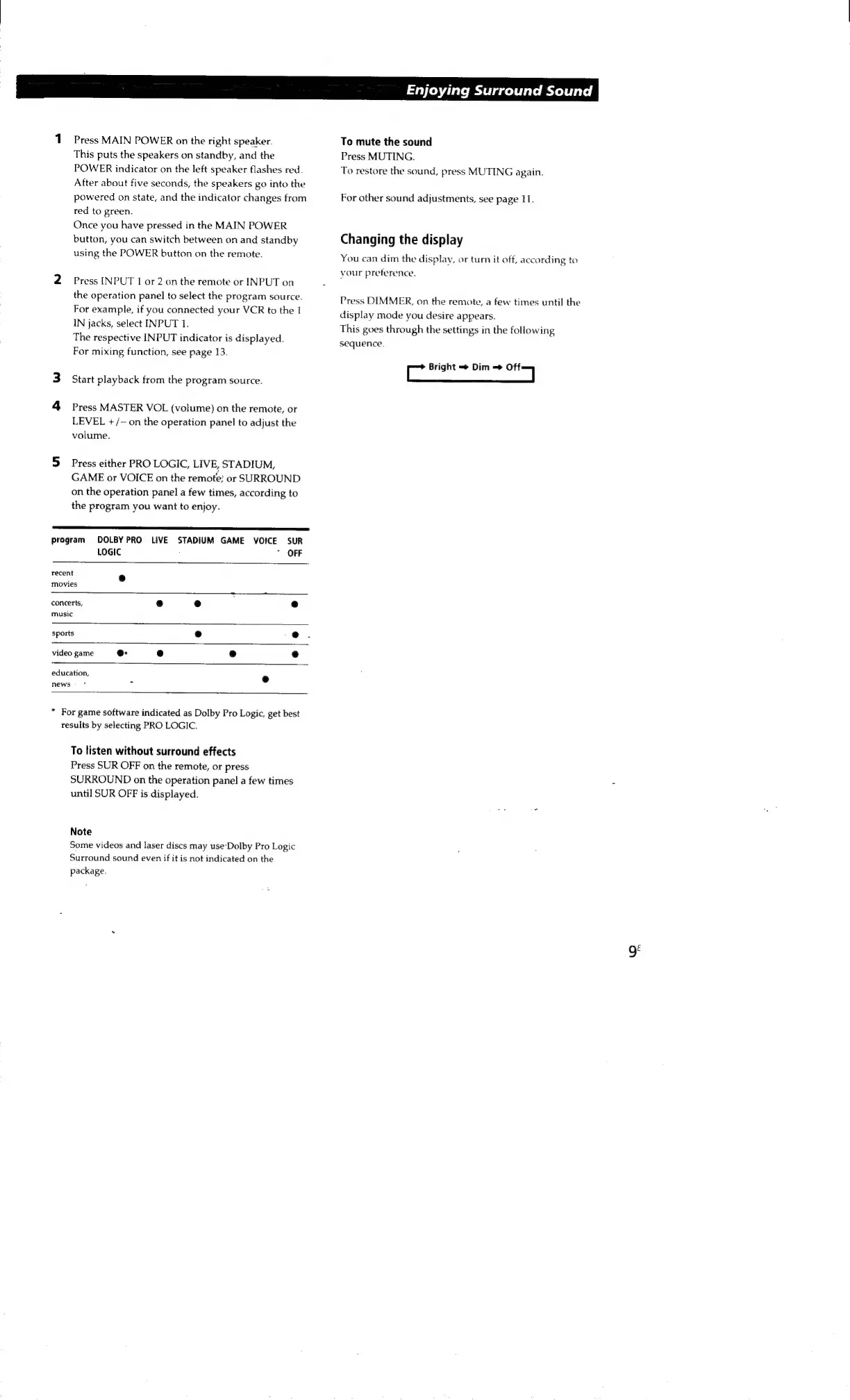
1.
Press
MAIN
POWER
on
the
right
speaker.
To
mute
the
sound
This
puts
the
speakers
on
standby,
and
the
Press
MUTING.
POWER
indicator
on
the
left
speaker
flashes
red.
To
restore
the
sound,
press
MUTING
again.
After
about
five
seconds,
the
speakers
go
into
the
powered
on
state,
and
the
indicator
changes
from
For
other
sound
adjustments,
see
page
11.
ted
to
green.
Once
you
have
pressed
in
the
MAIN
POWER
button,
you
can
switch
between
on
and
standby
Changing
the
display
using
the
POWER
button
on
the
remote.
You
can
dim
the
display,
or
turn
it
off,
according
to
vour
preference.
2
Press
INPUT
1
or
2
on
the
remote
or
INPUT
on
the
operation
panel
to
select
the
program
source.
For
example,
if
you
connected
your
VCR
to
the
1
IN
jacks,
select
INPUT
1.
The
respective
INPUT
indicator
is
displayed.
For
mixing
function,
see
page
13.
Cc
Bright
Dim
=>
ses
3
Start
playback
from
the
program
source.
4
Press
MASTER
VOL
(volume)
on
the
remote,
or
LEVEL
+/-
on
the
operation
panel
to
adjust
the
volume.
Press
DIMMER,
on
the
remote,
a
few
times
until
the
display
mode
you
desire
appears.
This
goes
through
the
settings
in
the
following
sequence.
5
Press
either
PRO
LOGIC,
LIVE,
STADIUM,
GAME
or
VOICE
on
the
remote;
or
SURROUND
on
the
operation
panel
a
few
times,
according
to
the
program
you
want
to
enjoy.
See
U
EEN
program
DOLBY
PRO
LIVE
STADIUM
GAME
VOICE
SUR
LOGIC
*
OFF
recent
e
movies
concerts,
e
e e
music
sports
e
video
game
@
e
e
e
education,
news
*
*
For
game
software
indicated
as
Dolby
Pro
Logic,
get
best
results
by
selecting
PRO
LOGIC.
To
listen
without
surround
effects
Press
SUR
OFF
on
the
remote,
or
press
SURROUND
on
the
operation
panel
a
few
times
until
SUR
OFF
is
displayed.
Note
Some
videos
and
laser
discs
may
use‘Dolby
Pro
Logic
Surround
sound
even
if
it
is
not
indicated
on
the
package.

Other manuals for Sony SAVA-7

Related product manuals