EasyManua.ls Logo

Sony SAVA-7 - Audio Component Hookups

Sony SAVA-7
29 pages
Print Icon
To Next Page IconTo Next Page
To Previous Page IconTo Previous Page
Loading...
If
you
use
AUDIO
OUT
jacks
marked
VARIABLE
After
making
the
connection
as
shown
above,
turn
up
the
volume
on
the
TV.
Use
this
speaker
system’s
volume
control
for
regular
volume
adjustment.
Turning
down
the
volume
on
the
TV
reduces
the
AUDIO
OUT
signal
level
and
may
cause
a
loss
in
sound
quality.
For
the
best
possible
sound
(or
if
your
TV
only
has
a
monaural
AUDIO
OUT
jack,
or
no
AUDIO
OUT
jacks)
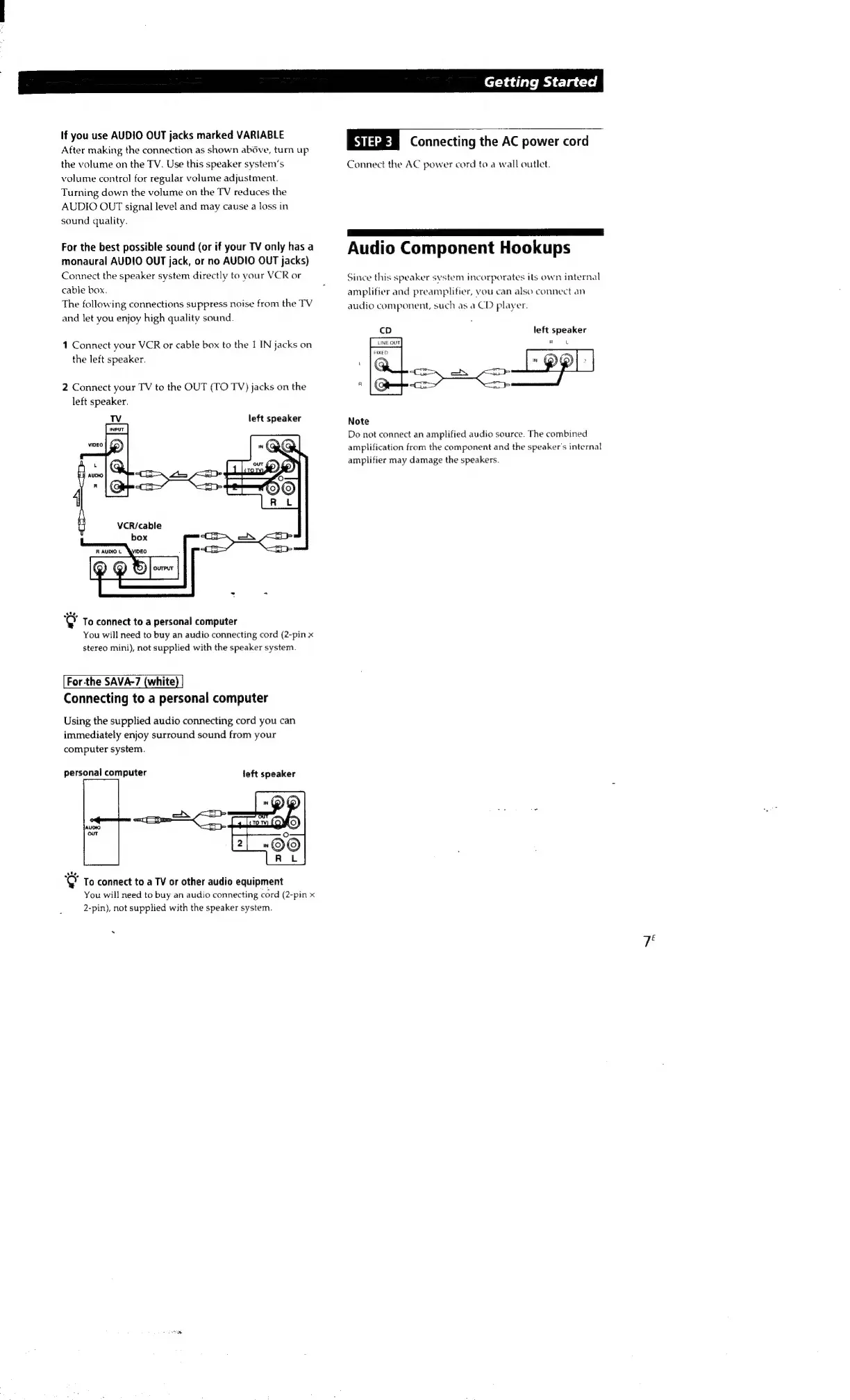
Connect
the
speaker
system
directly
to
your
VCR
or
cable
box.
The
following
connections
suppress
noise
from
the
TV
and
let
you
enjoy
high
quality
sound.
1
Connect
your
VCR
or
cable
box
to
the
I
IN
jacks
on
the
left
speaker.
2
Connect
your
TV
to
the
OUT
(TO
TV)
jacks
on
the
left
speaker.
left
speaker
"@
To
connect
to
a
personal
computer
You
will
need
to
buy
an
audio
connecting
cord
(2-pin
x
stereo
mini),
not
supplied
with
the
speaker
system.
For-the
SAVA-7
(white
Connecting
to
a
personal
computer
Using
the
supplied
audio
connecting
cord
you
can
immediately
enjoy
surround
sound
from
your
computer
system.
personal
computer
left
speaker
"@
To
connect
to
a
TV
or
other
audio
equipment
You
will
need
to
buy
an
audio
connecting
cord
(2-pin
x
2-pin),
not
supplied
with
the
speaker
system.
Getting
Started
Siazem
Connecting
the
AC
power
cord
Connect
the
AC
power
cord
to
a
wall
outlet.
Audio
Component
Hookups
Since
this
speaker
system
incorporates
its
own
internal
amplifier
and
preamplifier,
vou
can
also
connect
an
audio
component,
such
as
a
CD
player.
left
speaker
R
u
Note
Do
not
connect
an
amplified
audio
source.
The
combined
amplification
from
the
component
and
the
speaker's
internal
amplifier
may
damage
the
speakers.
7

Other manuals for Sony SAVA-7

Related product manuals