EasyManua.ls Logo

Sony SAVA-7 - Index; Glossary

Sony SAVA-7
29 pages
Print Icon
To Next Page IconTo Next Page
To Previous Page IconTo Previous Page
Loading...
Additional
information
———SSEE
a
Glossary
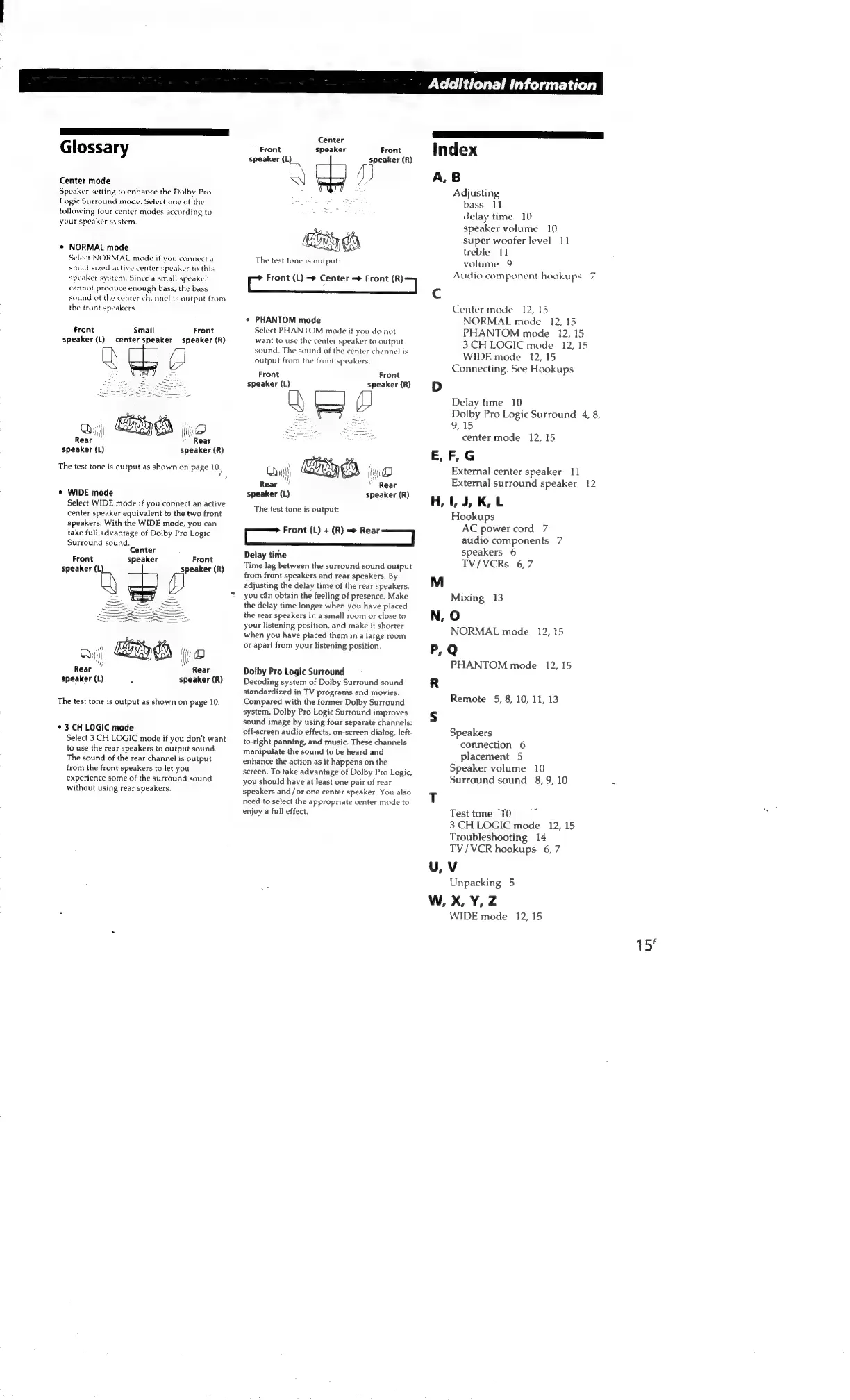
Center
mode
Speaker
setting
to
enhance
the
Dolby
Pro
Logic
Surround
mode.
Select
one
of
the
following
four
center
modes
according
to
your
speaker
system.
¢
NORMAL
mode
Select
NORMAL
mode
it
you
connect
a
small
sized
active
center
speaker
to
this
speaker
system.
Since
a
small
speaker
cannot
produce
enough
bass,
the
bass
sound
of
the
center
channel
is
output
from
the
front
speakers.
Front
Smalt
Front
speaker
(L)
center
speaker
speaker
(R)
pay
@;)
GRID
jo
Rear
Rear
speaker
(L)
speaker
(R)
The
test
tone
is
output
as
shown
on
page
10.
"
*
WIDE
mode
Select
WIDE
mode
if
you
connect
an
active
center
speaker
equivalent
to
the
two
front
speakers.
With
the
WIDE
mode,
you
can
take
full
advantage
of
Dolby
Pro
Logic
Surround
sound.
Center
Front
speaker
Front
speaker
2)
|
speaker
(R)
Rear
speaker
(R)
Rear
speaker
(L)
:
The
test
tone
is
output
as
shown
on
page
10
*
3
CH
LOGIC
mode
Select
3
CH
LOGIC
mode
if
you
don't
want
to
use
the
rear
speakers
to
output
sound.
The
sound
of
the
rear
channel
is
output
from
the
front
speakers
to
let
you
experience
some
of
the
surround
sound
without
using
rear
speakers.
Center
speaker
Front
speaker
(R)
(i
~~
Front
speaker
(L)
Eo
ed
The
test
tone
is
output
Cc
Front
(L)
<>
Center
=
Front
ea
|
*
PHANTOM
mode
Select
PHANTOM
mode
if
you
do
not
want
to
use
the
center
speaker
to
output
sound.
The
sound
of
the
center
channel
is
output
from
the
tront
speakers
Front
speaker
(R}
Front
speaker
(L)
speaker
(L)
speaker
(R)
The
test
tone
is
output:
Front
(L)
+
(R)
re
|
Delay
time
Time
lag
between
the
surround
sound
output
from
front
speakers
and
rear
speakers.
By
adjusting
the
delay
time
of
the
rear
speakers,
you
can
obtain
the
feeling
of
presence.
Make
the
delay
time
longer
when
you
have
placed
the
rear
speakers
in
a
small
room
or
close
to
your
listening
position,
and
make
it
shorter
when
you
have
placed
them
in
a
large
room
or
apart
from
your
listening
position
Dolby
Pro
Logic
Surround
Decoding
system
of
Dolby
Surround
sound
standardized
in
TV
programs
and
movies.
Compared
with
the
former
Dolby
Surround
system,
Dolby
Pro
Logic
Surround
improves
sound
image
by
using
four
separate
channels:
off-screen
audio
effects,
on-screen
dialog,
left-
to-right
panning,
and
music.
These
channels
manipulate
the
sound
to
be
heard
and
enhance
the
action
as
it
happens
on
the
screen.
To
take
advantage
of
Dolby
Pro
Logic,
you
should
have
at
least
one
pair
of
rear
speakers
and/or
one
center
speaker.
You
also
need
to
select
the
appropriate
center
mode
to
enjoy
a
full
effect
Index
A,
B
Adjusting
bass
11
delay
time
10
speaker
volume
10
super
woofer
leve]
11
treble
11
volume
9
Audio
component
hookups
7
Center
mode
12,
[5
NORMAL
mode
12,
15
PHANTOM
mode.
12,
15
3
CH
LOGIC
mode
12,
15
WIDE
mode
12,
15
Connecting.
See
Hookups
Delay
time
10
Dolby
Pro
Logic
Surround
4, 8,
9,15
center
mode
12,
15
E,
F,G
External
center
speaker
11
External
surround
speaker
12
H,
1,
J,
K,
L
Hookups
AC
power
cord
7
audio
components
7
speakers
6
TV/VCRs
6,7
M
Mixing
13
N,
O
NORMAL
mode
12,
15
P,Q
PHANTOM
mode
12,
15
R
Remote
5,
8,
10,
11,13
Speakers
connection
6
placement
5
Speaker
volume
10
Surround
sound
8,
9,
10
2
Test
tone
10
3
CH
LOGIC
mode
12,
15
Troubleshooting
14
TV/VCR
hookups
6,7
U,V
Unpacking
5
W,
X,
Y,
Z
WIDE
mode
12,
15
15°

Other manuals for Sony SAVA-7

Related product manuals