11
GB
Location and Functions of Parts
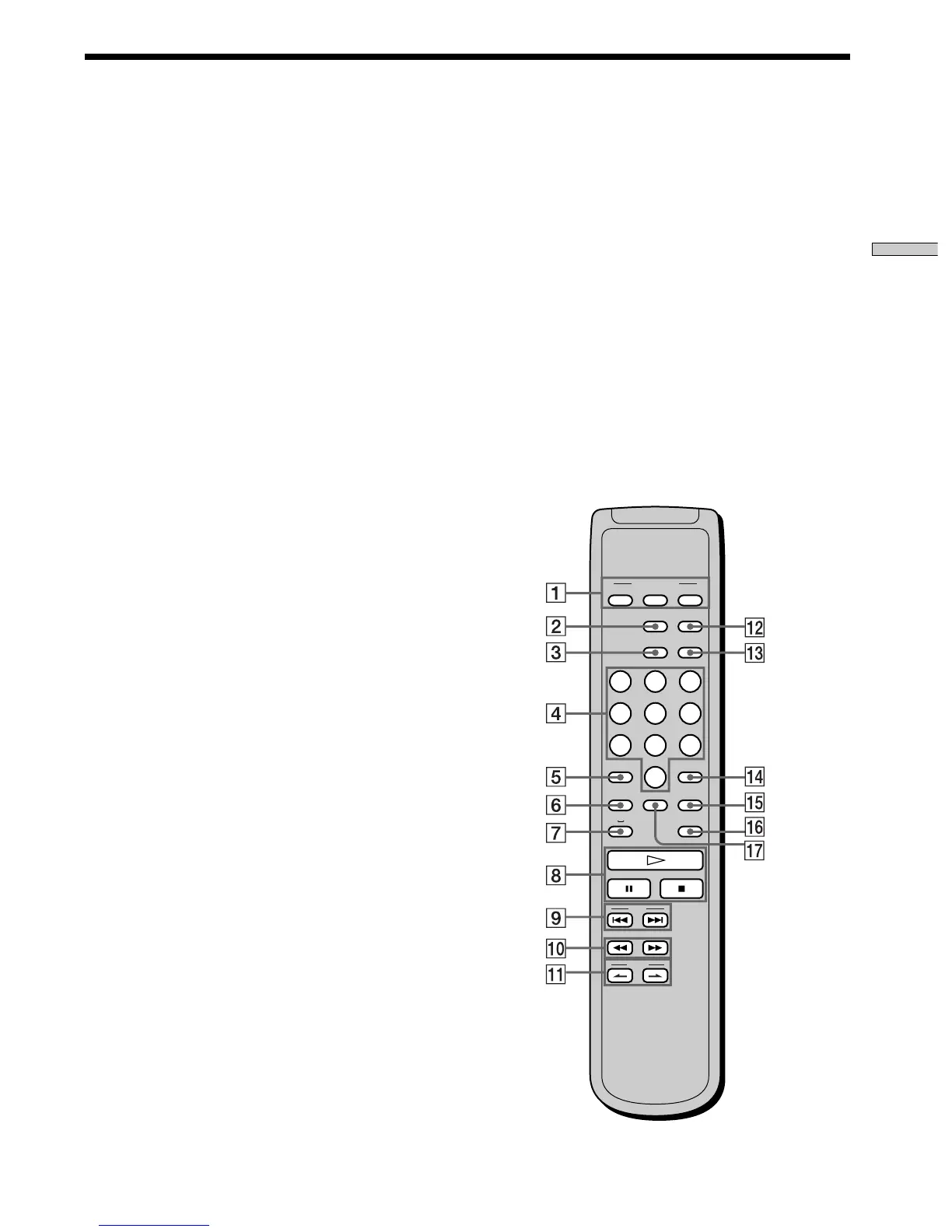
Remote Parts Descriptions
CONTINUE SHUFFLE
PLAY MODE
PROGRAM
SACD/CD
123
456
78
10/0
9
TIME/TEXT
REPEAT
AMS
BA
CLEAR
>10 ENTER
MODE
DISPLAY/
MULTI/2CH
INDEX
LEVEL
ADJ
CHECK
1 CONTINUE button (20)
Press to resume normal play from Shuffle Play or
Programme Play.
SHUFFLE button (20)
Press to select Shuffle Play.
PROGRAM button (21)
Press to select Programme Play.
2 DISPLAY MODE button (16)
Press to turn off the information.
3 TIME/TEXT button (15)
Each time you press the button, the playing time of the
track, the total remaining time on the disc, or TEXT
information appears in the display.
4 Number buttons (18)
Press to enter the track numbers.
5
i
10 button (18)
Press to locate a track numbered over 10.
6 REPEAT button (19)
Press repeatedly to play all tracks or only one track on
the disc.
7 AyB button (20)
Press to select Repeat A-B Play.
8 H button (14)
Press to start play.
X button (14)
Press to pause play.
x button (14)
Press to stop play.
9 AMS ./> (AMS: Automatic Music Sensor)
buttons (18)
Press to locate a specific track.
0 m/M buttons (18)
Press to locate a portion you want to play within a
track.
qa INDEX >/. buttons (18)
Press to locate a specific point marked with an index
signal when you play a disc that has index signals.
qs SACD/CD button (12)
Each time you press the button, ”SACD“ or ”CD“
appears in the display. Select the type of CD you want
to play.
qd MULTI/2CH button (12)
Press to select the playback area when the 2 channel +
Multi-channel Super Audio CD (page 13) is loaded.
qf ENTER button (24)
Press to decide the selection.
qg CLEAR button (21)
Press to delete a programmed track number.
qh LEVEL ADJ button (24)
Press to adjust the output level balance for the Multi-
channel management function (page 22).
qj CHECK button (21)
Press to check the programmed order.



 To Next Page