14 US
IMPORTANT INFORMATION
A few TVs or monitors may experience a
bouncing effect in their pictures when
using the PlayStation
® (PS one
™
) game
console. There is nothing wrong with
the PlayStation
® (PS one
™
) or the way it
is manufactured. The problem
technically lies within the television. If
you encounter such a problem with
your television/monitor, please contact
Consumer Services Technical Support at
1-800-345-7669.
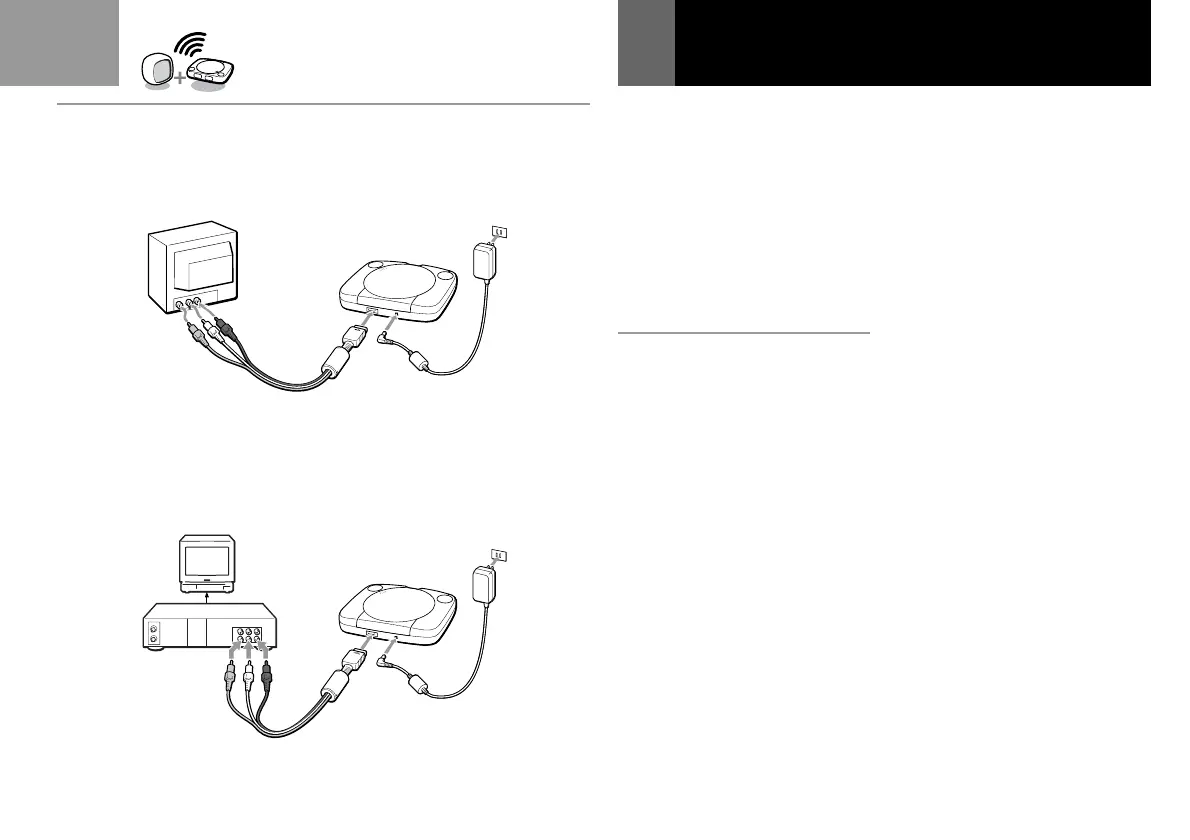
A 1 Connecting to a TV
with audio/video input
Connect your PlayStation®
(PS one
™
) to the TV using the
supplied AV cable (integrated
audio/video) matching the plug
colors.
If your TV is monaural, do not
connect the red plugs.
If you want to hear both left and
right sounds from a monaural TV,
use a commercially available 3-
phono to 2-phono (stereo to
monaural) type audio/video cable.
If your TV has an S VIDEO INPUT
connector, you can connect it by
using the SCPH-1100U S Video
cable (sold separately).
Connecting your PlayStation®
(PS one
™
) to a TV set
After connecting
Set your TV to the appropriate
video input mode. (Refer to the
instruction manual for your TV.)
2 Connecting to a VCR
Connect your PlayStation®
(PS one
™
) to the VCR using the
supplied A V cable (integrated
audio/video) matching the plug
colors.
If your VCR is monaural, do not
connect the red plugs.
After connecting
Set your TV and VCR operation
appropriately. (Refer to the
instruction manuals for your TV and
VCR.)
(Continued)
A
1
2



 To Next Page