36 US
Playing Audio CDs on your
PlayStation® (PS one
™
) will activate
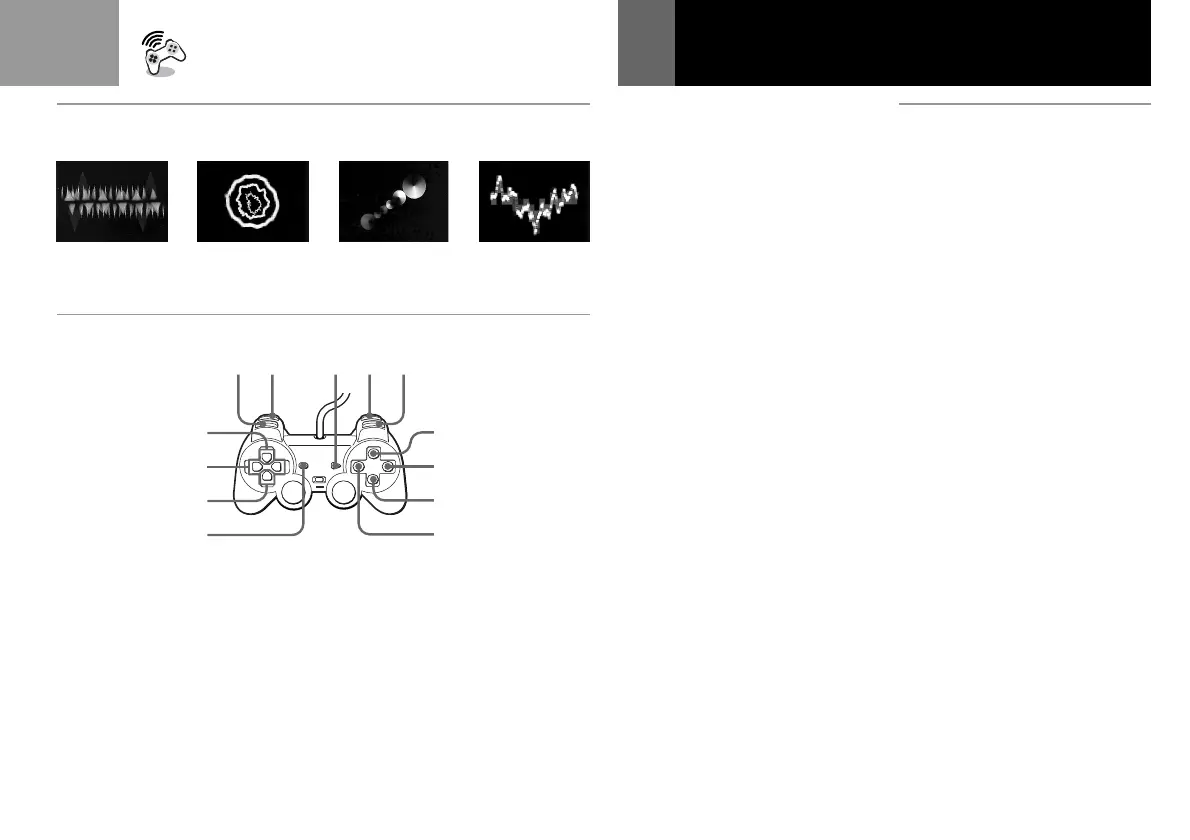
the SoundScope feature, a
graphical representation of the
music you are playing (A). Using
the buttons on the controller, you
can choose your favorite image
from 24 patterns, change the color
of the image or add the effect of an
afterimage. You can also save and
load your SoundScope settings
using the memory card.
When enjoying SoundScope, set
the supplied analog controller
(DUALSHOCK®) to digital mode
and operate the CD directly with
the controller (indicator: off).
To start SoundScope operation
Press the SELECT button when the
CD operation screen is displayed.
To return to the CD operation
screen
Press the SELECT button.
* : Press these buttons while holding down the ✕ button to save the operation or
change the size of the image. For details, see “D Additional operations”.
* : Appuyez sur ces touches tout en maintenant la touche ✕ enfoncée pour
sauvegarder l’opération ou pour changer le format de l’image. Pour plus de détails,
voir “D Opérations complémentaires”.
* : Oprima estos botones mientras mantiene oprimido el botón ✕ para guardar la
operación o cambiar el tamaño de la imagen. Para más información, consulte “D
Operaciones adicionales”.
Enjoying SoundScope
B SoundScope operation
1–5 Audio CD operation:
1 Find the beginning of the
current or previous track.
2 Rewind.
3 Play / Pause.
4 Fast Forward.
5 Find the beginning of the
next track.
6 Decrease length of time image
is displayed.
7 Change the pattern of the
image.
8 Increase length of time image
is displayed.
9 Return to the CD operation
screen.
0 Add an afterimage effect to
the image.
qz Select the pattern of the image
in random order.
qs Use this button with others
for additional operations.
qd Change the color of the image.
(Continued)
A
B
34* 5*
6*
7
8*
9
0
qa
qs
qd
1*
2*





 To Next Page