30 US
You can also listen to audio CDs
with your PlayStation® (PS one
™
).
There are two ways to play CDs:
• Selecting the buttons on the
screen
• Pressing the buttons on the
controller (direct key operation)
Set the supplied analog controller
(DUALSHOCK®) to digital mode
(indicator: off).
Note
Both of the methods above function
simultaneously, so be sure not to
confuse them.
To start audio CD operation
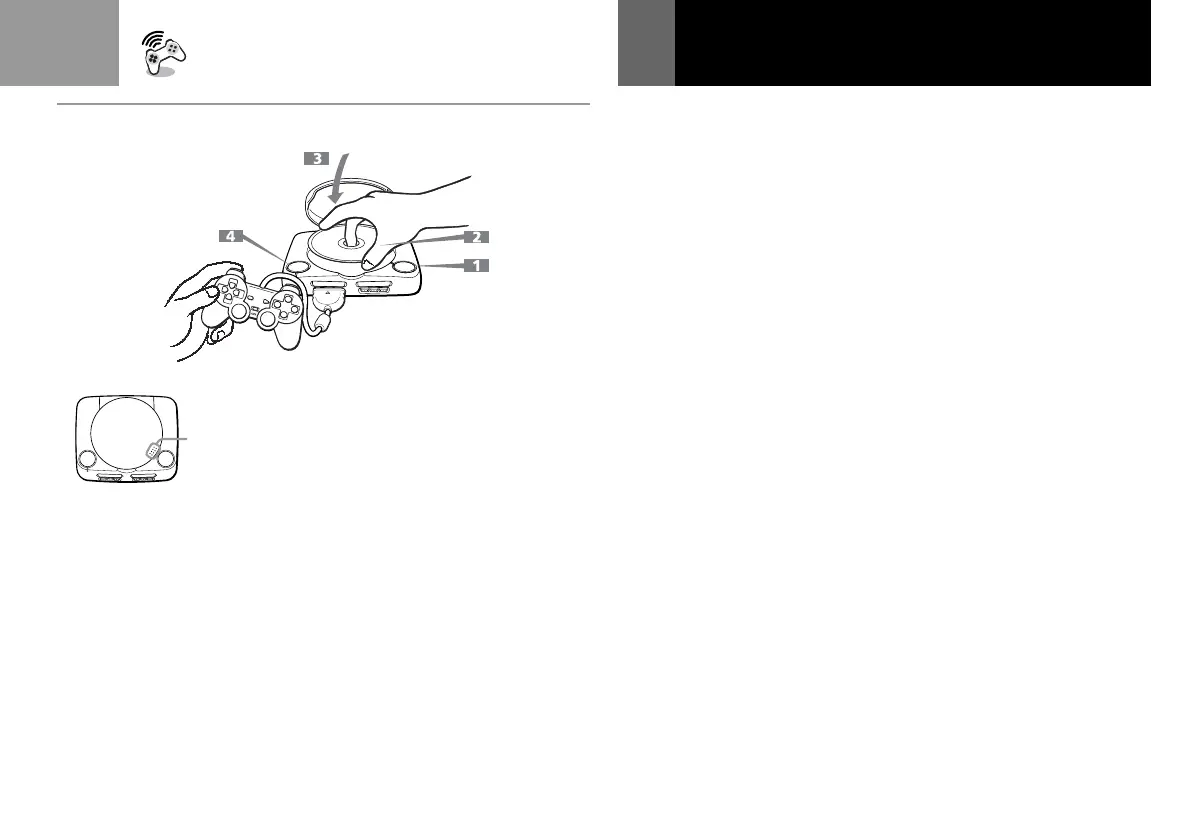
1 Press the A button.
The disc cover opens.
2 Insert a disc in the disc holder
with the label side up.
3 Close the disc cover.
When you close the disc
cover, close it firmly until it
clicks.
Playing an audio CD
4 Press the ?/1/RESET button.
The ?/1 indicator lights up.
After the start-up screen, the
CD operation screen appears.
You can play an audio CD
after turning the power on.
To cancel the CD operation
Select “EXIT ” on the screen with
the directional buttons and press
the a button.
(Continued)
B
• When you close the disc cover, push here firmly until it
clicks.
• Lorsque vous refermez le compartiment à disque, appuyez
fermement ici jusqu'à ce que vous entendiez un clic.
• Cuando cierre la cubierta del disco, presione aquí
firmemente hasta que oiga un “clic”.



 To Next Page