22 US
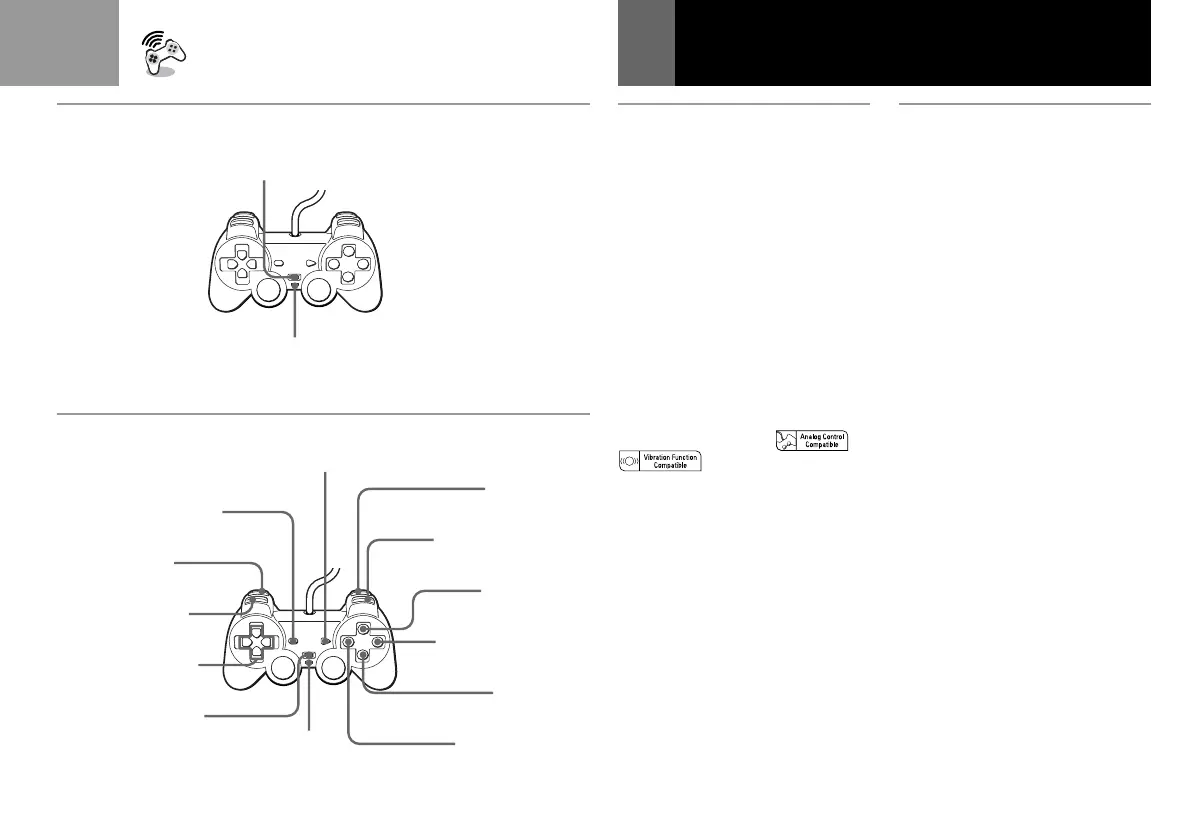
A Mode switching and the
mode indicator
This analog controller
(DUALSHOCK®) can be switched
between two modes by pressing
the ANALOG mode button.
Each time the ANALOG mode
button is pressed, the mode
changes as follows:
Digital mode (indicator: off)
M m
Analog mode (indicator: red)
Note
After verifying that the “
” icons are present on the
software package, switch to the
appropriate mode for use.
Note however, that some software
makes this adjustment automatically. In
such cases, the ANALOG mode button
is overridden by the software. For
details, refer to the software manual.
ANALOG mode button
Touche de mode ANALOG (analogique)
Botón modo ANALOG (analógico)
Mode indicator
Voyant de mode
Indicador de modo
SELECT button
Touche SELECT
Botón SELECT
L2 button
Touche L2
Botón L2
L1 button
Touche L1
Botón L1
Directional button
Touche directionnelle
Botón de dirección
ANALOG mode button
Touche de mode ANALOG
(analogique)
Botón modo ANALOG
(analógico)
Indicator: off
Voyant: éteint
Indicador: apagado
f button
Touche f
Botón f
s button
Touche s
Botón s
✕ button
Touche ✕
Botón ✕
a button
Touche a
Botón a
R1 button
Touche R1
Botón R1
R2 button
Touche R2
Botón R2
Analog Controller
(DUALSHOCK
®) usage
B Digital mode
(indicator: off)
You can operate this controller in
the same manner as the SCPH-
1080U Controller.
(Continued)
A
B
START button
Touche START
Botón START



 To Next Page