20 US
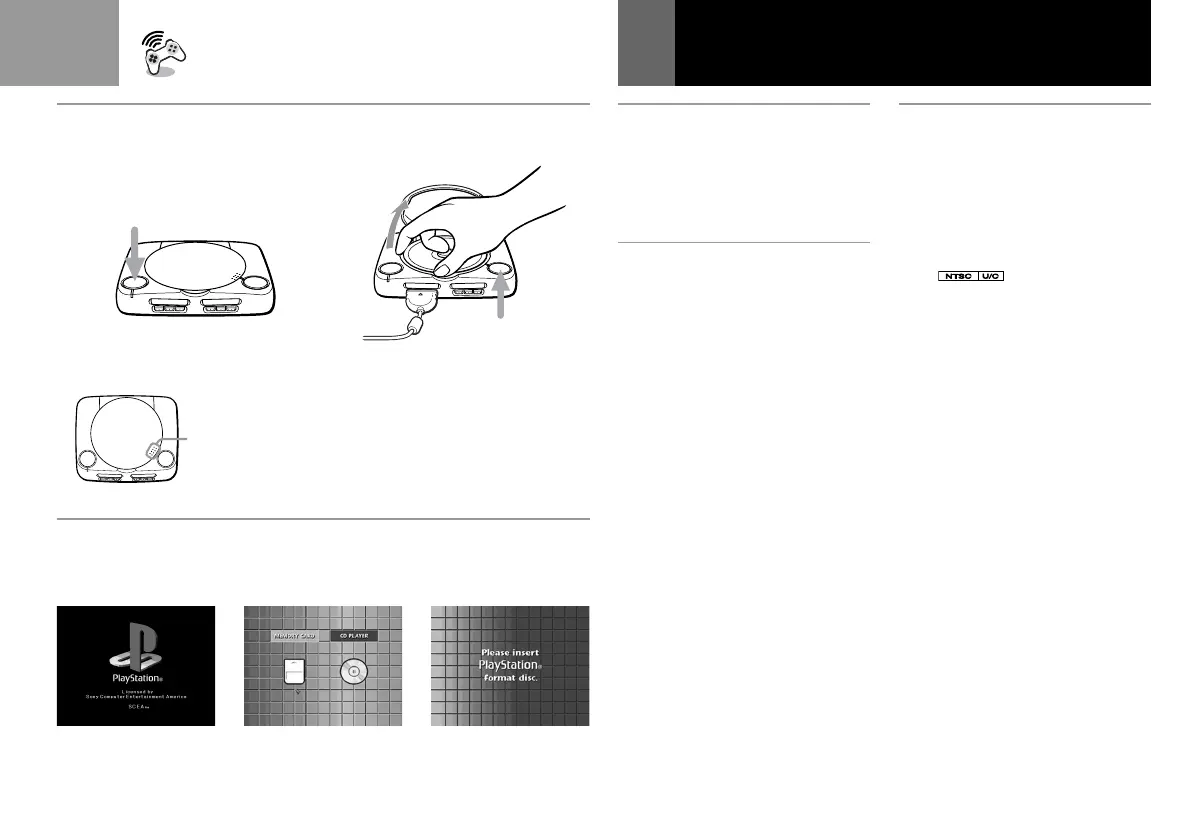
A To restart the game
Press the ?/1/RESET button twice.
Be careful not to press the
?/1/RESET button while playing
the game, or the game will end.
B To remove the disc
Press the A button.
While pressing the pivot gently,
pick up the disc holding the edges.
When you close the disc cover,
close it firmly until it clicks.
C Screens that appear
after the start-up screen
When you turn on your
PlayStation® (PS one
™
), one of the
following screens will appear:
1 A CD-ROM with both the
PlayStation® logo and
designation is
inserted.
2 No disc is inserted.
3 A disc that cannot be played
with the PlayStation®
(PS one
™
) is inserted.
AB
?/1/RESET button
Bouton ?/1/RESET
Botón ?/1/RESET
A button
Bouton A
Botón A
Playing a game (Continued)
• When you close the disc cover, push here firmly until it
clicks.
• Lorsque vous refermez le compartiment à disque, appuyez
fermement ici jusqu'à ce que vous entendiez un clic.
• Cuando cierre la cubierta del disco, presione aquí
firmemente hasta que oiga un “clic”.
123



 To Next Page